2026 September | Feature Highlights
Data Management | Product/Modifier Import/Exports
PRMA-3647
Added the ability to import and export Product/Modifier list subgroups.
Affected Components:
Cloud Portal
Data Management
Cloud Portal
Enhanced import/export functionality for Product/Modifier list with the following new permissions:
Add new permission subgroups Product Export and Product Import to Products List permission list at company level
Add new permission subgroups Modifier Export and Modifier Import to Modifier List permission list at company level
Company and global level new permissions in Product Export/Import subgroups are export-product.View, export-product.Manage, import-product.Add, import-product.View, import-product.Delete
Company and global level new permissions in Modifier Export/Import subgroups are export-modifier.View, export-modifier.Manage, import-modifier.Add, import-modifier.View, import-modifier.Delete
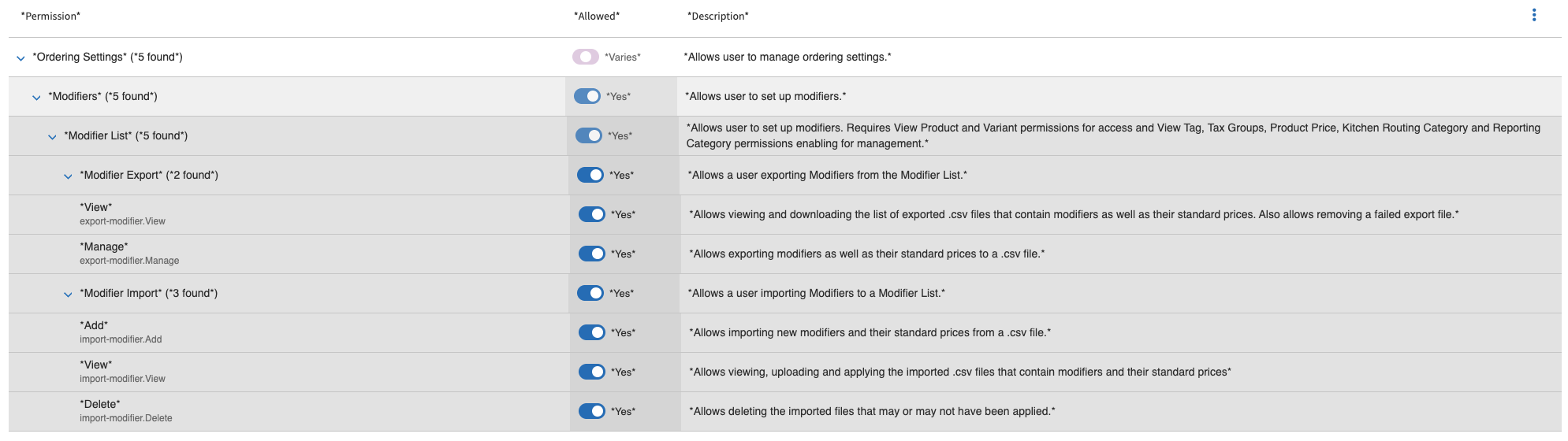 |
Data Management
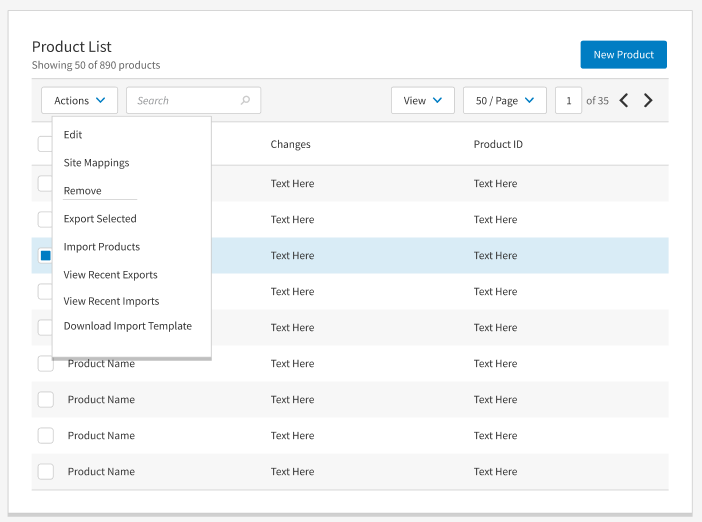
Added the ability initiate import, view, and manage the import list and download import template.
 |
Data Management | Custom Order Destination Segment Names
PRMA-7526
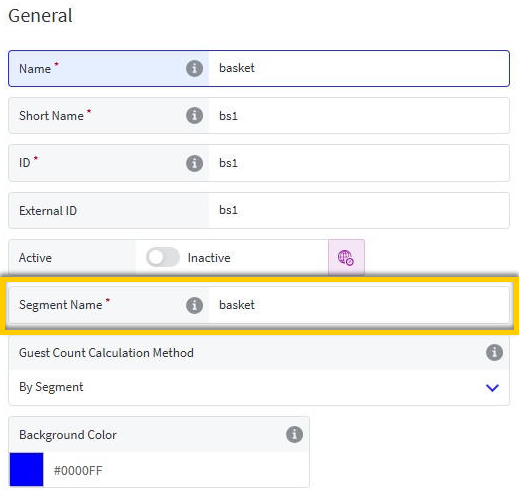
Converted Segment Name field into a user-defined, required text field that fully supports data string translations. Administrators can now establish custom destination naming conventions (e.g., Guest, Customer, Bag, Basket, Curbside) and translate those terms into multiple languages for seamless localized display on Genius Point of Sale (POS) terminals.
Affected Components:
Data Management
Data Management
→ → → → → →
Added Segment Name field as required text field to the General section of Order Destination. This field is intended to support translations.
 |
Data Management | Bulk Edit Order Source Restrictions
PRMA-4470
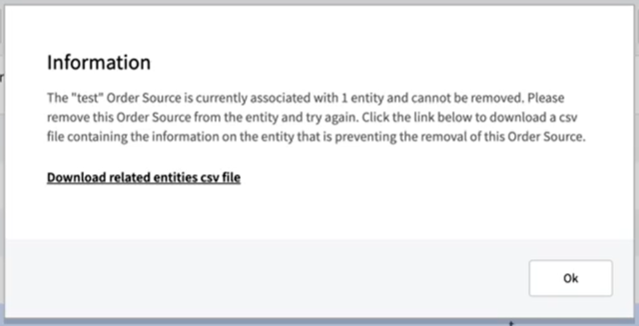
Added the ability for users to configure and edit multiple Order Source availability restrictions for Products and Modifiers at the site level within Data Management. Also introduced safeguards against deleting an active Order Source with existing dependencies and ensures real-time compatibility across Online Ordering.
Affected Components:
Data Management
Online Ordering
Data Management
Added ability to download CSV file containing information on related entities when removing Order Sources, if Order Sources have restricted dependencies.
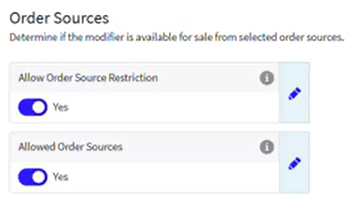
Added support for Order Source Availability within Product and Modifier forms.
Online Ordering
This release includes infrastructure improvements that do not affect the business functions of Genius or supported services.
Kitchen Management | Customized Items on Bump Chits
PRMA-5238
Added the ability to configure items printed on bump chits to help users accurately assemble and package the complete order without missing items.
Affected Components:
Data Management
Kitchen Management
Data Management
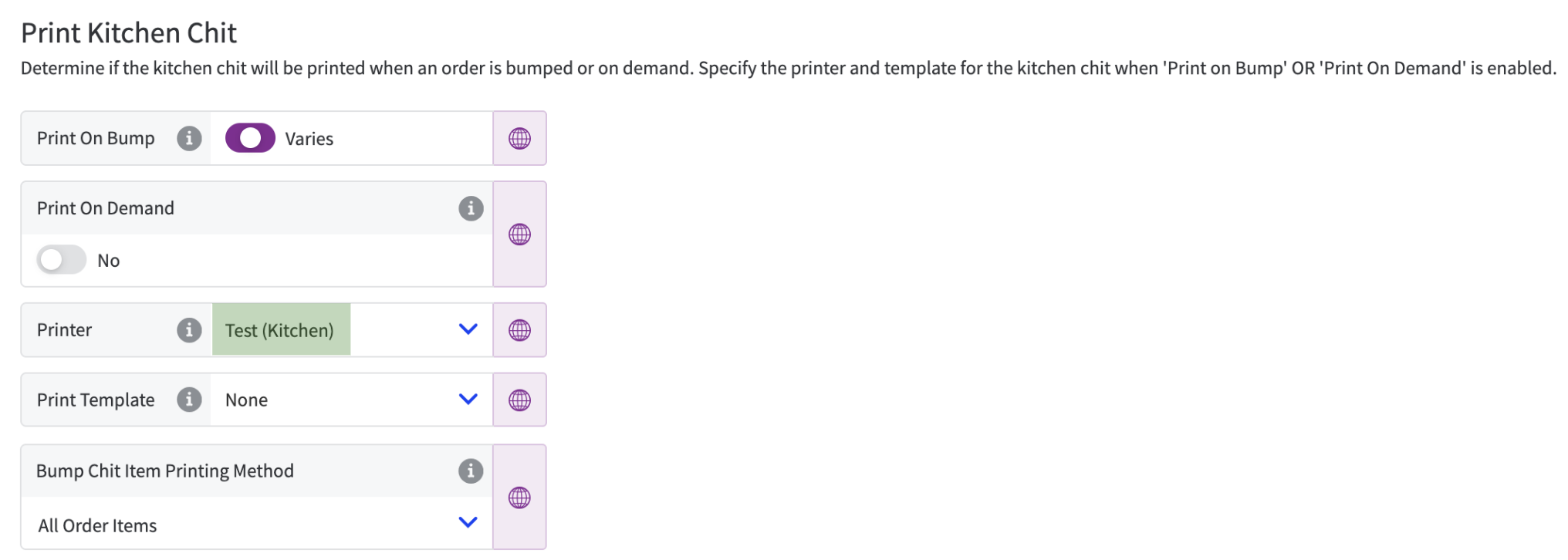
Added following setting to Kitchen Screens → Printing tab → Print Kitchen Chit:
Bump Chit Item Printing Method - Determines which order items to print on bump chits:
Displayed Items - (Default) Only print order items displayed on the kitchen screen
All Order Items - Print all order items
Note
This setting is only displayed after you select a Printer for at least one (1) Site.
 |
Kitchen Management
Set up specific kitchen screens to print all order items on bump chits (including hidden items) instead of only the order items displayed on the screen.
For example, the Expo screen displays all items except Beverages. You can configure the screen to include all order items, including Beverages, on the printed bump chit.
Kitchen Management | Cell Headers Based on Source/Destination
PRMA-5827
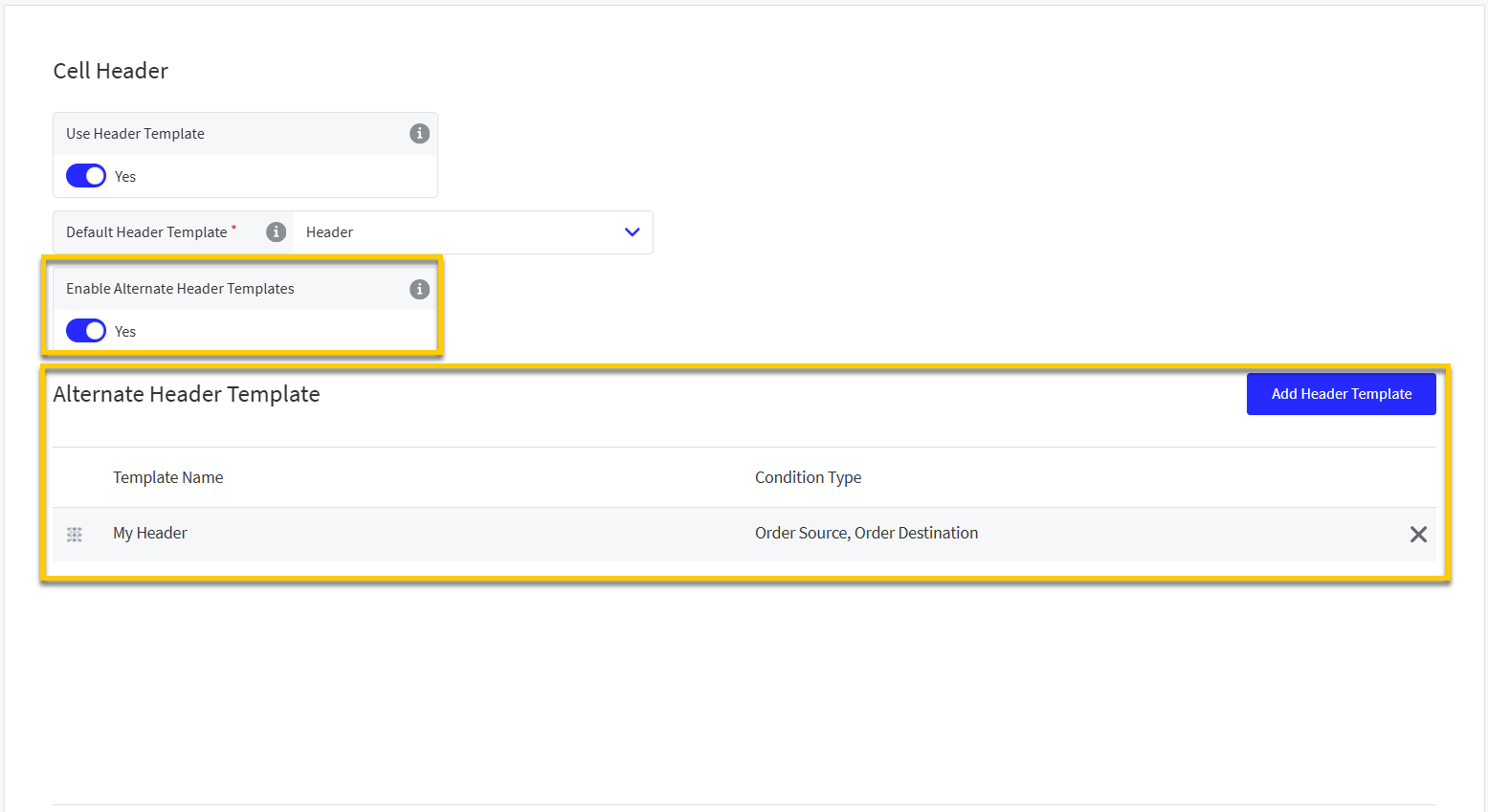
Enable alternate cell headers that are only used on a kitchen screen for specific Order Sources and/or Destinations.
Affected Components:
Data Management
Kitchen Management
Data Management
From Cells → Cell Header of Kitchen Screen Settings, enable alternate header templates to use for specific order sources and/or destinations.
See Alternate Cell Headers Based on Order Source/Destination.
 |
Kitchen Management | Print Order from Super Footer
PRMA-6616
Print an order summary chit on demand from the kitchen cell super footer of Saved and Paid orders.
 |
Optionally restrict screens to only print modifiers with specific tag assignments.
To prevent duplicate chits, Print On Bump is suppressed when you print an order chit on demand.
The Print button is not supported with Claim All or Begin All.
The name and IP address of the printer used for Print On Demand is identified on the Peripherals tab of Station Status.
Affected Components:
Data Management
Kitchen Management
Enable Print on Demand
From Kitchen Settings in Data Management, enable Print on Demand for preferred screens.
Define the following settings from the Printing → Print Kitchen Chit section of Kitchen Screen Settings:
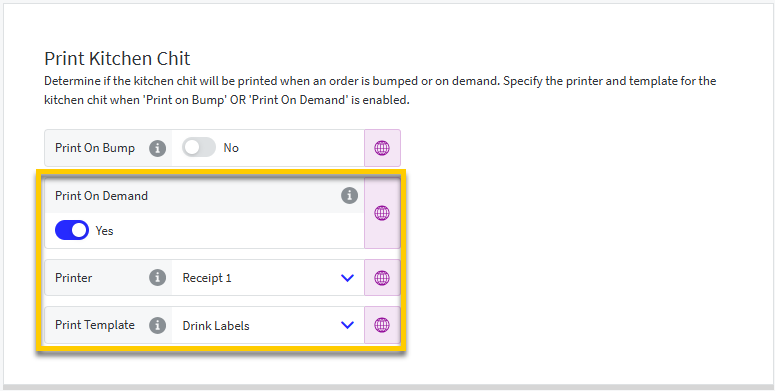 |
Print On Demand - Enable user to print order summary on demand from kitchen cell super footer.
When enabled, define the following:
Printer - Select the printer for Print On Demand chits for this screen.
Print Template - Select the template for Print On Demand chits.
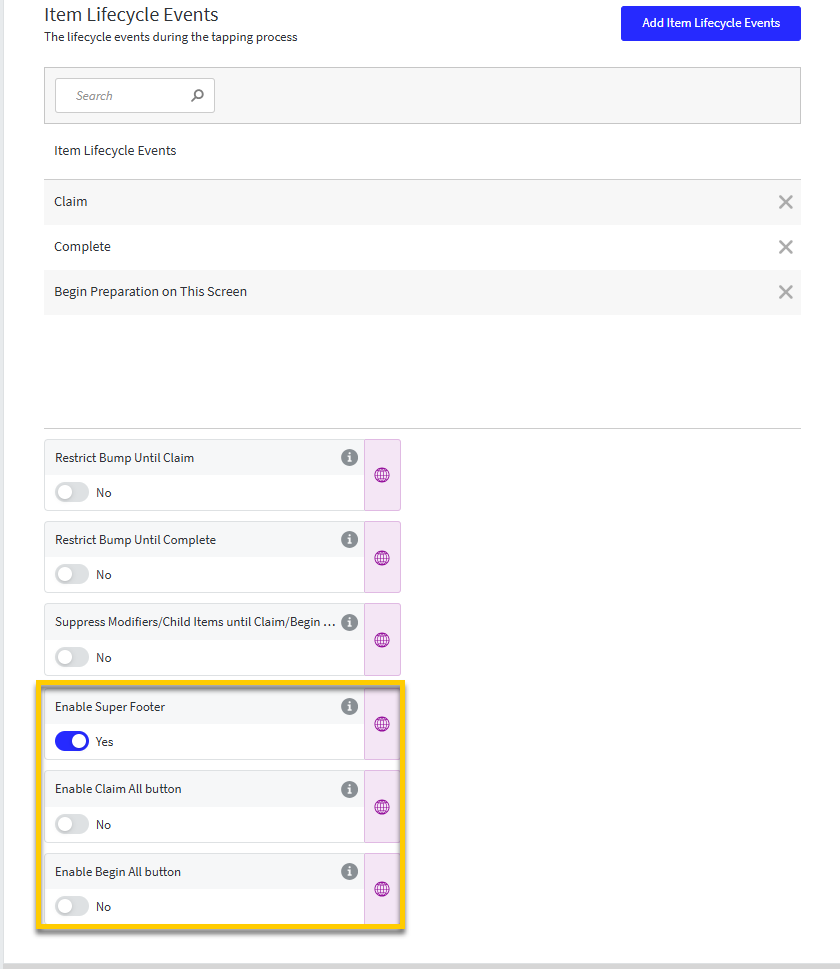
The Print On Demand setting is only available with the following Cells → Item Events configuration in Kitchen Screen Settings:
Set Enable Claim All Button and Enable Begin All Button to No.
 |
Define Modifier Tag Filter
From Kitchen Settings in Data Management, define an optional modifier tag filter for the Print on Demand feature.
Define the following setting for individual screens from the Printing → Print Item Label section of Kitchen Screen Settings:
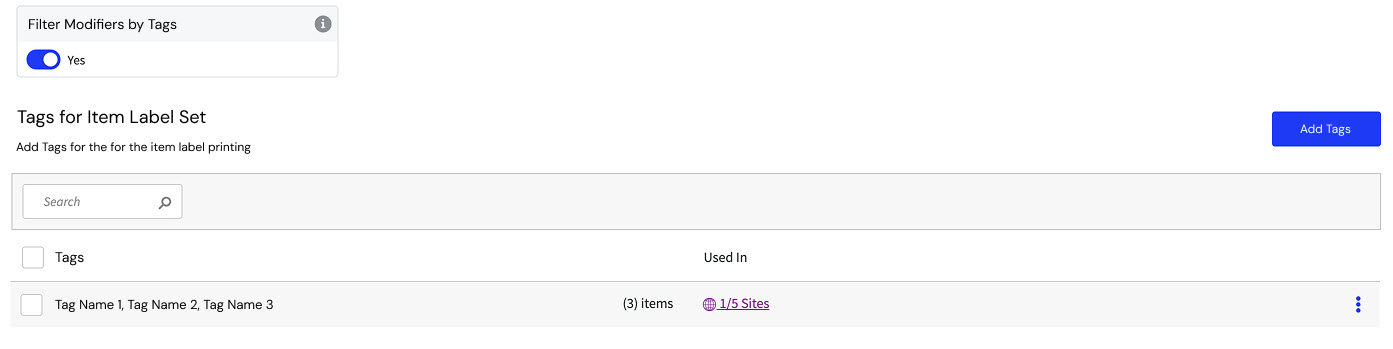 |
Filter Modifier by Tags - When enabled, only print modifiers associated with the selected tags.
Kitchen Management | Print Only Modified Items on Bump
PRMA-7196
Set up individual kitchen screens to print a label for modified items only when an order is bumped.
Reprint Label is available for Recalled orders regardless if order is manually bumped or autobumped.
Affected Components:
Data Management
Kitchen Management
Data Management
Configure the following from Printing → Print Item Label of Kitchen Screen Settings:
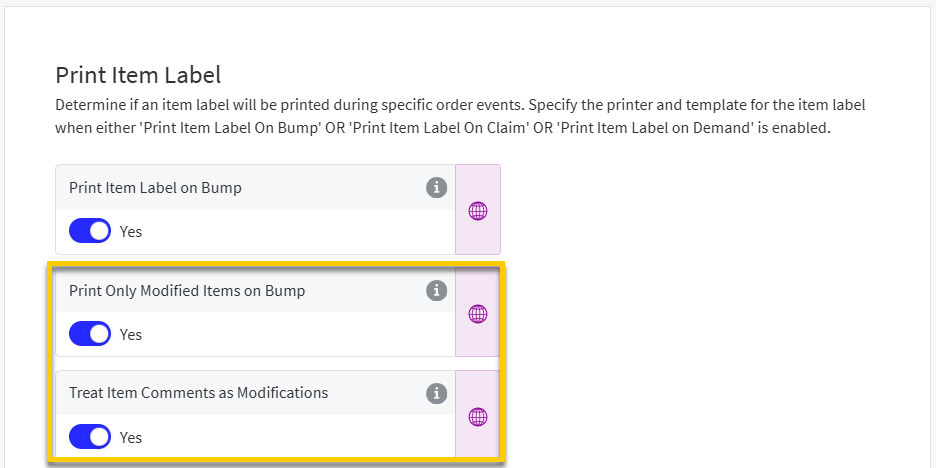 |
Print Only Modified Items on Bump - Print label on bump event only if the item has been modified.
This setting is only available when Print Item Label On Bump is enabled.
Treat Item Comments as Modifications - Item-level comments are displayed and formatted as item modifiers.
This setting is only available when Print Only Modified Items on Bump is enabled.
Kitchen Management | Single Row View
PRMA-7539
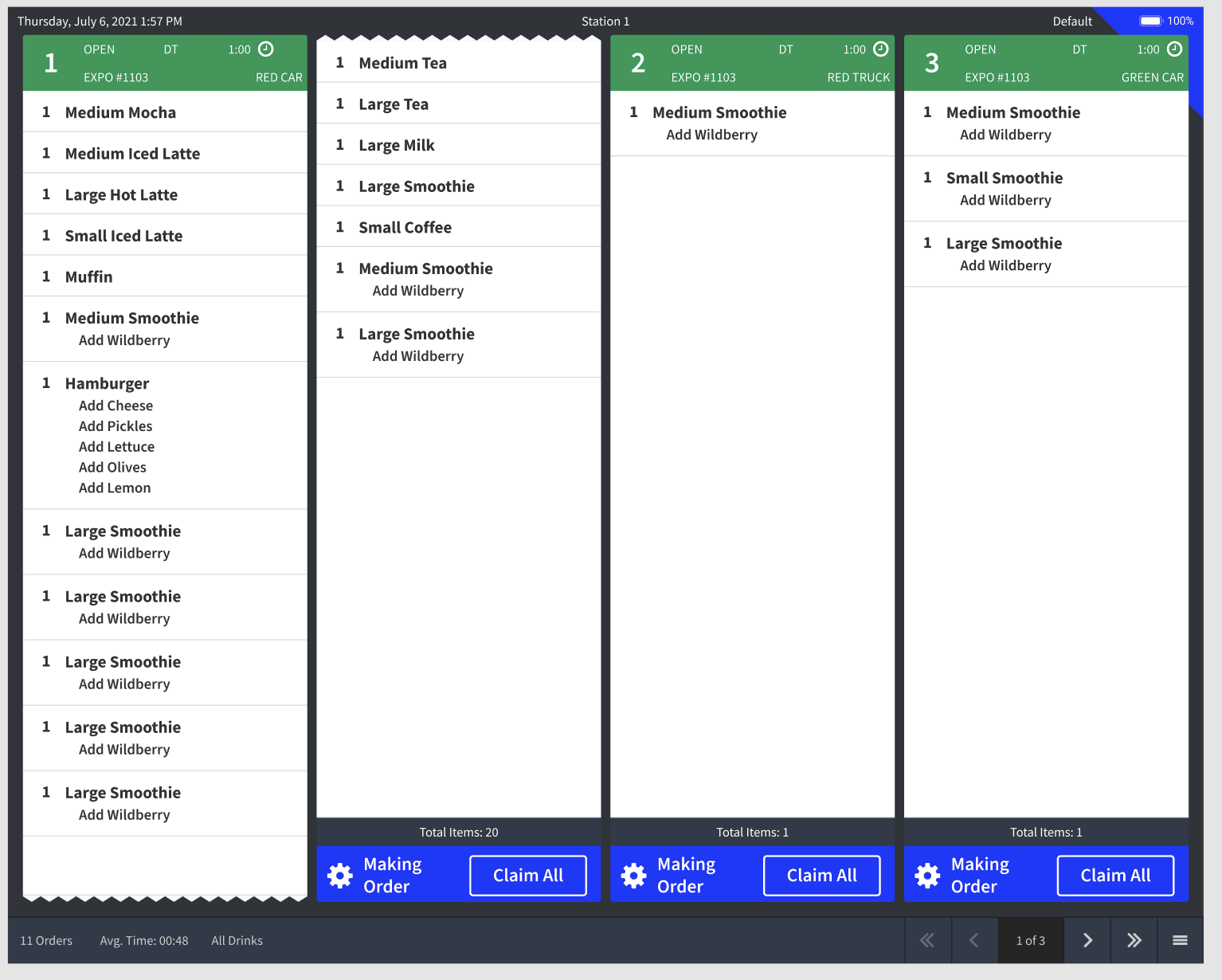
Specify the number of rows for kitchen screens in Row View, including a single row view. In a single row view, the order cells cover the whole screen area:
 |
Affected Components:
Data Management
Kitchen Management
Data Management
Configure the screen row count from General → Screen Layout of Kitchen Screen Settings:
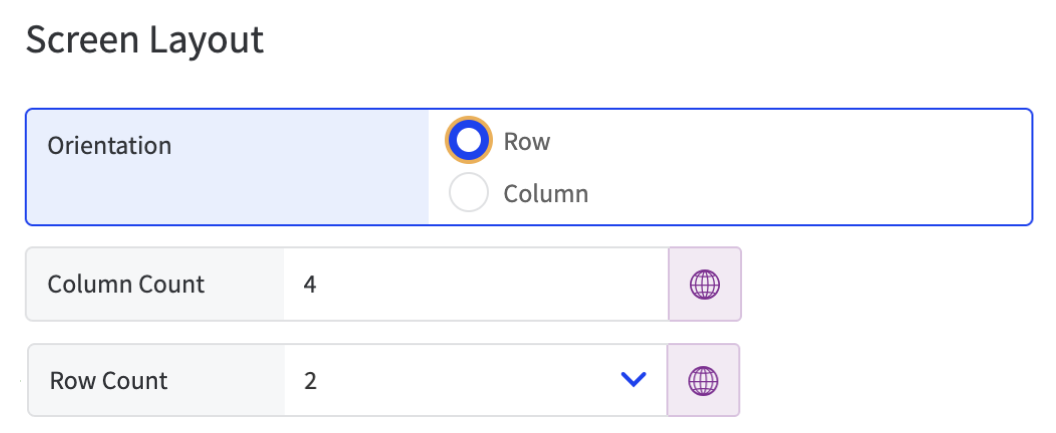 |
Row Count - From the dropdown, select the preferred number of rows to display on the screen: 1 or 2 (default)
This setting is only available when Orientation is set to Row.
Point of Sale | Exclude Discounted Items from Subtotal Qualification
PRMA-5487
When a Minimum Order Subtotal is defined for a discount, the order subtotal must be equal to or greater than the defined minimum to qualify for the discount.
You can optionally exclude the price of discounted items when determining if an order meets the minimum subtotal qualification.
Affected Components:
Data Management
Point of Sale (POS)
Online Ordering
Data Management
From the Rules page of Discounts List, define the following for the discount:
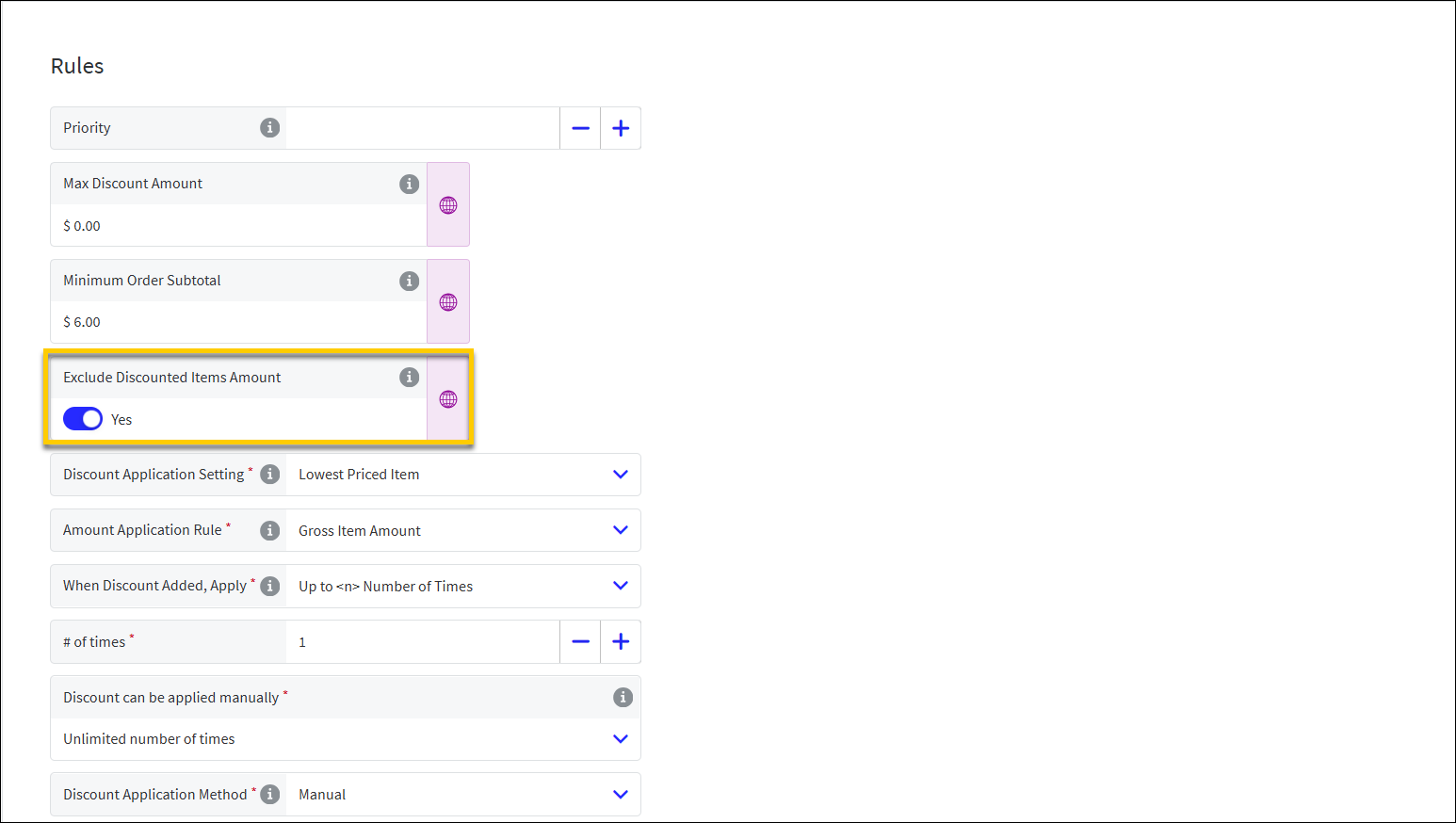 |
Exclude Discounted Items Amount - When calculating the subtotal to determine if an order qualifies for the discount, exclude discounted items from the subtotal calculation.
This setting is only available when:
The Minimum Order Subtotal on the Rules page is set to a value greater than zero (0) for one or more sites.
The Apply Criteria → Apply Type for the discount is set to Item(s).
POS and Online Ordering
Discount Calculator supports configuration to exclude discounted items when calculating the minimum subtotal qualification.
Point of Sale | User Authentication with Badge
PRMA-6839
Require POS users to authenticate with a badge or biometrics instead of User ID and PIN.
Affected Components:
Data Management
Point of Sale (POS)
Data Management
From the Ordering Application → Access section of Company/Site Preferences, define the following settings:
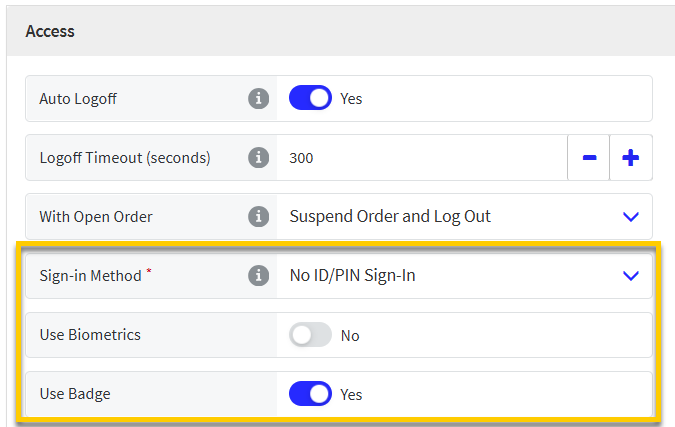 |
Sign-in Method - From the dropdown, select No ID/PIN Sign-In.
When selected, a User ID and PIN is NOT required to sign-in to POS authentication screens, including approval popups.
Use Badge - Select this option to require POS users to authenticate with a badge instead of User IDs and PINs.
From the Access page of Terminal Scheme, define the following settings:
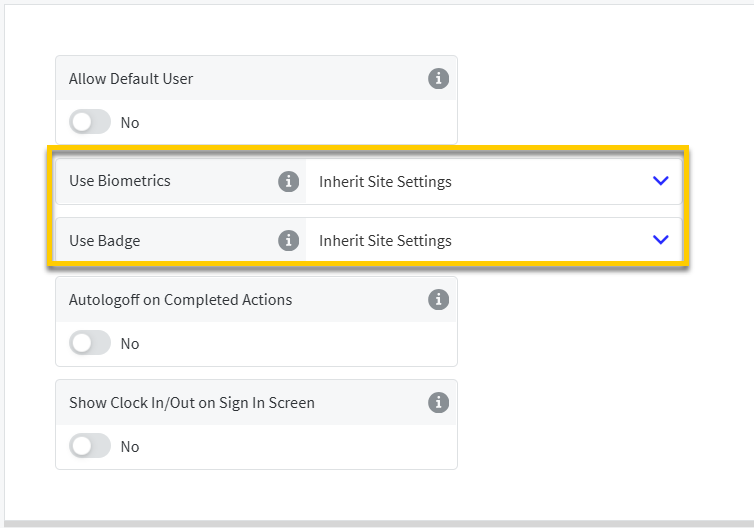 |
Use Badge - Select this option to require POS users to authenticate with a badge instead of User IDs and PINs.
Use Biometrics - Select this option if a biometric fingerprint reader device is used to grant users access to POS.
Point of Sale (POS)
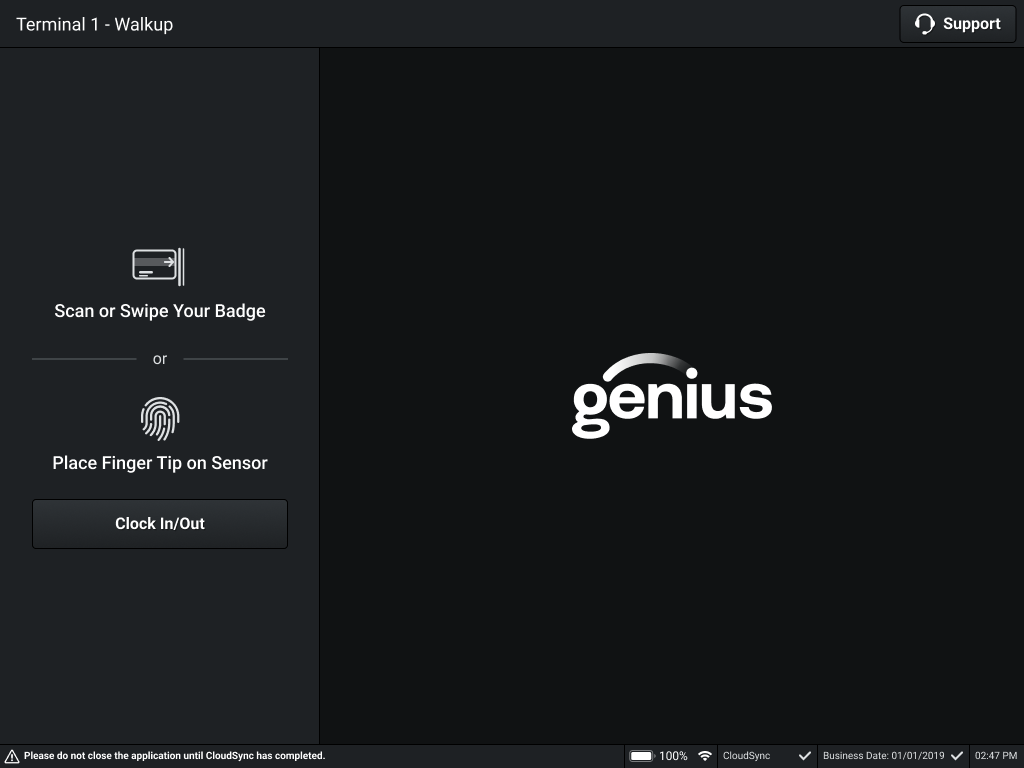
When Sign-in Method is set to No ID/PIN Sign-In in Data Management, the POS user is instructed to sign in with a badge (or biometrics if enabled). The User ID and PIN keypad is not displayed.
 |
Point of Sale | Check In Online Orders from Drive Thru
PRMA-7189
From an Open Orders view, POS users can lookup and Check In Online Orders. The Check In process supports Paid, Unpaid, and fully discounted orders.
Affected Components:
Data Management
Point of Sale (POS)
Online Orders (OO)
Data Management
Set the preferred order destination assignment method at the company, site, and terminal level.
Company/Site Preferences
From the Ordering Application → Ordering section of Company/Site Preferences, define the following:
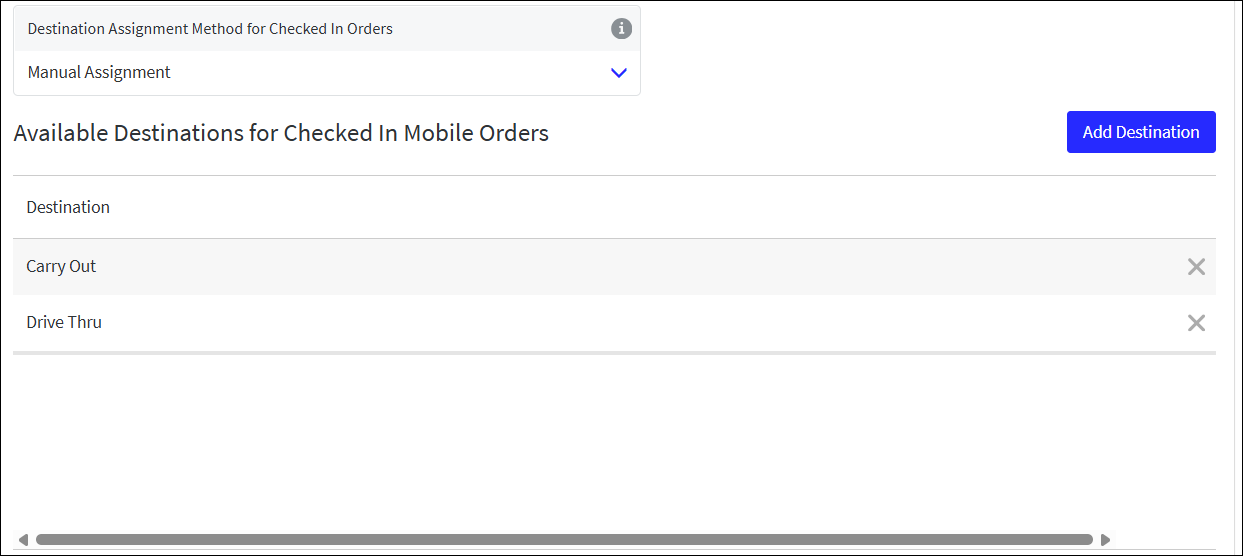 |
Destination Assignment Method for Checked In Orders - Select the method in which POS users assign an order destination to online orders on check-in:
Automatic Assignment - Automatically assign the default order destination selected for the terminal scheme
Manual Assignment - POS user selects the order destination
When Manual Assignment is selected, add the order destinations to make available to the user from Available Destinations for Checked In Mobile Orders.
In the example above, the Carry Out and Drive Thru destinations are added.
Define the list of available destinations from Online Ordering Settings.
Terminal Scheme Setup
From the Order Entry → Destinations section of Terminal Scheme, define the following:
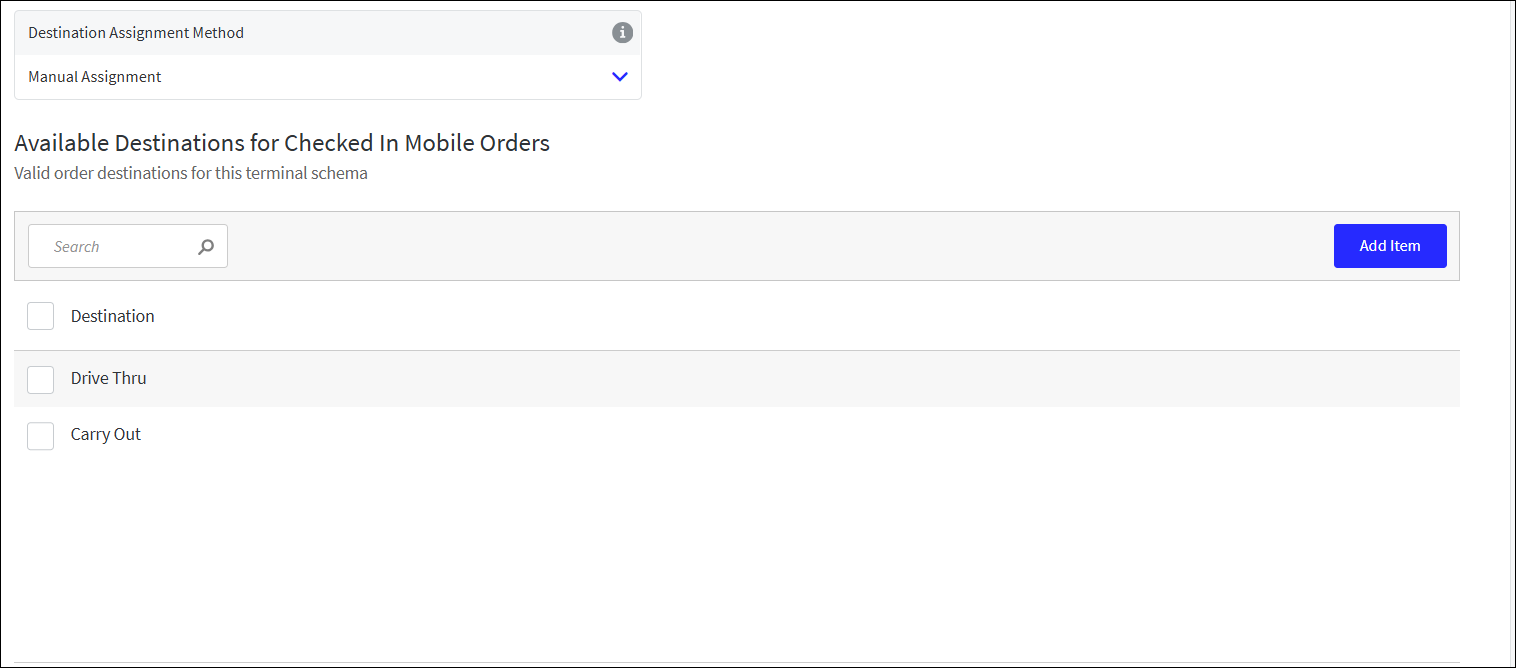 |
Destination Assignment Method - Select the method in which POS users assign an order destination to online orders on check-in:
Automatic Assignment - Automatically assign the default order destination selected for the terminal scheme
Manual Assignment - POS user selects the order destination
Inherit Site Settings - Apply the option defined in Site Preferences
When Manual Assignment is selected, add the order destinations to make available to the user from Available Destinations for Checked In Mobile Orders.
In the example above, the Carry Out and Drive Thru destinations are added.
Note
Queue Time tracks the time when a customer's order joins the queue of active orders. Set up Queue Time to ensure orders in the POS and Kitchen Management queues are sorted consistently.
Point of Sale (POS)
From an Open Orders view:
Select Check In next to a Paid Online Order to check it in
Select Pay next to an Unpaid Online Order to apply payment
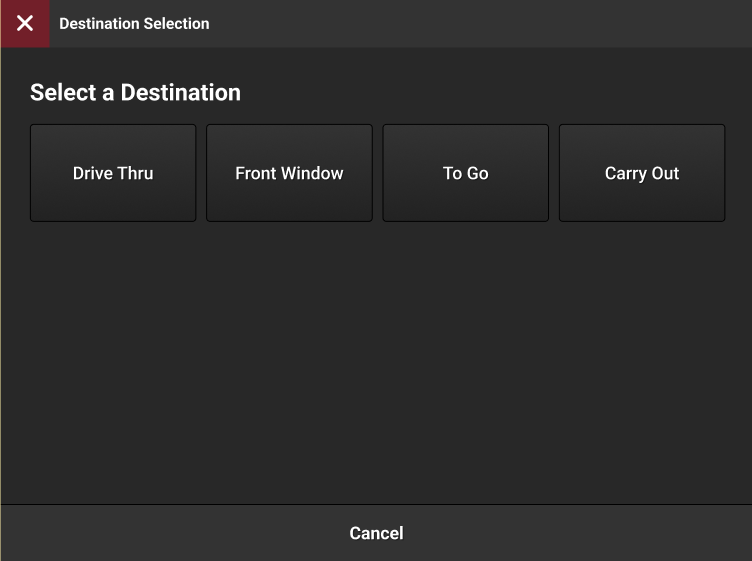
If a destination is not already assigned, select the appropriate destination:
 |
Point of Sale | Loyalty and Online Orders
PRMA-6959
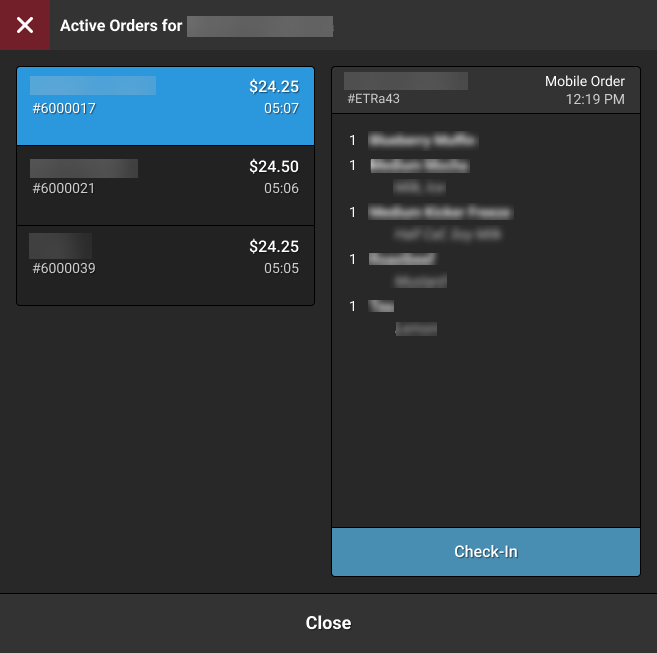
Gift and Loyalty integrates with Online Ordering. The POS user can check in, resume, cancel, or void Open orders associated with a Loyalty customer from Loyalty Lookup.
Affected Components:
Data Management
Point of Sale (POS)
Data Management
From the Loyalty → General Loyalty Settings section of Company/Site Preferences, define the following:
Lookup Open Orders on Loyalty Scan - When a Loyalty customer is identified, the POS displays all Open orders for that customer enabling the user to select an order and resume it.
When toggled On, define the following:
Order Lane - Select the Order Lane to use for order lookup.
From the Ordering Application → Ordering section of Company/Site Preferences, define the following:
Postpone Order Creation - Do NOT automatically create New Order after following actions:
Identify Loyalty Customer / Add Customer to Order
Save Order Information
Disabling this setting allows the POS user to select an existing Online Order associated with the Customer Loyalty account without creating a New Order.
Point of Sale (POS)
When a Loyalty customer is identified, the POS displays all Open orders for that customer enabling the user to select an order and resume it.
 |
Staff | Company Integrator Access Token Support
PRMA-7136
Added authenticate API requests using a Company Integrator Access Token with site-level authorization enforcement to automate schedule publishing, labor management, shift synchronization, and employee profile updates across designated sites without compromising location boundaries or requiring full global administrative privileges.
Affected Components:
Genius Portal
Staff
Pipeline
Genius Portal
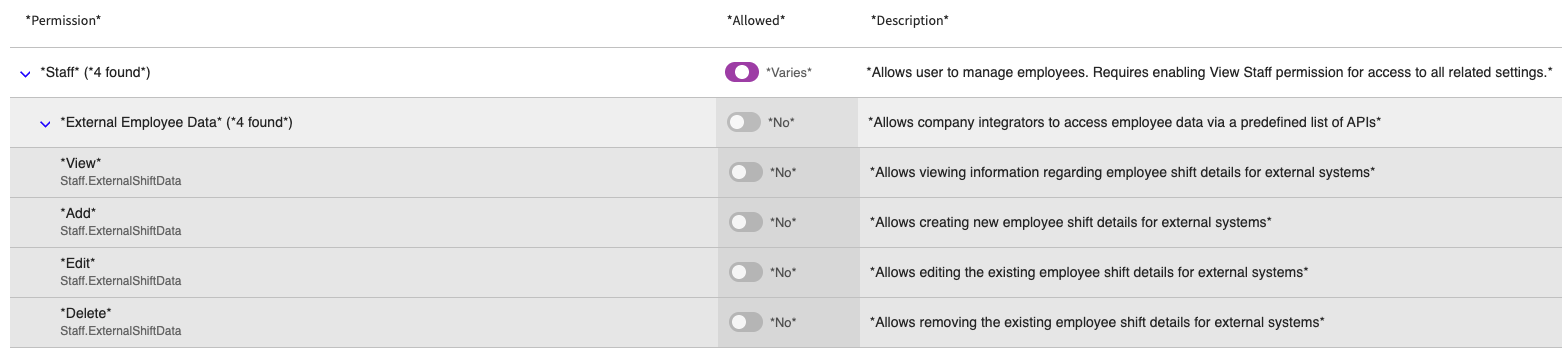
Enhanced access token functionality with the following new group/permissions at the Company and Global levels:
New External Employee Data group in Staff group at Company level, with description Allows company integrators to access employee data via a predefined list of APIs
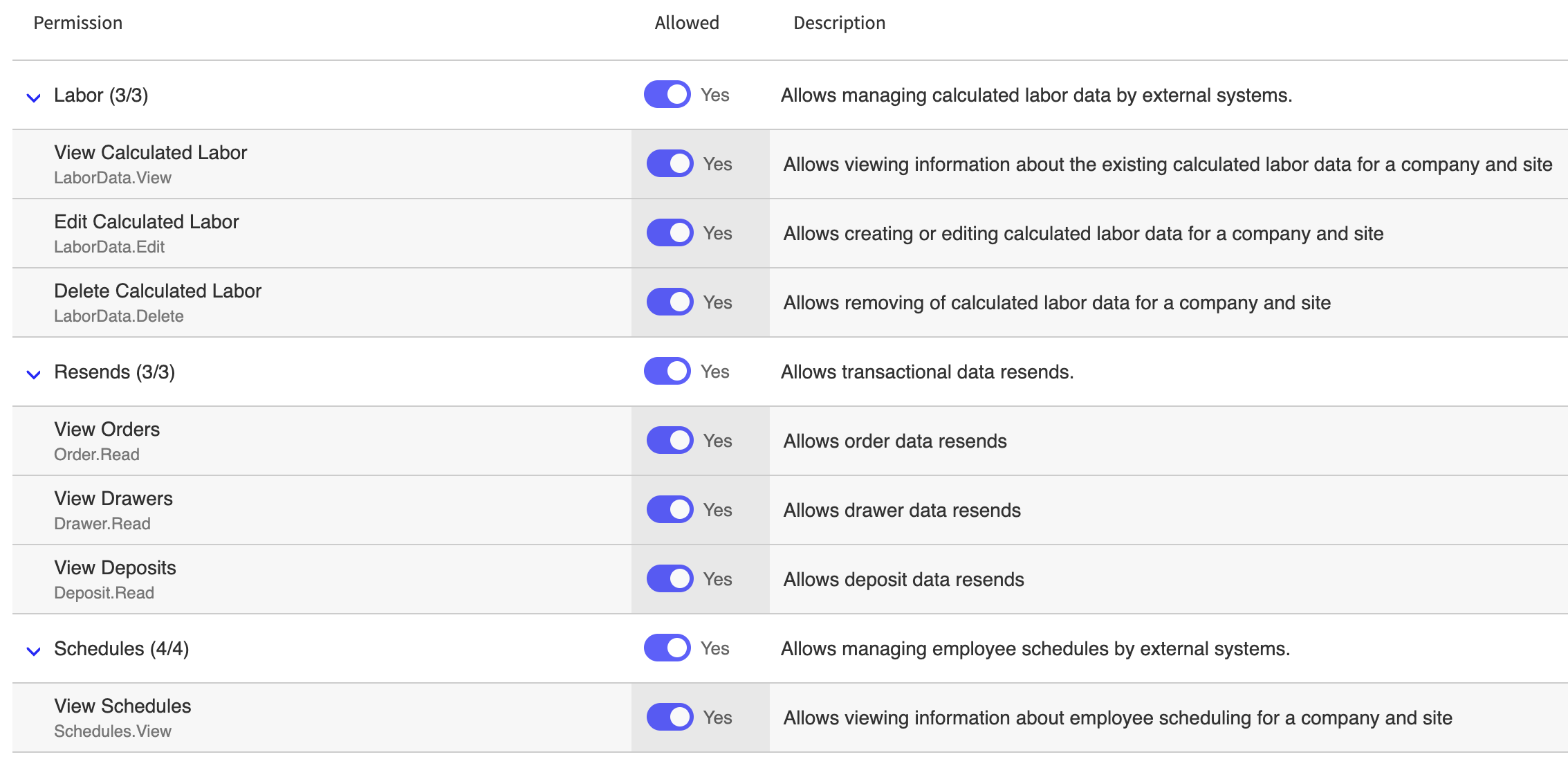
New Pipeline group at Company level with subgroups Labor; Resends; Schedules
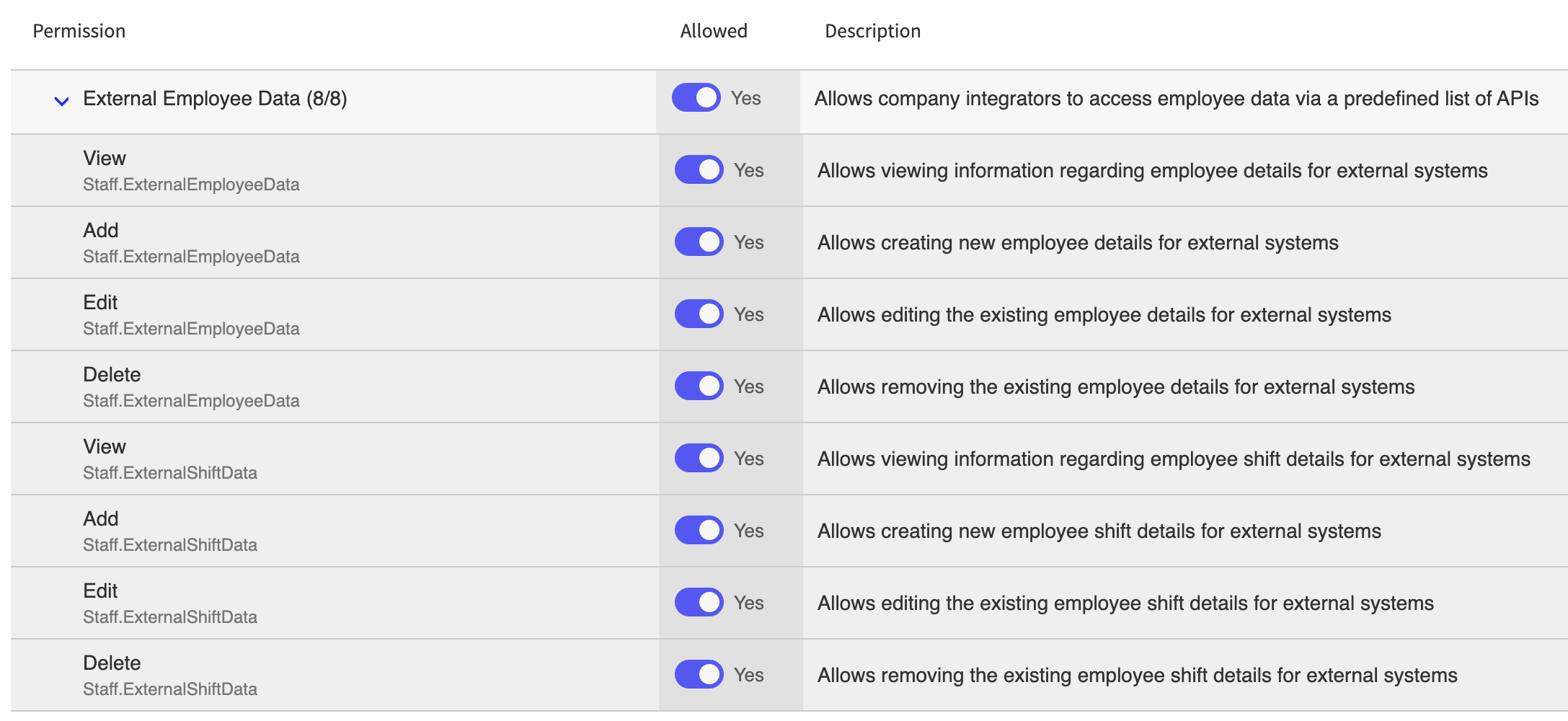
In External Employee Data group: View (view employee details for external systems)
In External Employee Data group: Add (create new employee details for external systems)
In External Employee Data group: Edit (edit existing employee details for external systems)
In External Employee Data group: Delete (remove existing employee details for external systems)
In External Employee Data group: View (view employee shift details for external systems)
In External Employee Data group: Add (create employee shift details for external systems)
In External Employee Data group: Edit (edit existing employee shift details for external systems)
In External Employee Data group: Delete (remove existing employee shift details for external systems)
In Pipeline group: View Calculated Labor (LaborData.View)
In Pipeline group: Edit Calculated Labor (LaborData.Edit)
In Pipeline group: Delete Calculated Labor (LaborData.Delete)
In Pipeline group: View Schedules (Schedules.View)
In Pipeline group: Edit Schedules (Schedules.Edit)
In Pipeline group: Add Schedules (Schedules.Add)
In Pipeline group: Delete Schedules (Schedules.Delete)
In Pipeline group: View Orders (Order.Read)
In Pipeline group: View Drawers (Drawer.Read)
In Pipeline group: View Deposits (Deposit.Read)
Staff
Added support for Company Integrator access token to the following endpoints:
GET External/General/Employee
DELETE External/General/Employee
POST/PATCH External/General/Employee
POST/PUT External/General/Employee
GET External/General/Shift
Payroll
ResendShiftData
Pipeline
Added support to specified endpoints for company integrator access token (aud"[]."COMPANY_INTEGRATOR):
GET /SchedulesService/schedules
POST /v2/schedules
PUT / v2/ schedules/[ID]
DELETE /v2/shifts/[ID]
DELETE /v2/schedules/[ID]
Added support to specified endpoints for company integrator access token .aud"[]."COMPANY_INTEGRATOR:
POST /order/v1/publish-external
POST /drawer/v1/publish-external
POST /deposit/v1/publish-external
Suite Catering | Item level Comment Enhancements
PRMA-5595
Introduced item-level comments across Self Service and Suite Catering Portal (SCP). Users can now append specific preparation instructions, allergen alerts, or customized service requests directly to individual menu items when placing or modifying catering orders.
Affected Components:
Online Ordering
Reporting
Suite Catering
Online Ordering
Online Order now reflects updated guest dietary requirements, food allergies, or preparation instructions for the kitchen prior to event execution.
Reporting
Added support for adding comments specific to single menu items with the following actions:
Add new column Comment to Production Report
Enable user to group by Item Name in Detail View
Suite Catering
Added support for comments with the following actions:
Enhance endpoints to support comments as child-items using comment_item object
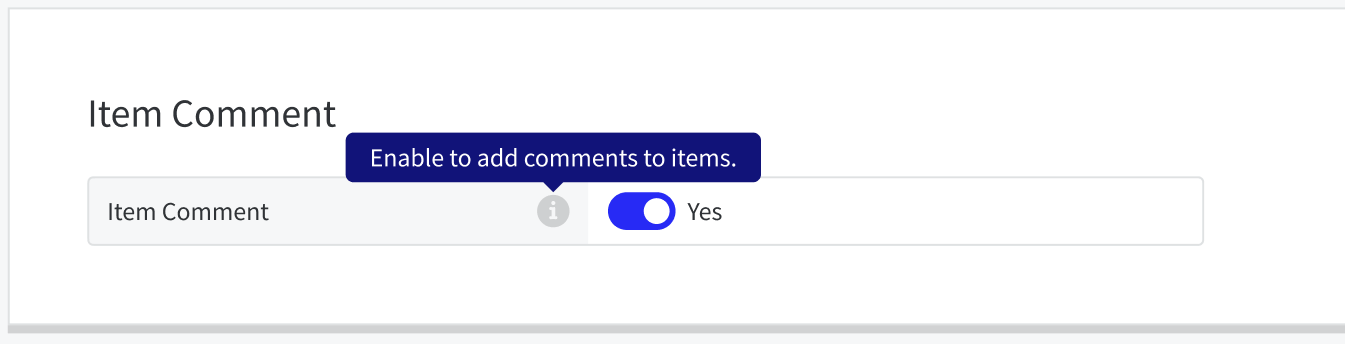
Add toggle setting Item Comment to Ordering Settings
Show comment information on PDF exports
Enable user to add comment to single menu parent item
Suite Catering | Notifications for Event Day Ordering Mobile Orders
PRMA-6606
Added support for automated SMS text alert on mobile whenever a guest places an End of Day (EDO) Mobile order. This will allow staff to prepare necessary food service items and deliver the order promptly without relying on manual checks or physical printouts.
Affected Components:
Genius Portal
Suite Catering
Genius Portal
Added support in Twilio for Event Day Ordering Mobile order SMS notification with the following actions:
For companies with active subscription, new tab Suite Catering displays below Transfer Request
Messaging dependent on tabs available for editing
Suite Catering tab contains Suite Catering field and Credentials field.
Suite Catering
Enabled staff notifications of Event Day Ordering mobile order by adding new toggle setting EDO SMS Notification with the following fields: Order Created; Suite; Customer; Order#; Products
Implement i18n data for SMS notifications.
Suite Catering | Miscellaneous Enhancements
PRMA-7345
This update includes several improvements to the functionality and user experience for Suite Catering.
Affected Components:
Reporting
Suite Catering
Reporting
Enabled display of Discount total in Suite Payment Report grid by adding new Discount column in grid.
Suite Catering
Enhanced invalid item design and display to report item removal only after payment handling is complete.
Added popup message when user attempts to add item quantity for currently unavailable order item. User can successfully decrease unavailable item quantity or remove unavailable item from order.

Enhanced display of multiple payments with same payment ID in a single order.
Guest Order chip displays accurately.
Enhanced support for i18n in Label Report Export Settings. Enhance i18n data sorting functionality.
Optimized reading of email logo image to prioritize site-level logo.
Improved registration security and process by limiting access to intermediate pages from direct entry from URLs.
Eliminated redundancy by removing card expiration check for Event-Suite reassignment.
Enhanced error messaging in Payment popup when switching payment method types.
Enhanced second order creation via POST /spot/suites/:suite_entity_id/events/:event_id/orders endpoint by making Event Day Ordering order the second call success.
Enhanced error handling for menu hierarchy by ensuring that next configured menu displays if a configured menu isn't accessible, with yellow toast message if any menu can still be utilized.
Enhanced i18n data sorting functionality.
Always display English data when site's preferred languages total more than 7 basic languages.