2026 July | Feature Highlights
Data Management | Tier Pricing
PRMA-4430
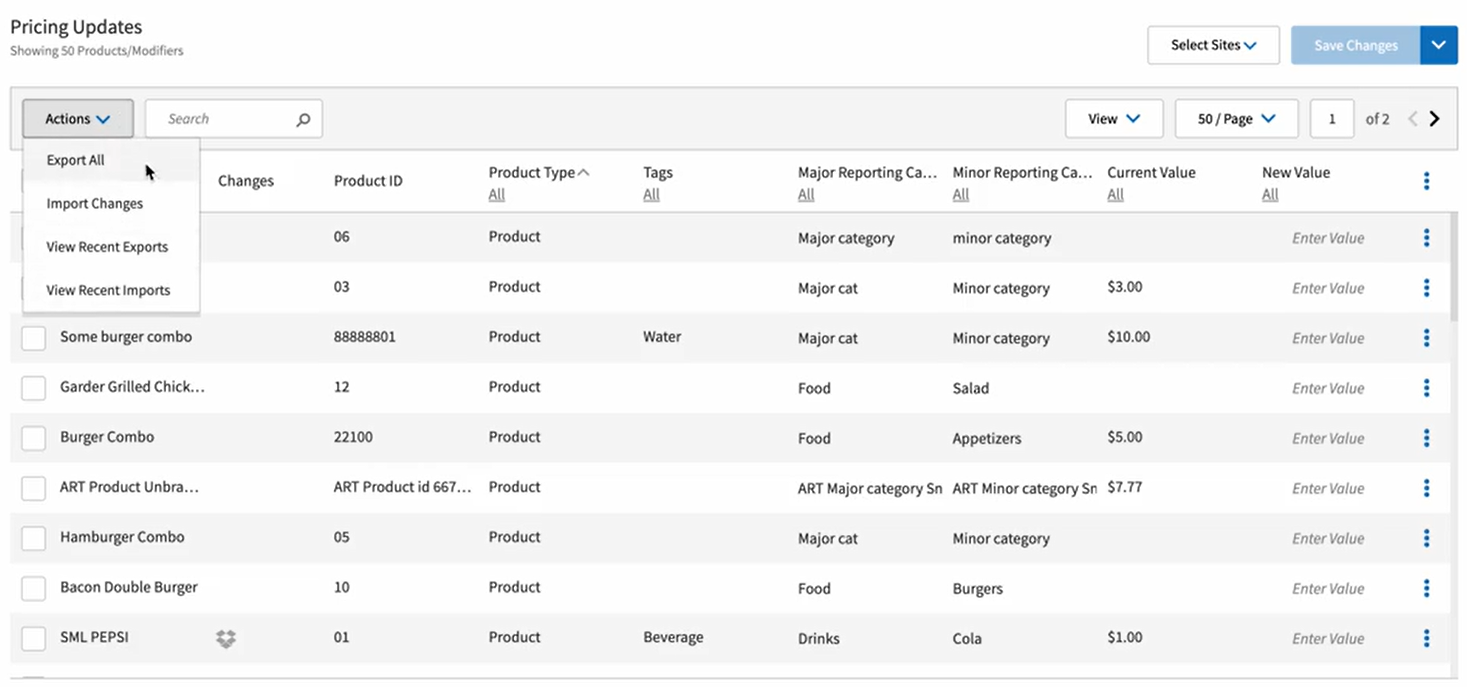
Added the ability to Export and Import options with Price Edit Utility edit mode.
Affected Components:
Data Management
Data Management
Added support for using Export/Import options with Price Edit Utility in selected edit modes with the following actions :
Add selection option to Pricing Updates grid
Add following options to Actions dropdown of Pricing Updates option as edit mode-specific actions: Export Current Item List; Import Changes; View Recent Exports; View Recent Imports
Clicking Edit Price option displays modal with text line Please edit price for 'N' selected items, where 'N' is number of items selected in grid
Clicking Clear Set Price option clears set price from New Price/Value column for items selected
Rename Export Current Item List option with dynamic displays for Export All and Export Selected options
Import Changes, View Recent Exports, and View Recent Imports options display only for Standard Price tab
Current Price column in Pricing Updates grid is renamed Current Value; New Price column is renamed New Value
New Price field name in Edit Price modal is renamed New Value
 |
Digital Menu Board (DMB) | Adding Loyalty Customers from Android Customer-facing display (CFD)
PRMA-6436
Added the ability to to enroll a loyalty customer from an Android Customer-facing display (CFD) to allow the customers to engage autonomously of the ordering process and enhance speed of service for the cashier.
Gift and Loyalty | Last and Favorite Orders
PRMA-6042
Added the ability to see the last few orders placed and to define a past order as a Favorite.
Affected Components:
Cloud Portal
Data Management
Gift and Loyalty
Pipeline
Point of Sale (POS)
Cloud Portal
Enabled user registration of loyalty customers with new permission Register Loyalty Customer (Loyalty.RegisterCustomer) at company and global levels.

Enhanced administrative control of loyalty customers at the Point of Sale level by adding the new permission Manage Loyalty Account (Loyalty.Manage.Account) at the global and company levels.

Added support for Loyalty account registration with the following actions:
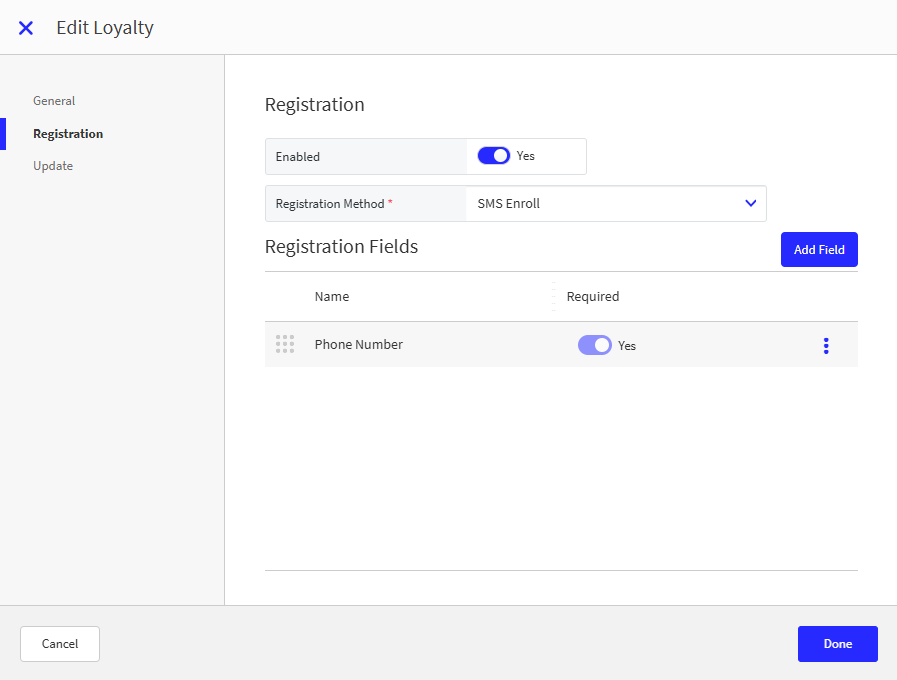
Add new sections Registration and Update to Services with pre-defined and custom loyalty provider options
Add Enabled toggle functionality to Registration and Update section, Off by default for new and existing companies.
When Registration toggle is enabled, Registration Method dropdown displays with options SMS Enroll (default) and Standard Registration
When Standard Registration method is selected in Registration Method dropdown, Card Template Code field displays
When adding Registration Field, Add Registration Field modal displays following field checkboxes: First Name, Middle Name, Last Name, Email, Phone Number, Code, Loyalty Card Number, Birthday, Address, Referral Code, Sms Opt In, Email Opt in
When Update toggle is enabled, Update Fields grid displays
Add Fields button opens Add Update Field modal with the following available fields: First Name, Middle Name, Last Name, Email, Phone Number, Code, Loyalty Card Number, Birthday, Address, Sms Opt In, Email Opt in
Registration
Update

Data Management
Enabled Quick Registration functionality for Loyalty Customer by adding new Quick Registration toggle in Loyalty Company/Site Preferences.
New Loyalty settings at the global and company levels
Portal → 4-Dot Menu → Data Management → Ordering Settings → Settings → Preferences
From the Loyalty → General Loyalty Settings section of Company/Site Preferences, define the following:
Customer Profile Prompt - Toggle On to automatically display the customer profile upon loyalty customer lookup.

From the Loyalty → Cashier Loyalty Prompts section of Company/Site Preferences, define the following:
Prompt Loyalty Lookup - Toggle On to prompt user to lookup loyalty membership if account not already added to order.

From the Loyalty → Favorite and Recent Items section, configure ability to view a customer's favorite and recently ordered items.

Gift and Loyalty
Enhanced Loyalty signup process with the following actions:
Adjusted /addCustomer endpoint by adding is_identified field and middle_name field to customer response
Successful request is sent to POST enrollment/smsEnroll.json in loyalty provider
When successful request returns printedCardNumber value, identifyCustomer request sends to loyalty provider using received printedCardNumber
When Registration Method is set to Standard Registration, POST enrollment/createAndEdit.json request sends to loyalty provider
Added support to add/edit/delete Loyalty account information with the following actions:
Adjusted /updateCustomer endpoint by adding is_identified field and middle_name field to customer response
Successful Point Of Sale request is sent to POST enrollment/editAccount.json in loyalty provider
Successful request returns identifyCustomer request to loyalty provider using same loyalty_card_number
Added primary_identifier field, email_opt_in field,sms_opt_in field, and optional country field to identifyCustomers, addCustomer, and updateCustomer responses.
Enhanced identifyCustomers request with the following actions:
Successful response sends userAndAccountInformationByPrintedCardNumber.json request to loyalty provider
Same merchant ID and printedCardNumber sends to loyalty provider
Successfully processed request maps following fields in information object in identifyCustomers, addCustomer, and updateCustomer to Point Of Sale: address, birth_date, phone, email, sms_opt_in, email_opt_in
Failure of /identifyCustomer request disables call for userAndAccountInformationByPrintedCardNumber as expected.
Set birthday date format in Loyalty service based on Loyalty service configuration when there is a customer_details.birth_date value in the request.
Pipeline
Added support for providing customer order history to Point Of Sale with the following actions:
Verify whether required subscription is enabled and add subscription to order message sent to Order Service
Applicable order messages forwarded to new service to store data in new collection customer_order_history
New GET endpoint fetches data from collection based on set of filters from Point Of Sale
Retention policy for records from new collection is consumed from new subscription
Point of Sale
Updates to allow user to view Loyalty customer's previous orders and favorite items:
Display loyalty profile upon customer lookup.
Prompt user to lookup loyalty membership if account not already added to order.
Create loyalty account from order entry and tender screen.
Quick registration from Identify Customer screen.
Full registration from loyalty lookup keypad and extended customer search.
Update account information from Customer Details modal.
View last few orders for customer and identify favorite items.
Resume unpaid online orders enabling customers to use loyalty benefits.
Gift Cards | Paytronix - Alphanumeric Gift Cards
PRMA-6679
Gift and Loyalty can now support alphanumeric gift cards though the Paytronix service.
Affected Components:
Gift and Loyalty
Gift and Loyalty
Added support for alphanumeric gift cards with Paytronix service by updating endpoint request to look up gift card number.
Point of Sale | All-in-One
PRMA-4121, PRMA-6217, PRMA-6219, PRMA-6222, PRMA-6220, and PRMA-6218
New terminal scheme type All-in-One, implementing tag-driven menu configurations, enabling code-driven application installations, generating separate configuration files for employees, and managing event assignments to orders.
Affected Components:
Back Office
Cloud Portal
Data Management
Online Ordering
Pipeline
Point of Sale (POS)
Back Office
New Employee configuration to integrate Back Office users for the All-in-One Point of Sale terminals.
Cloud Portal
Enabled administrators to introduce Available status for Point Of Sale terminals by adding new View Available Terminals dropdown to Terminal list. Dropdown will also display existing terminals with Available status.
Enabled user to configure Share Code and Revoke access with the following permissions at company and admin levels:
Create Share Code (ShareCode.Execute) at company and admin level
Revoke Terminal (Revoke.Terminal.Execute) at company level
Revoke Station (Revoke.Station.Execute) at company level

Enhanced Point Of Sale installation by enabling administrators to generate Share Codes for employees with the following actions:
Add 3-dot menu to every Terminal in Terminal List with options Share Code and Refresh Terminal
Share Code option is only displayed if user has Execute permission for Share Code
Refresh Terminal option is only displayed if user has Refresh permission for Sites
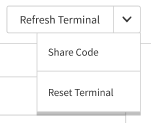
Add dropdown button to Refresh Terminal button on Terminal view details form
Dropdown options are Refresh Terminal and Share Code
Refresh Terminal option is only displayed if user has Refresh permission
Share Code option is only displayed if user has Execute permission
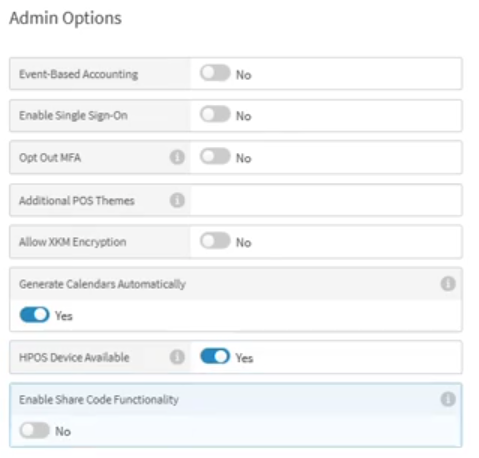
Added support for users to enable/disable option for company to be associated with HPOS AIO devices with the following actions:
Add toggle setting HPOS Device Available to Admin Options under Generate Calendars Automatically setting
Add toggle setting Enable Share Code Functionality to Admin Options under Generate Calendars Automatically setting
Environment variables to control share code generation include data Share Code Generation Enabled
Data Management
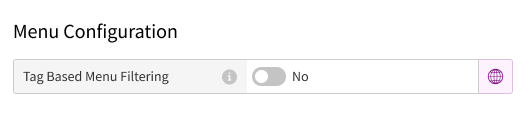
New Terminal editor section Menu Configuration to with setting Tags Based on Menu Filtering.
Yes - Select to show menus based on tags entered in the Products Tagged With field
Products Tagged With - Type a tag assigned to a menu
No - Select to show all menus
 |
Online Ordering
Enhanced functionality by adding support for SQS as alternative method for sending menu generation status updates.
Pipeline
New workflow to ensure an event is assigned when an order is finalized. Orders are checked for an assigned event upon dispatch, and if not, comparing the order creation time against existing event parameters. If order creation time falls within the range of an event's parameters, the corresponding event data is assigned to the order. If no matching event is found, no event data is be added.
Point of Sale (POS)
Updated Point of Sale (POS) to exclude terminals based on settings configured in Data Management.
Genius Point of Sale (POS) | POS Terminal Installation - Generated Code/User Credentials
PRMA-6337
Genius Point of Sale (POS) software can now be installed on a terminal with a generated code or user credentials,
Affected Components:
Data Management
Genius Point of Sale (POS)
Genius Portal
Kitchen Management
Online Ordering
Pipeline
Data Management
Removed Hawking Terminal operation and associated Terminal Scheme on Data Management user interface to prevent accidentally assigning unsupported terminal configurations.
Genius Point of Sale (POS)
Added support for a user without credentials to install Genius Shell using a Shared Code.
 |
The Shared Code is requested from Technical Support or generated from the Genius Portal by an authorized user.
Genius Portal
Added new dropdown menu View Available Stations to Stations list to enable company administrators to introduce Available status for Kitchen Stations.
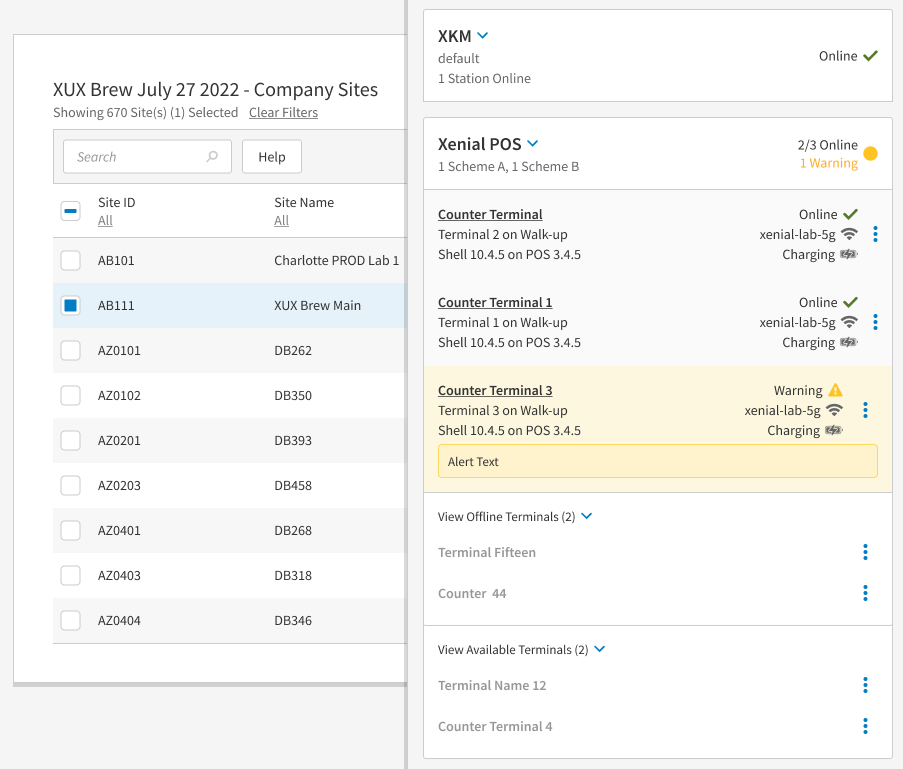
Added support to enable company administrators to generate Share Codes for employees with Share Code option in Actions menu.
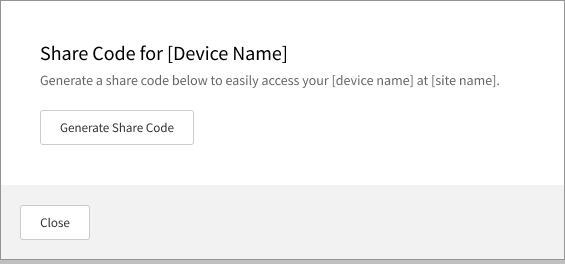
Added support for implementation of Share Code option with the following actions:
Add Share Code functionality to Action menu and 3-dots menu during single-site selection process
Selection of Share Code option opens Select the Share Code level for [Site Name] modal
Share Code level for [Site Name] modal features dropdowns Share Code Use and Service
Added support for implementation of Available status for Kitchen Stations with the following actions:
Add 3-dots menu functionality to each Station on Station list with options Share Code; Refresh Station; Reset Station
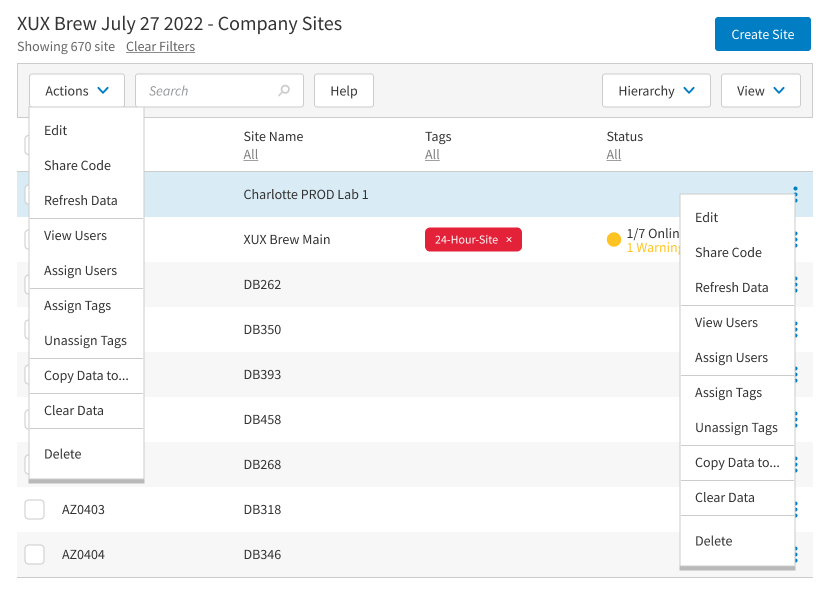
Refresh Station button and Share Code and Reset Station dropdowns are available for Online Stations only in Station view details
Enhance Kitchen Initial Station display.
Enhanced display of Stations/Terminals Offline status after implementation of Available status option for Stations and Terminals.
Enhanced management of Silent Install file generation by adding the new permission Generate Silent Install File (SilentInstall.Generate) at administrative and company levels.
Kitchen Management
From Genius Portal, generate a single-use, 8-character code that enables staff to securely and silently install POS / KM on a device.
With this update, system administrators can launch the Reset Station procedure from Genius Portal.
Online Ordering
Updated existing Reset Terminal flow by implementing new ACL method to check for blocked tokens.
Pipeline
Added support of new msg_types xprt.reset-terminal and xprt.reset-station by [stack]-dm-updates Kinesis Stream.
Genius Enterprise Portal | Company Integrators
PRMA-6329
Introduced new entity Company Integrators within User Management system to enhancing API access.
Affected Components:
Genius Enterprise Portal
Genius Enterprise Portal
Enhanced support for new Company Integrators entity with the following new permissions at company and global levels:
Add new permission subgroup Company Integrators
View Company Integrator (Company.Integrator.View)
Manage Company Integrator (Company.Integrator.Manage)
Add Company Integrator (Company.Integrator.Add)
Delete Company Integrator (Company.Integrator.Delete)