POS Output
The document root element, !DOCTYPE, must be POSOutput. Every POSOutput element must have the following attributes:
Field Name | Description |
|---|---|
| The vendor name |
| The model name. Generally refers to the point of sale (POS) terminal model. |
| The version identifier. Generally refers to the POS terminal version. |
| The number referencing which terminal the order is being taken on |
| The software version of program that generates the XML |
| The employee or cashier number |
| The Insert/Cash Drawer number |
Sample !DOCTYPE POSOutput
 <?xml version="1.0"?>
 <!DOCTYPE POSOutput >
 <POSOutput vendor="SICOM" model="SL" version="1.0" terminal="0"
POSVersion="3.02d"
employee_badge="101" insert="2" >
The POS Output has the following available elements:
Element | Description |
|---|---|
The NoteEvery | |
The order display area on the Customer Facing Display is categorized into two (2) sections: Main Order and Current Item | |
The | |
The | |
| |
| |
The running order total is displayed at the bottom of the Customer Facing Display using the | |
Full order discounts or value off is displayed on the Customer Facing Display using the |
Order
The Order element appears after the POSOutput element.
Note
Every Order element must contain the following attributes: number, state, and order_time.
Element Attributes
Field Name | Required | Description |
|---|---|---|
| Yes | The sequential order number |
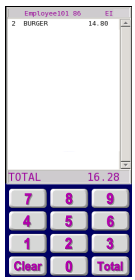
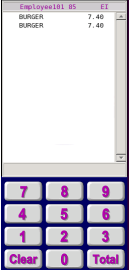
| No | The count of items contained in the order. Two of the same item are traditionally grouped on a single line in the virtual receipt. For example, if two "BURGER" are ordered, then the For more information, see Sample If the option to "Don't Consolidate Items and Don't Sort Items" is checked in Edit Global POS Options, then each "BURGER" in the order will occupy its own line in the virtual receipt, and the line_items value will be "2." For more information, see Sample |
| Yes | The current status of the order. The current possible order states are as follows:
|
| Yes | The value should be the transaction start time in seconds. The |
| No | The flag that identifies an order as waste |
| No | The flag for an order being voided/over rung. The default is “no.” |
| No | The destination number. The current available destinations and their numbers are as follows:
|
| No | For drive thru orders, you can select a lane that determines which Order Confirmation Unit the orders will be routed to. This value can be “0” (on front counter), “1” (default in drive thru), or “2” (selected in drive thru by the order taker). |
| No | Whether the cashier has pressed “Total” on their point of sale (POS) terminal. |
| No | This an 8-digit order specific number. It is calculated by using the terminal number, order number, and the time of the order. The |
| No | This is the unique identifier (UID) of a manager in the POS system. This value is generated when the Manager Access Card that is linked to a manager in the database is used to authorize a POS transaction. |
Sample Order Element Code
<?xml version="1.0"?>
 <!DOCTYPE POSOutput >
 <POSOutput vendor="SICOM" model="SL" version="1.1" terminal="0"
POSVersion="3.SRV" employee_badge="101" insert="12" >
 <Order number="4" line_items="1" state="Served" order_time="1356972453"
waste="no" overring="no" destination="1" dtlane="0" didsubtotal="yes"
unique_id="10160200">
Sample line_items Code
<?xml version="1.0"?>
 <!DOCTYPE POSOutput >
 <POSOutput vendor="SICOM" model="SL" version="1.1" terminal="0"
POSVersion="3.15b" employee_badge="101" insert="25" training="no" >
 <Order number="86" line_items="1" state="InProgress" order_time="1376403611"
waste="no" overring="no" destination="1" dtlane="0" didsubtotal="yes">
 <MainOrder>
 <ProductDetail>
 <Product name="BURGER" long_name="BURGER" category="2" price="740"
qualifiers="0" qty="2" plu="20500" extended_price="1480">
 </Product>
 </ProductDetail>
 </MainOrder>
 <Subtotal value="1480"/>
 <Taxes>
 <Tax name="10%% TAX" value="148"/>
 </Taxes>
 <Total value="1628"/>
 </Order>
 </POSOutput>
Two Consolidated "BURGER" Equaling One line_items in the XML Output
Sample line_items Non-consolidated Code
<?xml version="1.0"?>
 <!DOCTYPE POSOutput >
 <POSOutput vendor="SICOM" model="SL" version="1.1" terminal="0"
POSVersion="3.15b" employee_badge="101" insert="25" training="no" >
 <Order number="85" line_items="2" state="InProgress" order_time="1376402336"
waste="no" overring="no" destination="1" dtlane="0" didsubtotal="no">
 <MainOrder>
 <ProductDetail>
 <Product name="BURGER" long_name="BURGER" category="2" price="740"
qualifiers="0" qty="1" plu="20500" extended_price="740">
</Product>
 <Product name="BURGER" long_name="BURGER" category="2" price="740"
qualifiers="0" qty="1" plu="20500" extended_price="740">
 </Product>
 </ProductDetail>
 </MainOrder>
 <Subtotal value="1480"/>
 <Taxes>
 <Tax name="10%% TAX" value="148"/>
 </Taxes>
 <Total value="1628"/>
 </Order>
 </POSOutput>
Two Non-consolidated "BURGER" Equaling Two line_items in the XML Output.
ItemBuild and MainOrder
The order display area on the Customer Facing Display is categorized into two (2) sections: Main Order and Current Item. The Current Item always appears at the bottom of the order.
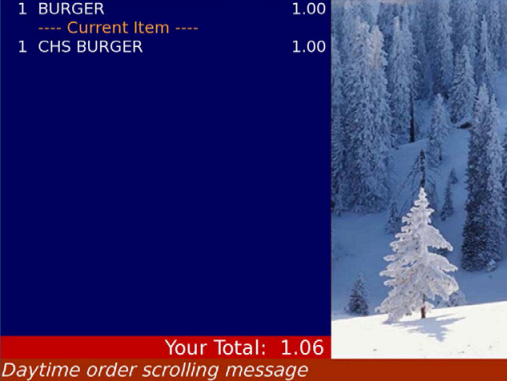 |
The ItemBuild element displays the details of the current order the cashier is entering. It displays below the “---- Current Item ----” line.
After an item is complete, the item moves to the Main Order section by using the MainOrder element. The ItemBuild element is an optional feature. If you choose not to use the ItemBuild element, then all items are put directly within a MainOrder element.
For the element attributes, see ProductDetail.
Sample ItemBuild Code
<ItemBuild>
 <ProductDetail>
 <Product name="CHS BURGER " long_name="" category="3" price="100"
qualifiers="0" qty="1" plu="20600" extended_price="100">
 </Product>
 </ProductDetail>
 </ItemBuild>
Sample MainOrder Code
 <MainOrder>
 <ProductDetail>
 <Product name="BURGER " long_name="" category="3" price="100"
qualifiers="0" qty="1" plu="20500" extended_price="100">
 </Product>
 </ProductDetail>
 </MainOrder>
Sample MainOrder and ItemBuild Code
<?xml version="1.0"?>
 <!DOCTYPE POSOutput >
 <POSOutput vendor="SICOM" model="SL" version="1.0" terminal="0"
POSVersion="3.02d" employee_badge="101" insert="2" >
 <Order number="8" line_items="1" state="InProgress" order_time="1271442499"
waste="no" overring="no" destination="1">
 <MainOrder>
 <ProductDetail>
 <Product name="BURGER " long_name="" category="3" price="100"
qualifiers="0" qty="1" plu="20500" extended_price="100">
 </Product>
 </ProductDetail>
 </MainOrder>
 <ItemBuild>
 <ProductDetail>
 <Product name="CHS BURGER " long_name="" category="3" price="100"
qualifiers="0" qty="1" plu="20600" extended_price="100">
 </Product>
 </ProductDetail>
 </ItemBuild>
 </Order>
 </POSOutput>
ProductDetail
The ProductDetail element is contained within the MainOrder and ItemBuild elements. The ProductDetail element contains either Product or ValueMeal elements. The Product element is typically used for à la carte items. The ValueMeal element is typically used for multiple items that are linked together.
Note
Every Product and ValueMeal element must contain a name and extended_price attribute.
Element Attributes
Field Name | Required | Description |
|---|---|---|
| Yes | 13 character maximum item description |
| No | 29 character maximum item description |
| No | The category number |
| No | The single item price. If more than one of the same item is sold within an order, then the price is the price of the single item, and the extended price is the price of every one of the same items added together. A price entered as 1041 in XML displays as $10.41 in the point of sale (POS) system. |
| No | The qualifier count. If greater than zero, multiple |
| No | The item quantity. The default is 1. |
| No | The item price look up (PLU) number |
| Yes | The item extended (total) price (without currency separator). A price entered as 1041 in XML, displays as $10.41 in the POS system. If more than one item is sold within an order, then the extended price is the price of all the same items added together. See Price and Extended Price for an example of price versus |
For sample code, see ItemBuild and MainOrder.
Price and Extended Price
The elements price and extended_price mirror each other unless the quantity of an item in the order is greater than "1." If the quantity of an item in an order is greater than "1," then the price reflects the price of a single item, while extended_price reflects the total price of all the items.
ValueMeal
The ValueMeal element contains a line_items attribute unlike the Product element that contains the qualifiers attribute.
Element Attribute
Field Name | Description |
|---|---|
| The number of |
Sample ValueMeal Code
<ProductDetail>
 <ValueMeal name="KIDS MEAL BRG" long_name="" category="81" price="279"
line_items="4" qty="1" plu="3001000" extended_price="279">
 <Product name="BURGER " long_name="" category="3" price="0" qualifiers="0"
qty="1" plu="20500" extended_price="0">
 </Product>
 <Product name="KD FRY " long_name="" category="8" price="0" qualifiers="0"
qty="1" plu="50010" extended_price="0">
 </Product>
 <Product name="KD COKE " long_name="KIDS COKE" category="9" price="0"
qualifiers="0" qty="1" plu="80099" extended_price="0">
 </Product>
 <Product name="MEAL TOY " long_name="" category="60" price="0" qualifiers="0"
qty="1" plu="7019300" extended_price="0">
 </Product>
 </ValueMeal>
 </ProductDetail>
Qualifier
Product elements may contain Qualifier elements. Qualifiers are modifications to the product, such as "No Onion."
If the qualifiers attribute is set, the Customer Facing Display expects to receive that number of Qualifier elements.
Note
Each Qualifier element must contain a name and extended_price attribute.
Element Attributes
Field Name | Required | Description |
|---|---|---|
| Yes | 13 character maximum item description |
| No | 29 character maximum item description |
| No | The category number |
| No | The item price |
| No | The number of qualifiers. The default is 1. |
| No | The item price look up (PLU) number |
| Yes | The qualifier value (without currency separator). A price entered as 1041 in XML displays as $10.41 in the point of sale (POS) system. |
Sample Qualifier Code
<ProductDetail>
 <Product name="BURGER " long_name="" category="3" price="100" qualifiers="1"
qty="1" plu="20500" extended_price="100">
 <Qualifier name=" no onion " long_name="" category="21" price="0" qty="1"
plu="9010100" extended_price="0"/>
 </Product>
 </ProductDetail>
Discount
Product elements may contain Discount elements. Discount elements are usually Free Items or Item Coupons.
Note
Every Discount element must contain a name and extended_price attribute.
Element Attributes
Field Name | Required | Description |
|---|---|---|
| Yes | 13 character maximum item description |
| No | 29 character maximum item description |
| No | The category number |
| Yes | The discount value (without currency separator). A discounted price entered as 1041 in XML displays as $10.41 in the point of sale (POS) system. |
| No | The item quantity. The default is 1. |
Sample Discount Code
 <ProductDetail>
 <Product name="BURGER " long_name="" category="3" price="100" qualifiers="0"
qty="1" plu="20500" extended_price="100">
 <Discount name="FREE COUPON " long_name="" category="81" extended_price="-100"
qty="1"/>
 </Product>
 </ProductDetail>
Total
The running order total is displayed at the bottom of the Customer Facing Display using the Total element. The required value attribute holds the total to be displayed. The amount should not contain a currency separator. The currency separator is inserted by the Customer Facing Display based on the XML configuration.
The Customer Facing Display accepts Subtotal and Taxes elements, but these elements are not displayed on the Customer Facing Display currently.
Element Attribute
Field Name | Required | Description |
|---|---|---|
| Yes | The order total including tax (without currency separator). A price entered as 1041 in XML displays as $10.41 in the point of sale (POS) system. |
Sample Total Code
 <?xml version="1.0"?>
 <!DOCTYPE POSOutput >
 <POSOutput vendor="SICOM" model="SL" version="1.0" terminal="0"
POSVersion="3.02d" employee_badge="101" insert="2" >
 <Order number="9" line_items="2" state="InProgress" order_time="1271442990"
waste="no" overring="no" destination="1">
 <MainOrder>
 <ProductDetail>
 <Product name="BURGER " long_name="" category="3" price="100" qualifiers="0"
qty="1" plu="20500" extended_price="100">
 <Discount name="FREE COUPON " long_name="" category="81" extended_price="-100"
qty="1"/>
 </Product>
 <Product name="CHS BURGER " long_name="" category="3" price="100"
qualifiers="0" qty="1" plu="20600" extended_price="100">
 </Product>
 </ProductDetail>
 </MainOrder>
 <Subtotal value="100"/>
 <Taxes>
 <Tax name="TAX " value="6"/>
</Taxes>
 <Total value="106"/>
 </Order>
 </POSOutput>
OrderDiscount
Full order discounts or value off is displayed on the Customer Facing Display using the OrderDiscount element.
Note
Every OrderDiscount element must contain a name and extended_price attribute.
Element Attributes
Field Name | Required | Description |
|---|---|---|
| Yes | 13 character maximum item description |
| No | 29 character maximum item description |
| No | The category number |
| Yes | The discount value (without currency separator). A discounted price entered as 1041 in XML displays as $10.41 in the point of sale (POS) system. |
| No | The item quantity. The default is 1. |
Sample OrderDiscount Code
<?xml version="1.0"?>
 <!DOCTYPE POSOutput >
 <POSOutput vendor="SICOM" model="SL" version="1.0" terminal="0"
POSVersion="3.02d" employee_badge="101" insert="2" >
 <Order number="10" line_items="2" state="InProgress" order_time="1271443188"
waste="no" overring="no"  destination="1">
 <MainOrder>
 <ProductDetail>
 <Product name="BURGER " long_name="" category="3" price="100" qualifiers="0"
qty="1" plu="20500" extended_price="100">
 </Product>
 <Product name="CHS BURGER " long_name="" category="3" price="100"
qualifiers="0" qty="1" plu="20600" extended_price="100">
 </Product>
 </ProductDetail>
 </MainOrder>
 <OrderDiscounts>
 <OrderDiscount name="10%% BUSINESS " long_name="" category="81"
extended_price="-20" qty="1"/>
 </OrderDiscounts>
 <Subtotal value="180"/>
 <Taxes>
 <Tax name="TAX " value="11"/>
 </Taxes>
 <Total value="191"/>
 </Order>
 </POSOutput>