Customer Loyalty Service | Getting Started
The Setup topic describes how to enable loyalty services on a merchant's account and add provider profiles to those accounts. The Quick Start topic provides example implementations of looking up customer accounts and accruing and redeeming rewards. The Loyalty Program Flows topic includes the Regular Order Flow.
Setup
This topic describes how to enable loyalty services on an account for companies and sites. These steps include specifying a loyalty service provider and account credentials.
Follow the steps below to add a loyalty subscription to a company, set up a loyalty provider profile, and add loyalty details to a site:
Log in to the Portal and navigate to Company Settings.
Scroll down to the Services section and select the toggle to enable Loyalty services. The Loyalty Provider settings display:
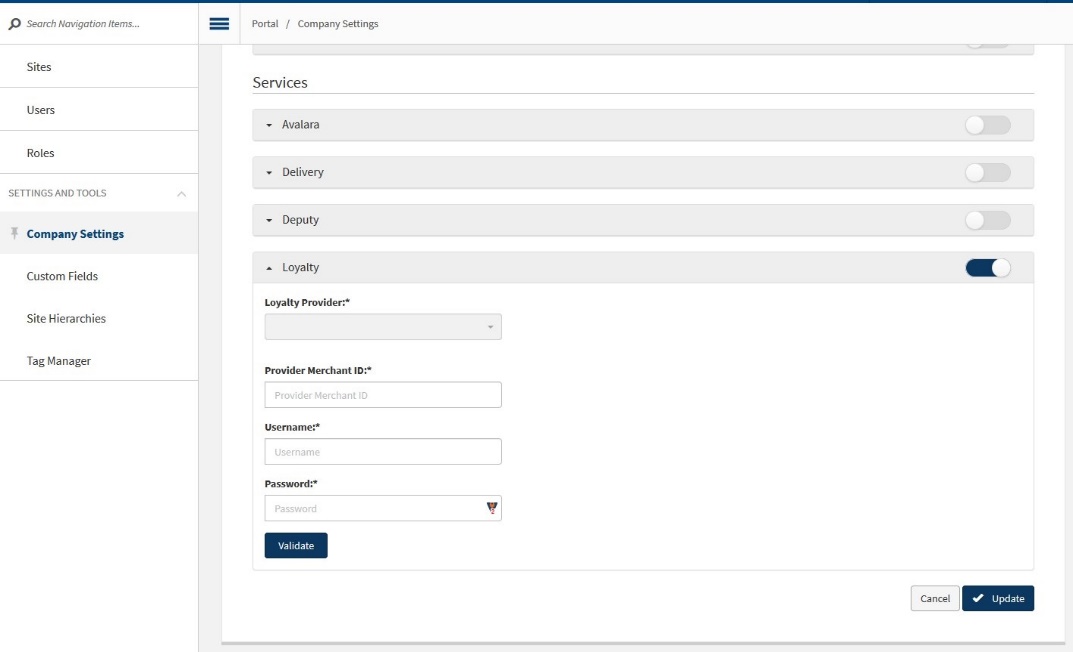
Select the correct loyalty provider from the drop down menu.
Enter the details of the loyalty account. Different providers require different account information, and the form fields change based on the provider selected in step 3.
Select Validate to check that the connection to the selected loyalty provider is functioning.
Select Update to save the changes to the company settings. Loyalty settings will now be available at the site level.
Enable the Loyalty service for each site by navigating to the Edit Site → Services screen. Select the loyalty service by selecting the check box on the row labeled Loyalty Provider and use the on screen options to set the service to Active. The image below shows the site level Services screen:
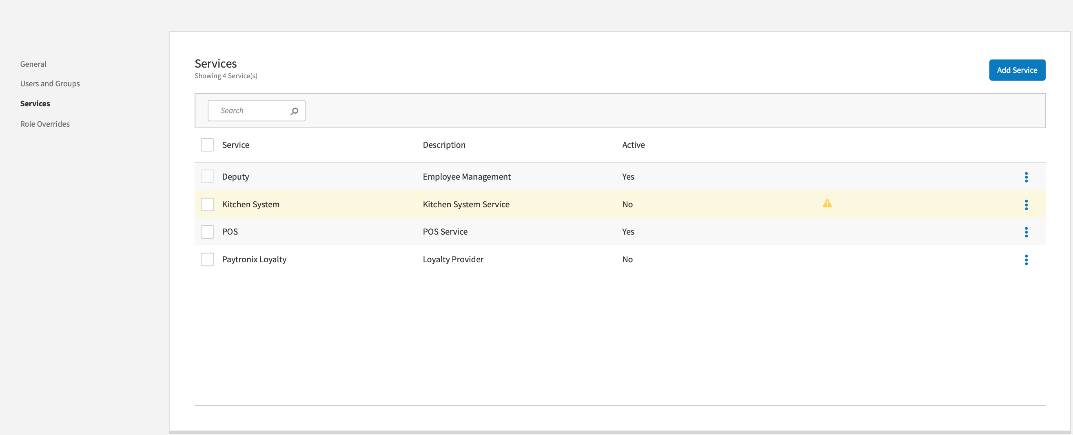
After activating the service, use the 3-dot menu to open the Options screen. The image below shows the loyalty service Options screen for Paytronix:
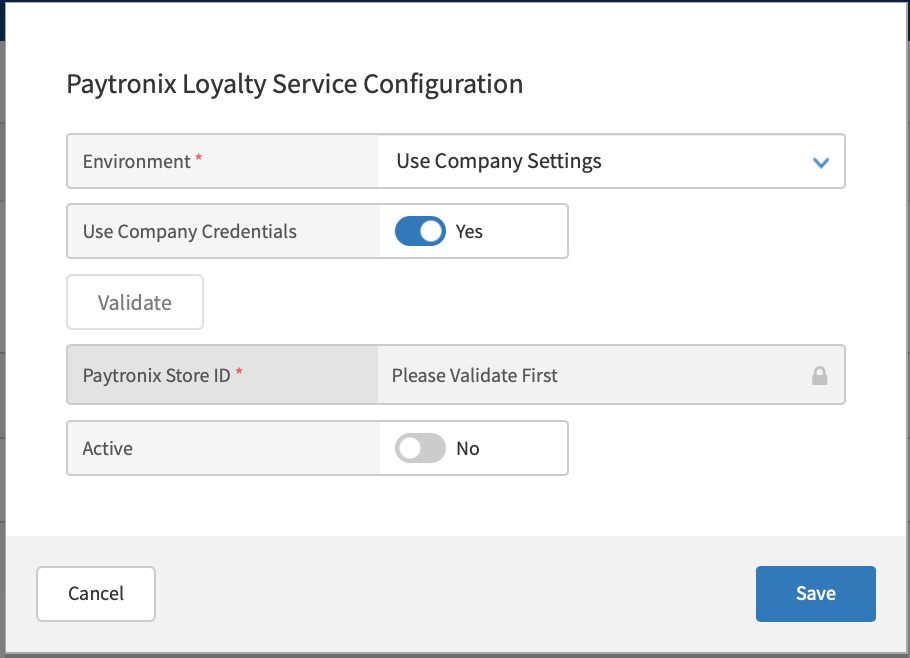
The available settings depend on the environment that you select and your loyalty provider:
Use Company Settings - The API base path, credentials, and other values will be updated as the company moves through different development, QA, and production environments.
Production - The loyalty service will use the company's production credentials.
Sandbox - The loyalty service will use the company's sandbox credentials, which is useful for development and testing.
Custom - Define a custom API base path and mapping style.
Select whether to use company credentials by toggling the Use Company Credentials switch. The image below shows the Paytronix settings:
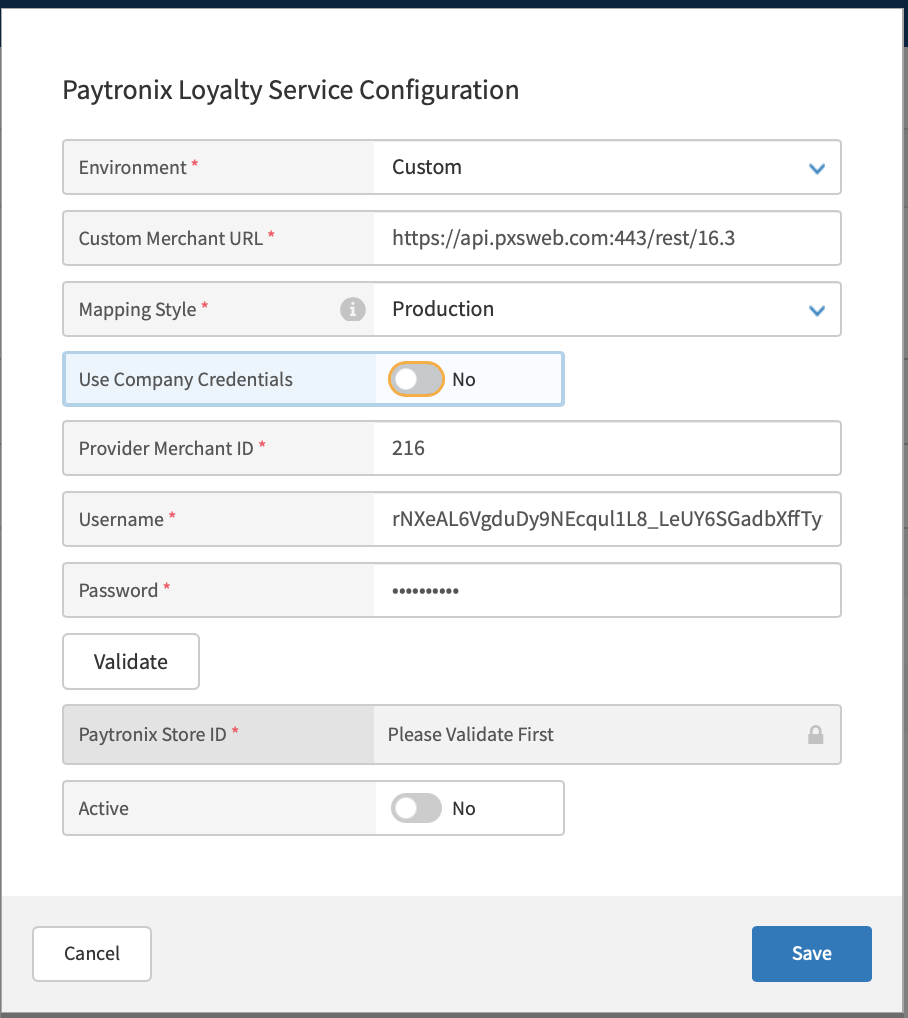
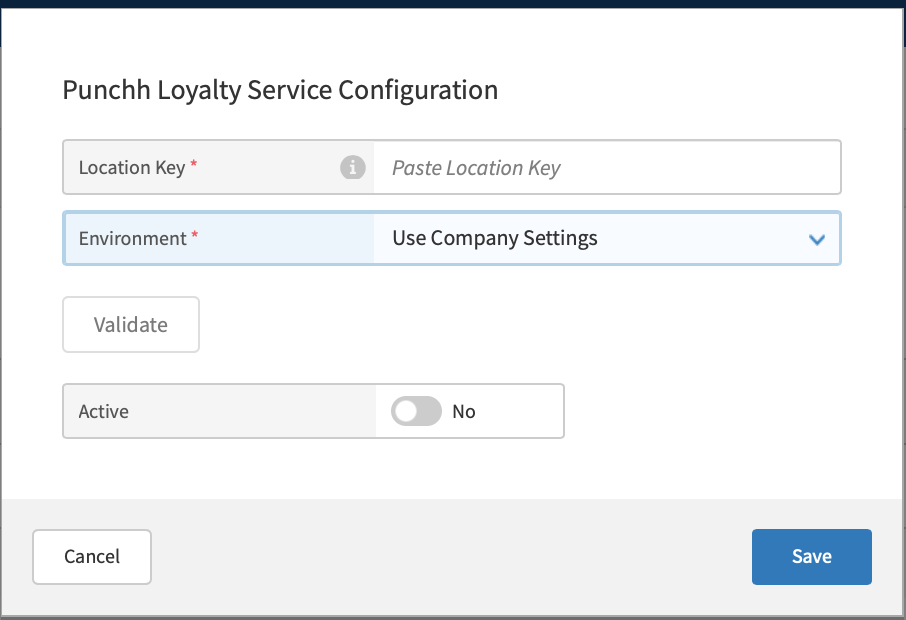
Turn off the Use Company Credentials option to enter custom credentials. This is useful for testing in different environments. The image below shows the settings for Punchh integrations:
Select Save in the upper right of the screen to save the site settings. The site can now begin processing transactions that include loyalty accounts and awards.
Quick Start: Integrations
This topic describes how to implement basic transaction flows for accruing and redeeming rewards. Accruing rewards adds rewards to a customer's loyalty account that they earn for a purchase. Redeeming rewards identifies rewards that are available for a customer to apply to the purchase, applies the rewards to the order, and updates the customer's loyalty account as needed. After a customer's loyalty account has been applied to an order, the options for applicable rewards to redeem display for selection. The order is automatically submitted to the loyalty provider for reward accrual after the transaction.
Gift and Loyalty sends and receives information from loyalty program providers in order to seamlessly integrate loyalty programs with the point of sale (POS) system. In order to identify rewards that can be accrued and redeemed, many of the requests to Gift and Loyalty include the order object that is created by the POS system. By integrating loyalty operations with the existing POS system, Gift and Loyalty can update orders with discounts during the transaction without having to manage separate requests to a loyalty provider.
There are two integration types:
Provider Integrations - Loyalty rewards rules and calculations are owned by the loyalty provider.
Client Integrations - Loyalty rewards rules and calculations are owned by our system.
Provider Integration
A provider integration indicates that all reward logic is owned by a loyalty provider and includes the following:
The loyalty provider calculates and passes the reward amount.
The loyalty provider defines the rules for whether a loyalty reward can or cannot be applied to the order or item.
The loyalty provider defines the rules for whether a loyalty reward should be applied at the order-level or item-level and to which qualifying items the reward is applicable.
The loyalty provider defines the rules for whether multiple rewards can be applied to the order or if they are mutually exclusive.
Use the steps below to process a transaction that redeems and accrues rewards:
Look up the customer's loyalty account by sending a PUT request to the
/identifyCustomersendpoint with the account information in the body, as shown in the sample below:{ "application_version": "3.2.21-2", "clerk_id": "999999", "date_time": "20YY-01-11T16:06:15.163Z", "local_date": "20YY0111", "local_time": "999999", "terminal_id": "999999999999", "terminal_txn_id": "999999", "check_id": "999999999999", "customer_id": "john.smith@123.com", // general field for any identification criteria when POS doesn't know the identification method. Parsing takes place on Gift and Loyalty side "first_name": "John", // when customer is identified by first name "last_name": "Smith", // when customer is identified by last name "email": "john.smith@123.com", // when customer is identified by email "phone_number": "9999999999", // when customer is identified by phone number "loyalty_card_number": "999999999999", // when customer is identified by loyalty card number or loyalty id "code": "999999999999", // when customer is identified by code "order": {} // order object. Optional property }The resource returns an object that includes information about the customer's loyalty account, including rewards that are available to redeem, as shown in the sample response below:
{ "server_date_time":"20YY-01-11T16:31:20.409Z", "host_txn_id":"999999999999", // // transaction_id "merchant_data":{ "name":"Provider Name", "id":"Provider Id", "response_code":200, "response_message":"Authorized", "response_name":"authorizedSuccess", "authorization_code":"999999" }, "customers":[ // list of customers { "is_identified":true, // true - when customer is identified, false - when it was a customer lookup and provider returns a list of customers with limited information "information":{ "first_name":"First", "last_name":"Last", "loyalty_card_number":"9999999999999", "id":"1234", "email":"xxxxxx.xxxxxx@xxxxx.xxx", "phone":"9999999999", "address":{ "address_1":"address", "city":"city", "state":"state", "zip_code":"999" }, "preferred_tips":[ // preferred tip rules set by a loyalty customer { "order_amount":10, "calc_method":"fixed_amount", "value":0.75 }, { "calc_method":"percent", "value":10 } ] }, "balance":[ // loyalty balance for customer account { "name":"Points", "balance":185, "expiration_dates":[] } ], "rewards":[ // the list of rewards available for customer's loyalty account { "id":"99", "expiration_dates":[], "name":"Free Product", "balance":1, "program_id":"1", "apply_automatically":false, "calculated_by":"provider", "reward_type":"discount", "associated_points":100, "promoted":true, "promotion_type":"Welcome Reward", "qualified":false }, { "id":"999", "expiration_dates":[], "name":"10% off", "balance":1, "apply_automatically":false, "calculated_by":"provider", "reward_type":"discount", "qualified":false } ], "promotions":[], "cards":[ // stored value accounts and balance { "card_number":"999999999999", "card_balance":"3.26" } ], "rewards_data":{ "validated_rewards":[] // loyalty rewards that should be added to the order automatically }, "identification_method":"email" // // criteria used for customer identification } ] }
At this point, the POS system keeps track of the account that is applied to the transaction.
The cashier continues processing the order by adding items.
After the order is entered, the cashier selects the awards to apply to the order.
The POS system sends a PUT request to the
/simulateAccrualendpoint to verify that the applied rewards are valid for the order. The request must include the order object, as shown in the sample request body below. The rewards that are being validated are in theoffersarray.{ "action_type": "simulateAccrual", "application_version": "3.2.16", "clerk_id": "999999", "date_time": "20YY-12-04T09:37:04.430Z", "local_date": "999999", "local_time": "999999", "terminal_id": "999999999999", "terminal_txn_id": "999999", "receipt_datetime": "20YY-12-04T09:37:04.430Z", "check_id": "999999999999", "transaction_token": "9999999999", "integrator_name": "xpos", "integrator_type": "pos", "order": { // Order Object "_id": "01ab111c-0d1d-1234-5678-i11de234bc15", "business_date": "20YY-12-04T00:00:00.000Z", "company_id": "999999999999", "contributors": [], "creator": {}, "customer": { "loyalty_info": { "balances": [], "cards": [], "customer": { "address": "{}", "code": "9999", "email": "xxxxxx.xxxxxx@xxxxx.xxx", "first_name": "Xxxxx", "id": "99999999", "identification_method": "phone_number", "last_name": "X", "phone": "9999999999", "preferred_tips": [ { "calc_method": "fixed_amount" } ] }, "identify_customer": { "transaction_id": "0000" }, "offers": [ // loyalty rewards passed for validation against the order { "apply_automatically": false, "calculated_by": "provider", "expiration_date": "2023-12-28T09:59:59Z", "id": "99", "name": "Free Product", "points_required": null, "promoted": true, "promotion_type": "Welcome Reward", "qualified": true, "reward_type": "reward", "status": "validated" } ], "preferred_tips": [ { "calc_method": "fixed_amount" } ] } }, "day_part_info": {}, "destination": {}, "discount_info": { // order-level discounts "discounts": [ { "order_discount_id": "999999999999", "discount_definition_id": "999999999999", "discount_code": "11", "name": "Guest Checked In", "apply_type": "manual", "apply_post_tax": false, "created_at": "20YY-12-04T09:37:03.929Z", "updated_at": "20YY-12-04T09:37:03.929Z", "use_loyalty": false, "discount_type": "discount", "discount_variable_value": 0.01, "quantity": 1, "amount": 0.01, "amount_unrounded": 0.01, "distributed": false } ], "total": 0.01, "total_unrounded": 0.01, "discount_map": [] }, "discount_total": 0.01, "expo_number": "999999", "fulfillment_status": "submitted", "guest_count": 1, "hash_code": "12a34fecd567897a2a1ab1234b12345678d1f12b12d2cbabbd340d031b1aa101", "items": [ { "entity_id": "1c11e1234f011a0012342118", "guest_count": 0, "item_type": "standard", "name": "Medium Coffee", "alternate_kitchen_name": "", "revenue_class": [], "reporting_category": {}, "product_id": "101", "kitchen_routing_categories": [], "tax_group": {}, "tax_inclusive": true, "price": 4.75, "unit_price": 4.75, "tags": [], "item_count_quantity": 1, "product_ingredients": [], "quantity": 1, "segment_id": "012a1eda-1b1-1e2f-bd3d-500f2f11d111", "order_item_id": "111fab1-1213-19a3-568f-e1234056789a", "time": {}, "state": "pending", "payment_status": "open", "child_items": [], "tax_inclusive_price": 4.75, "discount_info": { "discounts": [ // item-level discounts are discounts with the "distributed": false { "order_discount_id": "999999999999", "discount_definition_id": "999999999999", "discount_code": "123", "name": "Free Drink", "apply_type": "manual", "apply_post_tax": false, "created_at": "20YY-12-04T09:37:03.929Z", "updated_at": "20YY-12-04T09:37:03.929Z", "use_loyalty": false, "discount_type": "discount", "discount_variable_value": 4.75, "quantity": 1, "amount": 4.75, "amount_unrounded": 4.75, "distributed": true } ], "total": 4.75, "total_unrounded": 4.75 }, "tags_info": [ // tags used to categorize the items in loyalty providers. Optional { "entity_id": "999999999999", "name": "All Drinks Discounts", "tag_id": "111" } ] } ], "lifecycle": "pending", "notification_status": "open", "order_number": "999999", "order_source": "POS", "order_source_ext": {}, "order_status": { "status": "pending" }, "order_type": "order", "origin": "777", "owner": {}, "payment_info": {}, "payment_status": "open", "segments": [], "sequential_order_number": "99", "site_info": { "address": "9999 Xxxx Xxxx", "address2": "", "apps": [ { "app_code": "XPOS", "preferred_version": { "uri": "https://pos-download.xenial.com/pos-app/3.8.1/", "version": "3.8.1" } } ], "city": "Xxxxxxx", "company": { "id": "99a9e0da999aa90ab9c9d2e7e", "name": "Company Name" }, "email": "", "id": "11a1e0da111aa10ab1c1d2e1e", "isOnlineOrderingAvailable": true, "name": "Site Name", "phone": "", "state": "XX", "store_number": "1234", "timezone": "US/Pacific", "website": "", "zip": "99999" }, "state": "xxxxxxx", "subtotal": 4.75, "tax_inclusive_subtotal": 4.75, "tax_info": { "taxes": [ { "amount": 0.0, "amount_unrounded": 0.0, "marketplace_liable": false, "name": "Sales Tax", "tax_class": "sales_tax", "tax_definition_id": "123456d0a0b1f11d111d511e", "tax_inclusive": true } ], "total_marketplace_liable_unrounded": 0, "total_marketplace_liable": 0, "total_inclusive_unrounded": 0, "total_inclusive": 0, "total_exclusive_unrounded": 0, "total_exclusive": 0, "total_unrounded": 0, "total": 0 }, "time": {}, "total": 0.0, "version": "111" } }The response includes a
rewards_datalist that identifies the rewards that can be applied to the order, as shown in the example below:{ "server_date_time": "20YY-12-04T09:37:04.211Z", "host_txn_id": "999999999999", // transaction id "merchant_data": { "name": "Provider Name", "id": "999999", "response_name": "success" }, "rewards_data": { "validated_rewards": [ { "name": "Free Product", "reward_id": "12", "quantity_redeemed": "1", "apply_automatically": false, "program_id": "1", "offer_id": "99", "amount": "4.75", "rewarded_items": [ { "name": "Medium Coffee", "amount": 4.75, "quantity": "1", "id": "101", "item_id": "111fab1-1213-19a3-568f-e1234056789a" } ] } ], "declined_rewards": [] // loyalty rewards that cannot be applied } }The POS system should display the valid and invalid rewards so that the cashier can notify the customer.
The cashier tenders the order, and the POS system sends the POS request to the
/redeemRewardendpoint as shown in the example below. The applied rewards are defined in thediscount_infoobject(s) and the loyalty rewards have aloyalty_infoobject.{ "action_type": "redeemReward", "application_version": "3.2.16", "clerk_id": "999999", "date_time": "20YY-12-04T09:37:04.430Z", "local_date": "999999", "local_time": "999999", "terminal_id": "999999999999", "terminal_txn_id": "999999", "receipt_datetime": "20YY-12-04T09:37:04.430Z", "check_id": "999999999999", "transaction_token": "9999999999", "integrator_name": "xpos", "integrator_type": "pos", "is_retry": false, "order": { "_id": "01ab111c-0d1d-1234-5678-i11de234bc15", "business_date": "20YY-12-04T00:00:00.000Z", "company_id": "999999999999", "contributors": [], "creator": {}, "customer": { "loyalty_info": { "balances": [], "cards": [], "customer": { "address": "{}", "code": "9999", "email": "xxxxxx.xxxxxx@xxxxx.xxx", "first_name": "Xxxxx", "id": "99999999", "identification_method": "phone_number", "last_name": "X", "phone": "9999999999", "preferred_tips": [ { "calc_method": "fixed_amount" } ] }, "identify_customer": { "transaction_id": "0000" }, "offers": [ { "apply_automatically": false, "calculated_by": "provider", "expiration_date": "2023-12-28T09:59:59Z", "id": "99", "name": "Free Product", "points_required": null, "promoted": true, "promotion_type": "Welcome Reward", "qualified": true, "reward_type": "reward", "status": "validated" }, { "apply_automatically": false, "calculated_by": "provider", "expiration_date": "2023-12-28T09:59:59Z", "id": "999", "name": "10% off", "points_required": null, "promoted": false, "qualified": true, "reward_type": "reward", "status": "validated" } ], "preferred_tips": [ { "calc_method": "fixed_amount" } ] } }, "day_part_info": {}, "destination": {}, "discount_info": { "discounts": [ { "order_discount_id": "999999999999", "discount_definition_id": "999999999999", "discount_code": "defaultLoyaltyOrderLevelDiscount", "name": "10% off", "apply_type": "manual", "apply_post_tax": false, "created_at": "20YY-12-04T09:37:03.929Z", "updated_at": "20YY-12-04T09:37:03.929Z", "use_loyalty": false, "discount_type": "discount", "discount_variable_value": 1.25, "loyalty_info": { "amount": 1.25, "apply_automatically": false, "calculated_by": "provider", "name": "10% off", "offer_id": "999", "program_id": "1", "quantity_redeemed": "1", "reward_id": "123", "status": "validated" }, "quantity": 1, "amount": 1.25, "amount_unrounded": 1.25, "distributed": false } ], "total": 1.25, "total_unrounded": 1.25, "discount_map": [] }, "discount_total": 6.0, "expo_number": "999999", "fulfillment_status": "submitted", "guest_count": 1, "hash_code": "12a34fecd567897a2a1ab1234b12345678d1f12b12d2cbabbd340d031b1aa101", "items": [ { "entity_id": "1c11e1234f011a0012342118", "guest_count": 0, "item_type": "standard", "name": "Medium Coffee", "alternate_kitchen_name": "", "revenue_class": [], "reporting_category": {}, "product_id": "101", "kitchen_routing_categories": [], "tax_group": {}, "tax_inclusive": true, "price": 4.75, "unit_price": 4.75, "tags": [], "item_count_quantity": 1, "product_ingredients": [], "quantity": 1, "segment_id": "012a1eda-1b1-1e2f-bd3d-500f2f11d111", "order_item_id": "111fab1-1213-19a3-568f-e1234056789a", "time": {}, "state": "pending", "payment_status": "open", "child_items": [], "tax_inclusive_price": 4.75, "discount_info": { "discounts": [ { "order_discount_id": "999999999999", "discount_definition_id": "999999999999", "discount_code": "defaultLoyaltyItemLevelDiscount", "name": "Free Product", "apply_type": "manual", "apply_post_tax": false, "created_at": "20YY-12-04T09:37:03.929Z", "updated_at": "20YY-12-04T09:37:03.929Z", "use_loyalty": false, "discount_type": "discount", "discount_variable_value": 4.75, "quantity": 1, "amount": 4.75, "amount_unrounded": 4.75, "distributed": false, "loyalty_info": { "amount": 4.75, "apply_automatically": false, "calculated_by": "provider", "program_id": "1", "quantity_redeemed": "1", "reward_id": "12", "status": "validated" } } ], "total": 4.75, "total_unrounded": 4.75 }, "tags_info": [ { "entity_id": "999999999999", "name": "All Drinks Discounts", "tag_id": "111" } ] }, { "entity_id": "2c22e2222f022a0012242218", "guest_count": 0, "item_type": "standard", "name": "Large Coffee", "alternate_kitchen_name": "", "revenue_class": [], "reporting_category": {}, "product_id": "102", "kitchen_routing_categories": [], "tax_group": {}, "tax_inclusive": true, "price": 12.5, "unit_price": 12.5, "tags": [], "item_count_quantity": 1, "product_ingredients": [], "quantity": 1, "segment_id": "022a2eda-2b2-2e2f-bd2d-200f2f22d222", "order_item_id": "222fab2-1223-12a3-528f-e1232256789a", "time": {}, "state": "pending", "payment_status": "open", "child_items": [], "tax_inclusive_price": 12.5 } ], "lifecycle": "total", "notification_status": "open", "order_number": "999999", "order_source": "POS", "order_source_ext": {}, "order_status": { "status": "pending" }, "order_type": "order", "origin": "777", "owner": {}, "payment_info": { "change": 0, "change_info": [], "hash_code": "999999999999999999999999999999999999", "payments": [ { "added_at": "99999999999999", "added_by": "999999e9a9999f000999999d", "amount": 11.25, "code": "CASH", "hash_code": "999999999999999999999999999999999999", "id": "11111111-1c10-10ed-1111-1c11c0010e1a", "name": "Cash", "open_cash_drawer": true, "pay_type_id": "01", "pay_type_name": "Cash", "payment_id": "01", "payment_source": "POS", "payment_source_ext": { "name": "POS", "order_source_id": "111" }, "processed_at": "2024-03-01T03:59:37.553Z", "status": "PAID", "tip_amount": 0, "transaction_type": "SALE" } ], "tips": 0, "total": 11.25 }, "payment_status": "open", "segments": [], "sequential_order_number": "99", "site_info": { "address": "9999 Xxxx Xxxx", "address2": "", "apps": [ { "app_code": "XPOS", "preferred_version": { "uri": "https://pos-download.xenial.com/pos-app/3.8.1/", "version": "3.8.1" } } ], "city": "Xxxxxxx", "company": { "id": "99a9e0da999aa90ab9c9d2e7e", "name": "Company Name" }, "email": "", "id": "11a1e0da111aa10ab1c1d2e1e", "isOnlineOrderingAvailable": true, "name": "Site Name", "phone": "", "state": "XX", "store_number": "1234", "timezone": "US/Pacific", "website": "", "zip": "99999" }, "state": "xxxxxxx", "subtotal": 17.25, "tax_inclusive_subtotal": 17.25, "tax_info": { "taxes": [ { "amount": 0.0, "amount_unrounded": 0.0, "marketplace_liable": false, "name": "Sales Tax", "tax_class": "sales_tax", "tax_definition_id": "123456d0a0b1f11d111d511e", "tax_inclusive": true } ], "total_marketplace_liable_unrounded": 0, "total_marketplace_liable": 0, "total_inclusive_unrounded": 0, "total_inclusive": 0, "total_exclusive_unrounded": 0, "total_exclusive": 0, "total_unrounded": 0, "total": 0 }, "time": {}, "total": 0.0, "version": "111" } }
An example of the response is shown below:
{ "host_txn_id":"9999999999", "merchant_data":{ "id":"Provider Id", "name":"Provider Name", "response_name":"success" }, "rewards_data":{ "declined_rewards":[ ], "redeemed_rewards":[ { "amount":4.75, "apply_automatically":false, "name":"Free Product", "program_id":"1", "quantity_redeemed":"1", "redemption_code":"123", "reward_id":"12", "rewarded_items":[ { "name":"Medium Coffee", "amount":4.75, "quantity":"1", "id":"101", "item_id":"111fab1-1213-19a3-568f-e1234056789a" } ], "transaction_id":"9999999999" }, { "amount":1.25, "apply_automatically":false, "name":"10% off", "quantity_redeemed":"1", "redemption_code":"124", "reward_id":"999", "rewarded_items":[ ], "transaction_id":"99999999999" } ] }, "server_date_time":"2024-03-01T03:59:37.954Z" }
The cashier tenders the order, and the POS system sends a POST request to the
/submitOrderendpoint, which updates the customer's loyalty account by removing redeemed rewards and adding accrued rewards.
Client Integration
Client integrations are client-centric integrations. These integrations indicate that all reward logic is owned by our system and include the following:
The client calculates the loyalty reward amount based on the discount configuration. For example, the client sets the loyalty rewards amount on the point of sale (POS) system.
The client defines the rules for whether a loyalty reward can or cannot be applied to the order or item based on the discount configuration.
The client defines the rules for whether a loyalty reward should be applied at the order-level or item-level and to which qualifying items the reward is applicable based on the discount configuration.
The client defines the rules for whether multiple rewards can be applied to the order or if they are mutually exclusive based on the discount configuration.
For Client integrations, the loyalty provider passes the reward code that matches the discount code configured in Data Management. The validation request is not sent to a loyalty provider to get the reward information. The client validates all rewards based on the rules set for the matching discount.
Use the steps below to process a transaction that redeems and accrues rewards:
Look up the customer's loyalty account by sending a PUT request to the
/identifyCustomers{ "application_version": "3.2.21-2", "clerk_id": "999999", "date_time": "20YY-01-11T16:06:15.163Z", "local_date": "20YY0111", "local_time": "999999", "terminal_id": "999999999999", "terminal_txn_id": "999999", "check_id": "999999999999", "customer_id": "john.smith@123.com", // general field for any identification criteria when POS doesn't know the identification method. Parsing takes place on Gift and Loyalty side "first_name": "John", // when customer is identified by first name "last_name": "Smith", // when customer is identified by last name "email": "john.smith@123.com", // when customer is identified by email "phone_number": "9999999999", // when customer is identified by phone number "loyalty_card_number": "999999999999", // when customer is identified by loyalty card number or loyalty id "code": "999999999999", // when customer is identified by code "order": {} // order object. Optional property }
The resource returns an object that includes information about the customer's loyalty account, including rewards that are available to redeem, as shown in the sample response below:
{ "server_date_time":"20YY-01-11T16:31:20.409Z", "host_txn_id":"999999999999", // transaction_id "merchant_data":{ "name":"Provider Name", "id":"Provider Id", "response_code":200, "response_message":"Authorized", "response_name":"authorizedSuccess", "authorization_code":"999999" }, "customers":[ // list of customers { "is_identified":true, // true - when customer is identified, false - when it was a customer lookup and provider returns a list of customers with limited information "information":{ "first_name":"First", "last_name":"Last", "loyalty_card_number":"9999999999999", "id":"1234", "email":"xxxxxx.xxxxxx@xxxxx.xxx", "phone":"9999999999", "address":{ "address_1":"address", "city":"city", "state":"state", "zip_code":"999" }, "preferred_tips":[ // preferred tip rules set by a loyalty customer { "order_amount":10, "calc_method":"fixed_amount", "value":0.75 }, { "calc_method":"percent", "value":10 } ] }, "balance":[ // loyalty balance for customer account { "name":"Points", "balance":185, "expiration_dates":[ ] } ], "rewards":[ // the list of rewards available for customer's loyalty account { "id":"99", "expiration_dates":[ ], "name":"Free Product", "balance":1, "program_id":"1", "apply_automatically":false, "calculated_by":"client", "reward_type":"discount", "associated_points":100, "promoted":true, "promotion_type":"Welcome Reward", "discount_code":"300" }, { "id":"999", "expiration_dates":[ ], "name":"10% off", "balance":1, "apply_automatically":false, "calculated_by":"provider", "reward_type":"discount", "discount_code":"302" } ], "promotions":[ ], "cards":[ // stored value accounts and balance { "card_number":"999999999999", "card_balance":"3.26" } ], "rewards_data":{ "validated_rewards":[] // validated loyalty rewards that should be applied to the order automatically }, "identification_method":"email" // criteria used for customer identification } ] }
At this point, the POS system keeps track of the account that is applied to the transaction.
The cashier continues processing the order by adding items.
After the order is entered, the cashier selects the awards to apply to the order. The POS system validates the rewards to determine if they can be applied to the order.
The cashier tenders the order, and the POS system sends a POST request to the /redeemReward endpoint as shown in the example below. The applied rewards are defined in the
discount_infoobject(s) and the loyalty rewards have aloyalty_infoobject .{ "action_type": "redeemReward", "application_version": "3.2.16", "clerk_id": "999999", "date_time": "20YY-12-04T09:37:04.430Z", "local_date": "999999", "local_time": "999999", "terminal_id": "999999999999", "terminal_txn_id": "999999", "receipt_datetime": "20YY-12-04T09:37:04.430Z", "check_id": "999999999999", "transaction_token": "9999999999", "integrator_name": "xpos", "integrator_type": "pos", "is_retry": false, "order": { "_id": "01ab111c-0d1d-1234-5678-i11de234bc15", "business_date": "20YY-12-04T00:00:00.000Z", "company_id": "999999999999", "contributors": [], "creator": {}, "customer": { "loyalty_info": { "balances": [], "cards": [], "customer": { "address": "{}", "code": "9999", "email": "xxxxxx.xxxxxx@xxxxx.xxx", "first_name": "Xxxxx", "id": "99999999", "identification_method": "phone_number", "last_name": "X", "phone": "9999999999", "preferred_tips": [ { "calc_method": "fixed_amount" } ] }, "identify_customer": { "transaction_id": "0000" }, "offers": [ { "apply_automatically": false, "calculated_by": "client", "expiration_date": "2023-12-28T09:59:59Z", "id": "99", "name": "Free Product", "points_required": null, "promoted": true, "promotion_type": "Welcome Reward", "qualified": true, "reward_type": "reward", "status": "validated", "discount_code": "300" }, { "apply_automatically": false, "calculated_by": "client", "expiration_date": "2023-12-28T09:59:59Z", "id": "999", "name": "10% off", "points_required": null, "promoted": false, "qualified": true, "reward_type": "reward", "status": "validated", "discount_code": "302" } ], "preferred_tips": [ { "calc_method": "fixed_amount" } ] } }, "day_part_info": {}, "destination": {}, "discount_info": { "discounts": [ { "order_discount_id": "999999999999", "discount_definition_id": "999999999999", "discount_code": "302", "name": "10% off", "apply_type": "manual", "apply_post_tax": false, "created_at": "20YY-12-04T09:37:03.929Z", "updated_at": "20YY-12-04T09:37:03.929Z", "use_loyalty": false, "discount_type": "discount", "discount_variable_value": 1.25, "loyalty_info": { "amount": 1.25, "apply_automatically": false, "calculated_by": "client", "name": "10% off", "offer_id": "999", "program_id": "1", "quantity_redeemed": "1", "reward_id": "123", "status": "validated" }, "quantity": 1, "amount": 1.25, "amount_unrounded": 1.25, "distributed": false } ], "total": 1.25, "total_unrounded": 1.25, "discount_map": [] }, "discount_total": 6.0, "expo_number": "999999", "fulfillment_status": "submitted", "guest_count": 1, "hash_code": "12a34fecd567897a2a1ab1234b12345678d1f12b12d2cbabbd340d031b1aa101", "items": [ { "entity_id": "1c11e1234f011a0012342118", "guest_count": 0, "item_type": "standard", "name": "Medium Coffee", "alternate_kitchen_name": "", "revenue_class": [], "reporting_category": {}, "product_id": "101", "kitchen_routing_categories": [], "tax_group": {}, "tax_inclusive": true, "price": 4.75, "unit_price": 4.75, "tags": [], "item_count_quantity": 1, "product_ingredients": [], "quantity": 1, "segment_id": "012a1eda-1b1-1e2f-bd3d-500f2f11d111", "order_item_id": "111fab1-1213-19a3-568f-e1234056789a", "time": {}, "state": "pending", "payment_status": "open", "child_items": [], "tax_inclusive_price": 4.75, "discount_info": { "discounts": [ { "order_discount_id": "999999999999", "discount_definition_id": "999999999999", "discount_code": "300", "name": "Free Product", "apply_type": "manual", "apply_post_tax": false, "created_at": "20YY-12-04T09:37:03.929Z", "updated_at": "20YY-12-04T09:37:03.929Z", "use_loyalty": false, "discount_type": "discount", "discount_variable_value": 4.75, "quantity": 1, "amount": 4.75, "amount_unrounded": 4.75, "distributed": false, "loyalty_info": { "amount": 4.75, "apply_automatically": false, "calculated_by": "client", "program_id": "1", "quantity_redeemed": "1", "reward_id": "12", "status": "validated" } } ], "total": 4.75, "total_unrounded": 4.75 }, "tags_info": [ { "entity_id": "999999999999", "name": "All Drinks Discounts", "tag_id": "111" } ] }, { "entity_id": "2c22e2222f022a0012242218", "guest_count": 0, "item_type": "standard", "name": "Large Coffee", "alternate_kitchen_name": "", "revenue_class": [], "reporting_category": {}, "product_id": "102", "kitchen_routing_categories": [], "tax_group": {}, "tax_inclusive": true, "price": 12.5, "unit_price": 12.5, "tags": [], "item_count_quantity": 1, "product_ingredients": [], "quantity": 1, "segment_id": "022a2eda-2b2-2e2f-bd2d-200f2f22d222", "order_item_id": "222fab2-1223-12a3-528f-e1232256789a", "time": {}, "state": "pending", "payment_status": "open", "child_items": [], "tax_inclusive_price": 12.5 } ], "lifecycle": "total", "notification_status": "open", "order_number": "999999", "order_source": "POS", "order_source_ext": {}, "order_status": { "status": "pending" }, "order_type": "order", "origin": "777", "owner": {}, "payment_info": { "change": 0, "change_info": [], "hash_code": "999999999999999999999999999999999999", "payments": [ { "added_at": "99999999999999", "added_by": "999999e9a9999f000999999d", "amount": 11.25, "code": "CASH", "hash_code": "999999999999999999999999999999999999", "id": "11111111-1c10-10ed-1111-1c11c0010e1a", "name": "Cash", "open_cash_drawer": true, "pay_type_id": "01", "pay_type_name": "Cash", "payment_id": "01", "payment_source": "POS", "payment_source_ext": { "name": "POS", "order_source_id": "111" }, "processed_at": "2024-03-01T03:59:37.553Z", "status": "PAID", "tip_amount": 0, "transaction_type": "SALE" } ], "tips": 0, "total": 11.25 }, "payment_status": "open", "segments": [], "sequential_order_number": "99", "site_info": { "address": "9999 Xxxx Xxxx", "address2": "", "apps": [ { "app_code": "XPOS", "preferred_version": { "uri": "https://pos-download.xenial.com/pos-app/3.8.1/", "version": "3.8.1" } } ], "city": "Xxxxxxx", "company": { "id": "99a9e0da999aa90ab9c9d2e7e", "name": "Company Name" }, "email": "", "id": "11a1e0da111aa10ab1c1d2e1e", "isOnlineOrderingAvailable": true, "name": "Site Name", "phone": "", "state": "XX", "store_number": "1234", "timezone": "US/Pacific", "website": "", "zip": "99999" }, "state": "xxxxxxx", "subtotal": 17.25, "tax_inclusive_subtotal": 17.25, "tax_info": { "taxes": [ { "amount": 0.0, "amount_unrounded": 0.0, "marketplace_liable": false, "name": "Sales Tax", "tax_class": "sales_tax", "tax_definition_id": "123456d0a0b1f11d111d511e", "tax_inclusive": true } ], "total_marketplace_liable_unrounded": 0, "total_marketplace_liable": 0, "total_inclusive_unrounded": 0, "total_inclusive": 0, "total_exclusive_unrounded": 0, "total_exclusive": 0, "total_unrounded": 0, "total": 0 }, "time": {}, "total": 0.0, "version": "111" } }
An example of the response is shown below:
{ "host_txn_id":"9999999999", "merchant_data":{ "id":"Provider Id", "name":"Provider Name", "response_name":"success" }, "rewards_data":{ "declined_rewards":[ ], "redeemed_rewards":[ { "amount":4.75, "apply_automatically":false, "name":"Free Product", "program_id":"1", "quantity_redeemed":"1", "redemption_code":"123", "reward_id":"12", "discount_code":"300", "transaction_id":"9999999999" }, { "amount":1.25, "apply_automatically":false, "name":"10% off", "quantity_redeemed":"1", "redemption_code":"124", "reward_id":"999", "discount_code":"302", "transaction_id":"99999999999" } ] }, "server_date_time":"2024-03-01T03:59:37.954Z" }
The cashier tenders the order, and the POS system sends a POST request to the
/submitOrderendpoint, which updates the customer's loyalty account by removing redeemed rewards and adding accrued rewards.
Loyalty Program Flows
Regular Order Flow
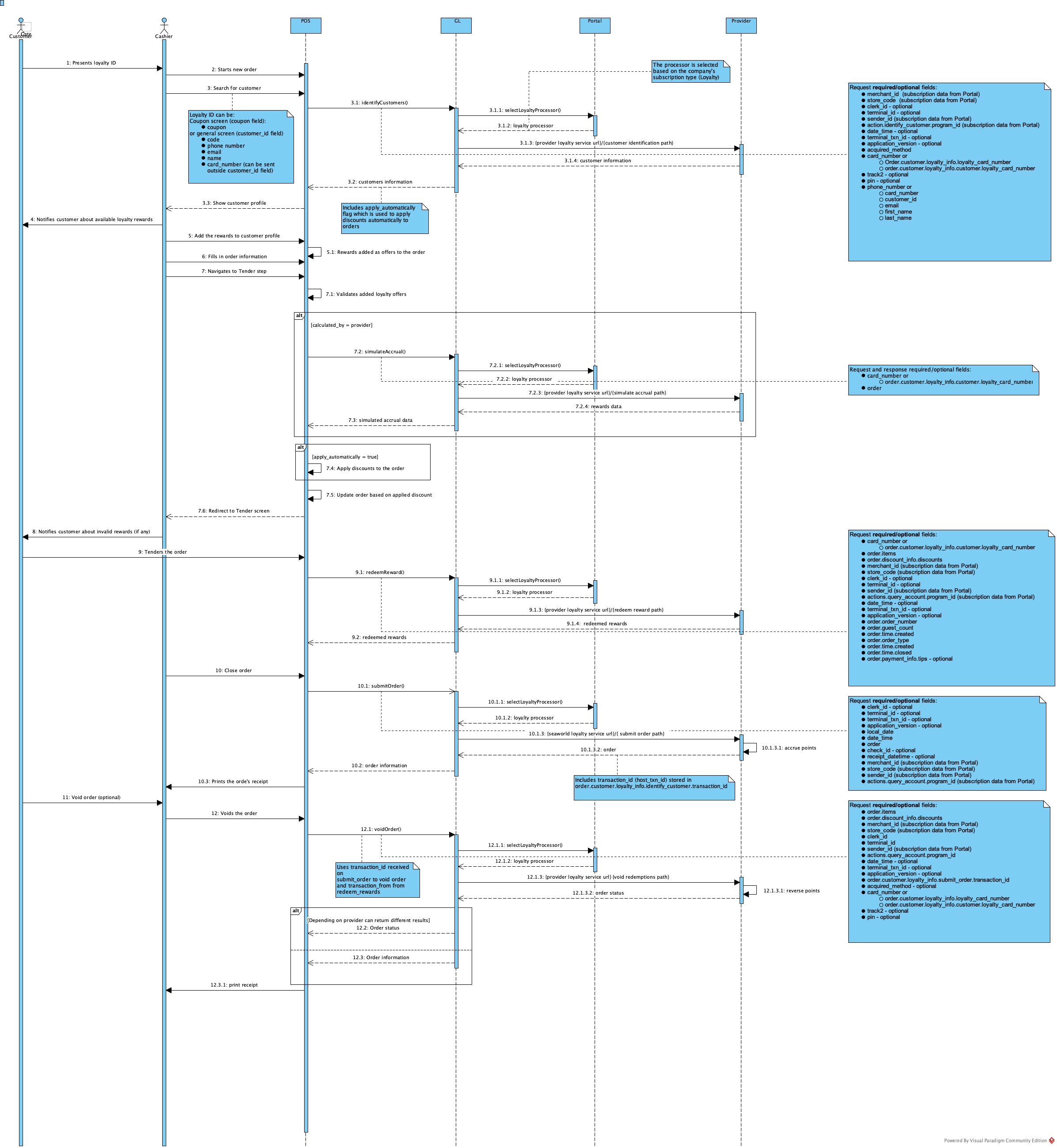
The point of sale (POS) regular order flow performs up to four calls to different Gift and Loyalty endpoints.
Related Custom Adapter API Documentation
Listed below are the links to the endpoint's documentation that is presented in the diagram: