DataSync Process Flow
DataSync performs the following tasks:
# | Step | Description |
|---|---|---|
1 | Gets the state of the local terminal. | Every 500ms, DataSync takes the last state of each local feed from POS-APP and generates the object in the following format:
Note
This format is used to create a unified standard for different POS-APP entities. |
2 | Generates a message that contains the necessary elements for peer terminals to determine how and what data to request from a specific terminal, then sends the data to the public network. | There are two types of notifications as follows:
|
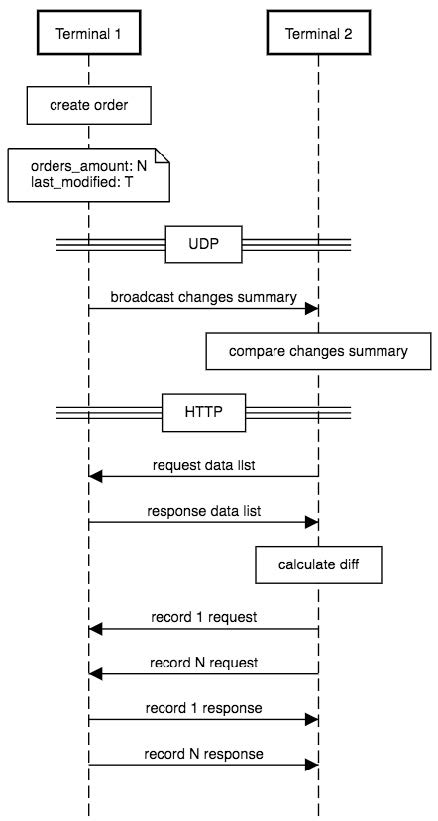
3 | Receives a message from the other terminals on the public network. | The terminals receive the messages with data from the LAN network by UDP. |
4 | Compares and determines the differences between local data and data described in the message. | After the UDP message is received, the terminal compares its local data with the data from the message received from the remote terminal (public network) by Micro Transport Protocol (uTP). NoteFor the message communications, the terminals should be on one Wi-Fi subnetwork and on one site. The system compares the number of resources in one feed in local data versus remote terminal data. If there is no difference between the data, no HTTP messages is sent. |
5 | Requests data from the remote terminal, when needed. | If there is a difference between the local data and the data received from the remote terminal, the system identifies what is missed by identifier, and the terminal sends the message to the particular remote terminal to receive the absent data. These are HTTP messages sent by Transmission Control Protocol (TCP). The connection is terminal-terminal by IP address. The received data is saved to the POS-APP database. |
6 | Performs conflict resolution to determine whether received data should overwrite the local data version. | |
7 | Saves the received data to the local database. | The data received by TCP protocol from the remote terminal is saved in the cloud and transferred to the terminal that requested it. |
8 | Monitors network health and is autonomous. In the event of a network shutdown, DataSync completes its work and is able to restore work when a network appears. | In the event of a network shutdown, DataSync completes its work and will restore work when the network is on. |
DataSync Sequence Diagrams
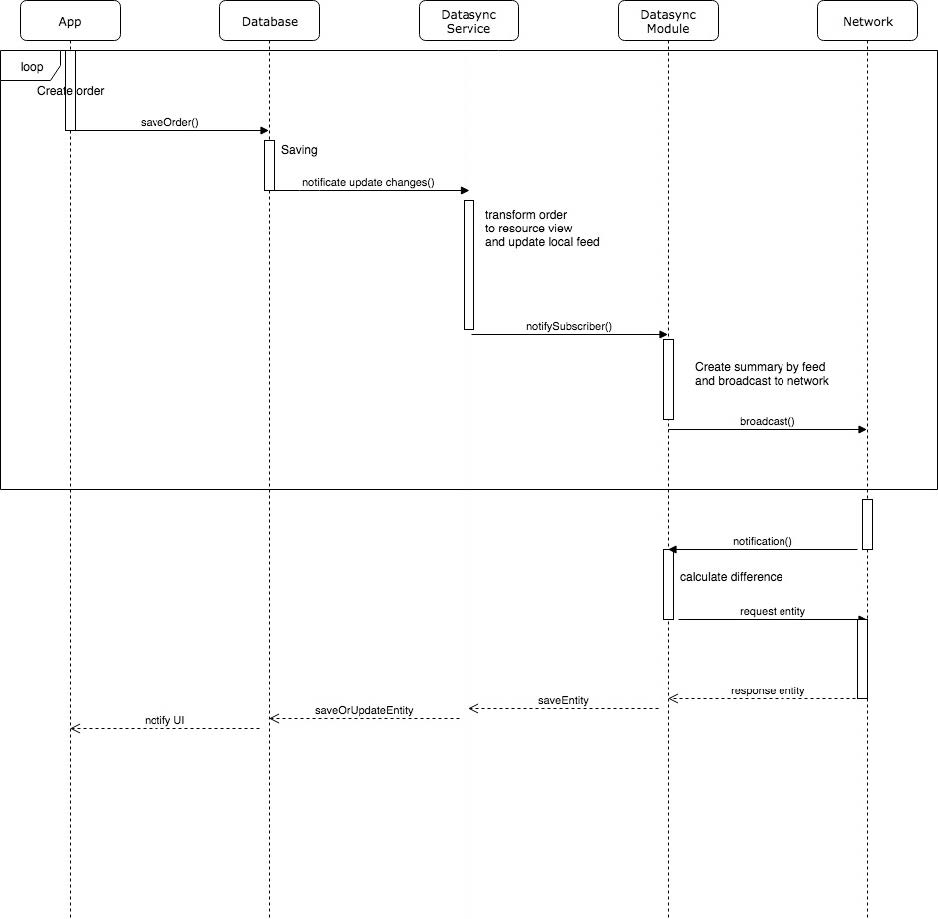
The following diagrams display the communication between terminals and the connections between the application, database, DataSync, and network.
Sequence Diagram of DataSync Algorithm
 |
Sequence Diagram of POS-APP Operation with DataSync
 |