2026 February | Feature Highlights
Data Management | Tier Pricing
PRMA-4430
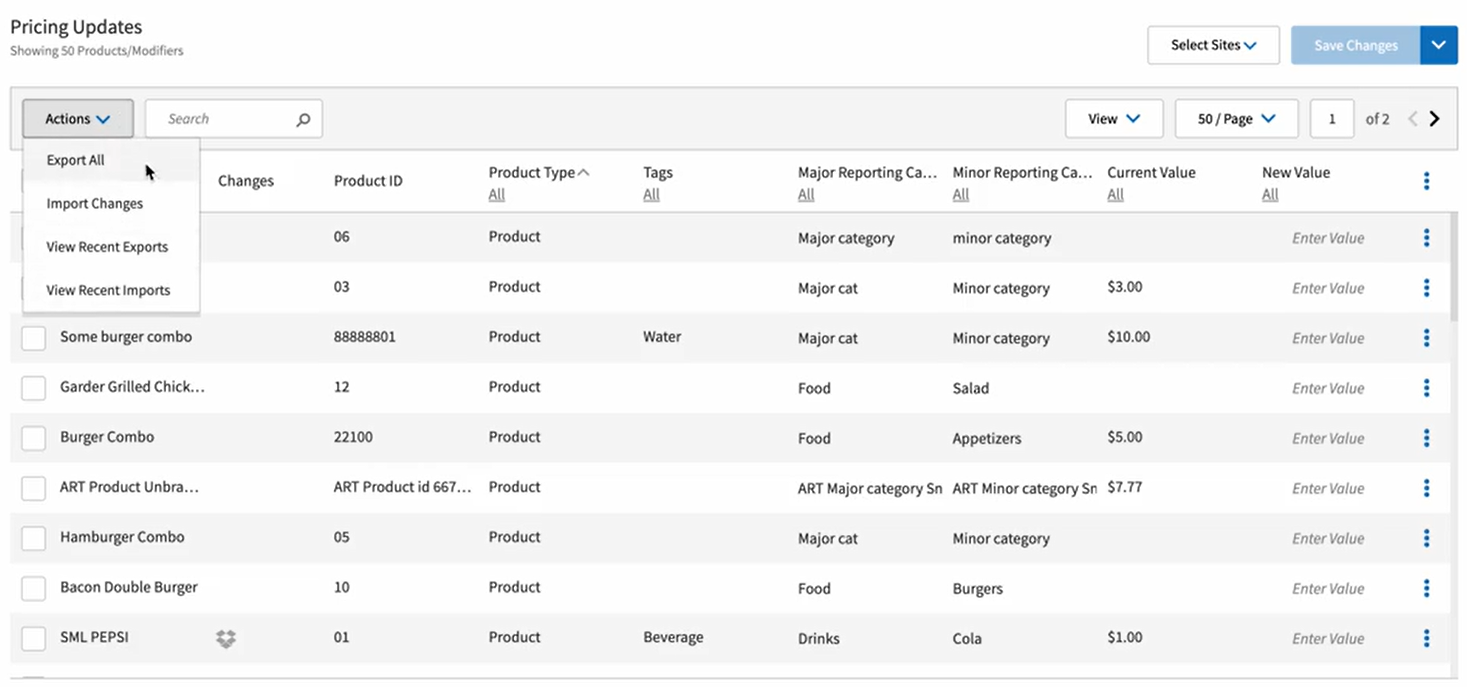
Added the ability to Export and Import options with Price Edit Utility edit mode.
Affected Components:
Data Management
Data Management
Added support for using Export/Import options with Price Edit Utility in selected edit modes with the following actions :
Add selection option to Pricing Updates grid
Add following options to Actions dropdown of Pricing Updates option as edit mode-specific actions: Export Current Item List; Import Changes; View Recent Exports; View Recent Imports
Clicking Edit Price option displays modal with text line Please edit price for 'N' selected items, where 'N' is number of items selected in grid
Clicking Clear Set Price option clears set price from New Price/Value column for items selected
Rename Export Current Item List option with dynamic displays for Export All and Export Selected options
Import Changes, View Recent Exports, and View Recent Imports options display only for Standard Price tab
Current Price column in Pricing Updates grid is renamed Current Value; New Price column is renamed New Value
New Price field name in Edit Price modal is renamed New Value
 |
Point of Sale | Calculate Suggested Tips Off Total/Subtotal
PRMA-2757
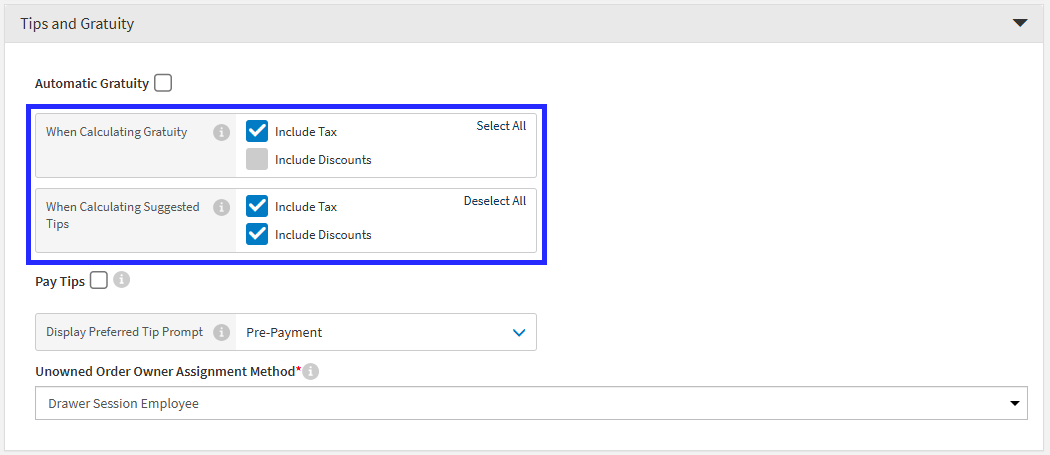
New setting gives the ability to decide whether suggested tip amounts should be calculated off order subtotal (before discounts and taxes) or order total (current behavior).
Affected Components:
Data Management
Point of Sale (POS)
Data Management
Portal → 4-Dot Menu → Data Management → Ordering Settings → Settings → Preferences
From the Tips and Gratuity section of Company/Site Preferences, define the following settings:
When Calculating Gratuity - Determines if tax and/or discounts are included in the gross order total when calculating the automatic gratuity for an order.
When Calculating Suggested Tips - Determines if tax and/or discounts are included in the gross order total when calculating the suggested gratuity for an order.
 |
Point of Sale (POS)
Added settings to calculate Automatic Gratuity and Suggested Tips from Order Subtotal (before Tax and Discounts).
Online Ordering | Menu User Interface
PRMA-6606
Added the ability for admins to verify menu creation from Portal to review for quality control. Menus can be filtered by Time Range or Input Field.
Affected Components:
Cloud Portal
Online Ordering
Cloud Portal
Enabled access control of viewing Menu Validator page and menu download with new menu_validator.View permission at global and company levels. Permission is within new permission group Platform Services containing sub-sections Log Viewer, Data Mapper, Record & Play, Menu Validator.
Online Ordering
Added new endpoint /v1/menu-status/list to retrieve latest menu updates. New menu status object field menu_creation_timestamp displays time menu creation ended processing.
New GET endpoint provides details about latest Menu updates.
Online Ordering | Translated Item Names
PRMA-6408
Item names display in the translated language.
Affected Components:
Online Ordering
Online Ordering
Enabled consumption of ISO language code values for Menu. Updated to replace original values with translated values. Use selected language code in Menu output for third-party delivery partner.
Online Ordering | Rejection of Invalid Orders Due to Modifier as Parent
PRMA-7083
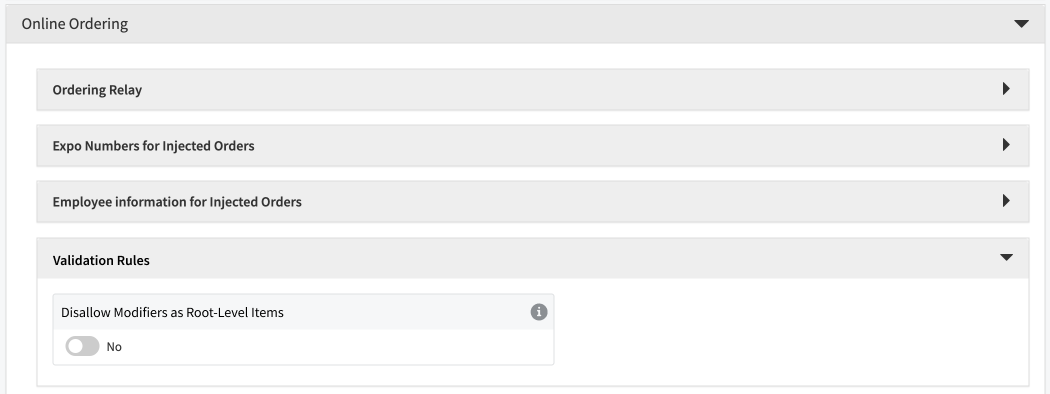
New configuration option for items added to return an error to the integrator calling out problematic item(s) with reason for the rejection for items added as a modifier at the root-level of an order.
Affected Components:
Data Management
Online Ordering
Data Management
Added Disallow Modifiers as Root-Level Items Company/Site permission in Online Ordering section to Reject Orders with Modifier as Root-Level Item.
 |
Online Ordering
Enhanced order processing by adding support to enable users to reject orders with a modifier added as root-level item.
Online Ordering | UberEats Delivery Integration
PRMA-4917, PRMA-6458, PRMA-6480, and PRMA-6584
Integrated UberEats Delivery Online Ordering Interface.
Affected Components:
Cloud Portal
Data Management
Online Ordering
Pipeline
Point of Sale
Reporting
Cloud Portal
Added Preferred icon in Settings and Tools Custom Service next to preferred delivery partner name.
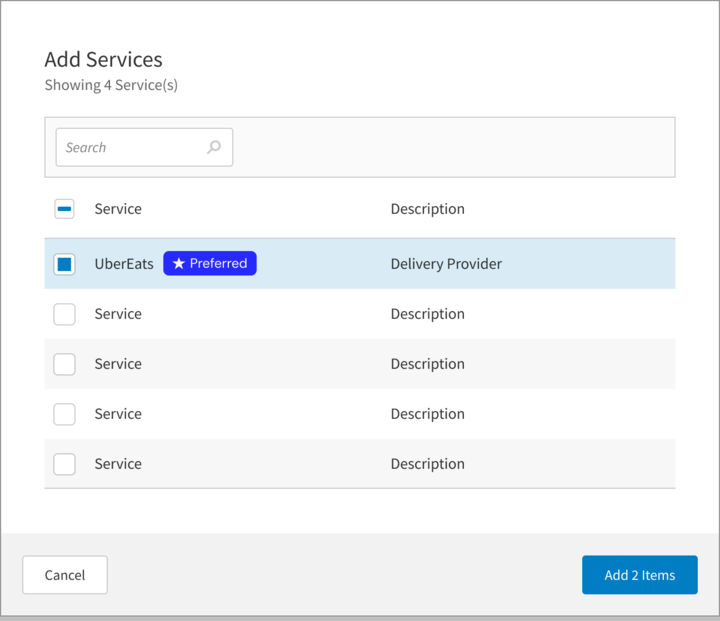
Enhanced store mapping capability for administrators with the following actions:
Add support to subscription for Single Sign On to third-party delivery service
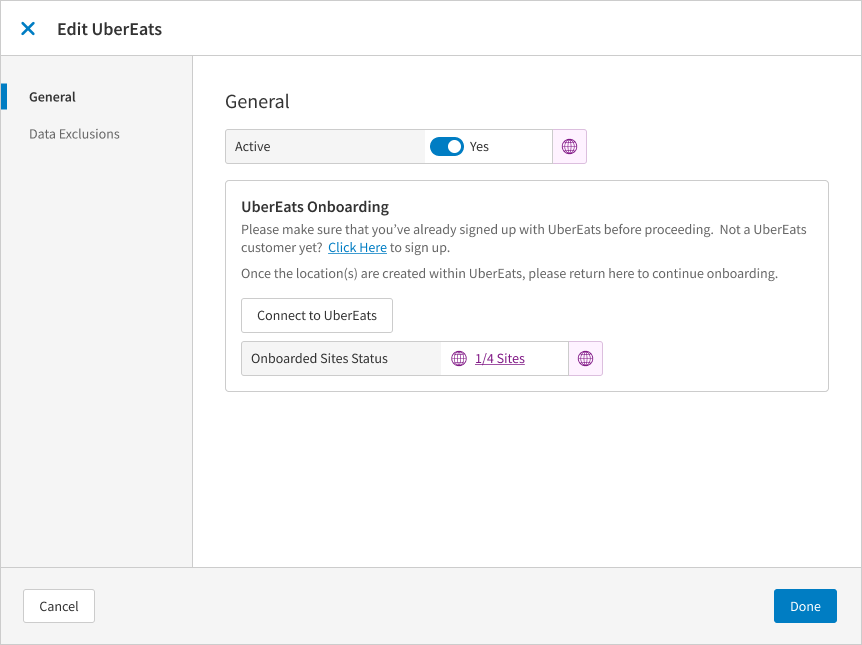
Update third-party service with the following fields in General tab: Uber Eats URL, Callback URL, Service URL, Order Source dropdown
Add the following new toggles: Use Integrated Images, Split Bundle Choices, Map Quantity to Variants
Enhanced onboarding to third-party delivery service with Connect to Uber Eats button in General tab
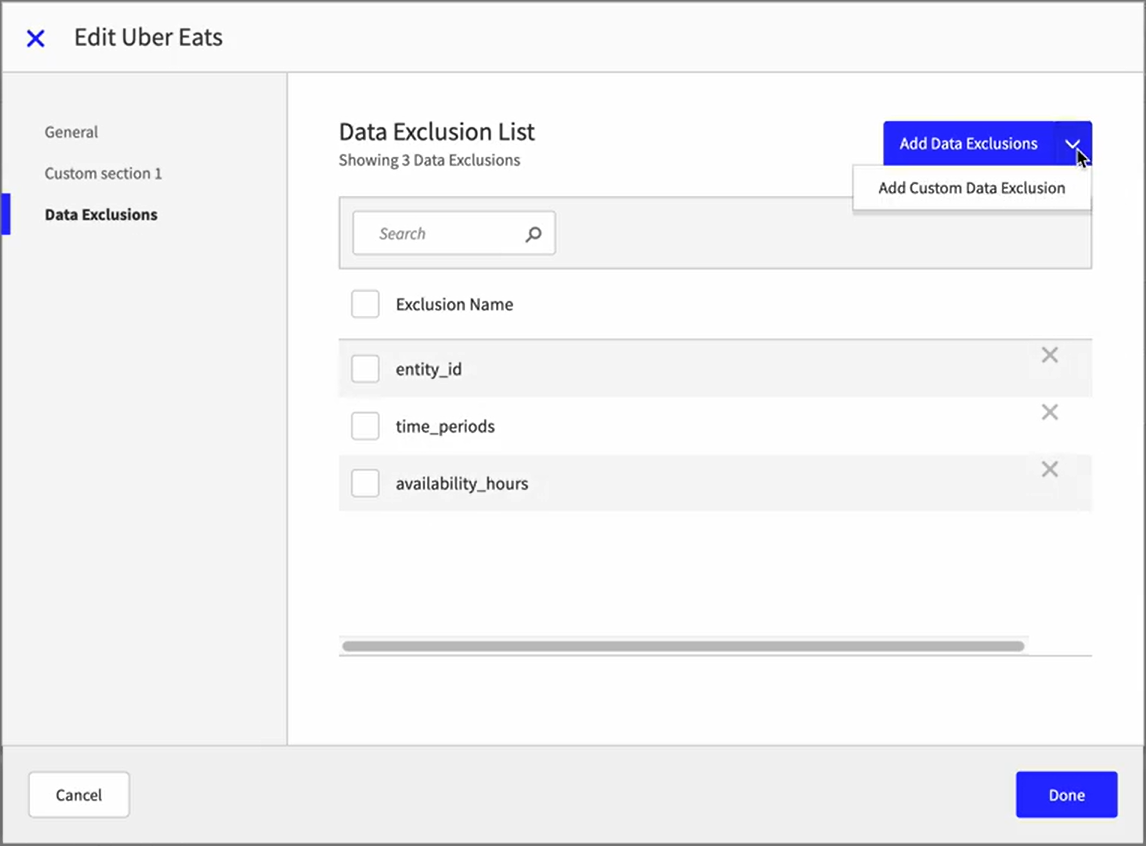
Enhanced Data Exclusion tab with addition of new field Environment with values Use Company Settings and Custom.
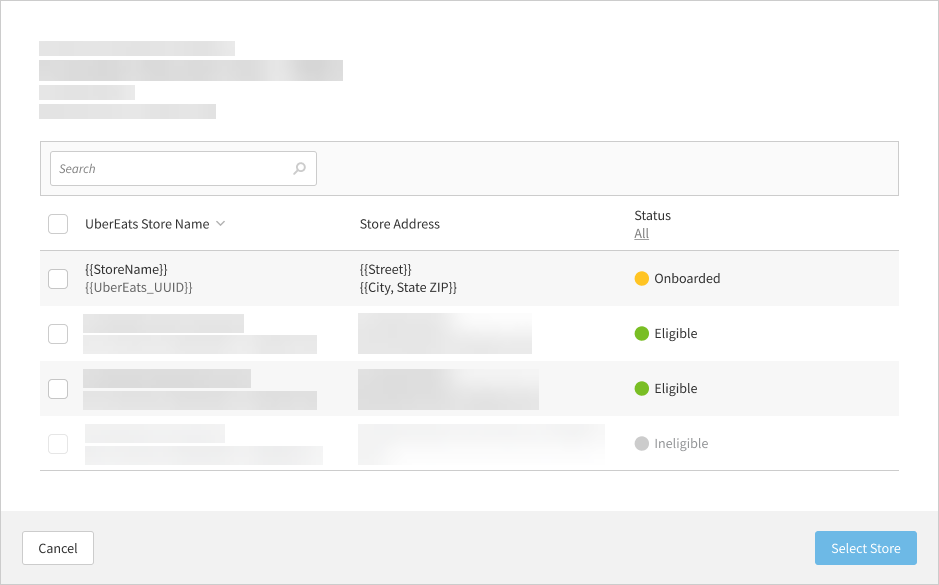
Enhanced onboarding status update process for third-party delivery partner stores.
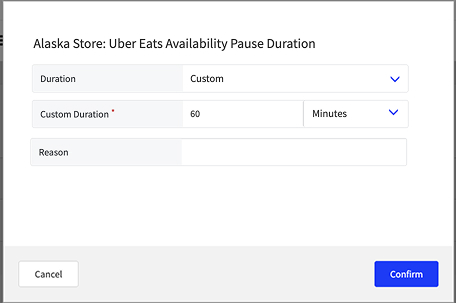
Added ability to pause UberEats connection.
Data Management
Updated schema for Product Availability updates.
Online Ordering
Added support to notify Store when it is activated/deactivated on delivery service platform.
Enabled user to pause and unpause online ordering by consuming new field values is_offline_until from {stack}-delivery-site-status and mapping to corresponding field in delivery service.
Added support for delivery service provider to include PIN with customer phone number by updating to consume PIN value and extend existing customer phone number field.
Enabled pause/unpause notifications to delivery service if alias not provided by adding lookupUbereatsStoreId request.
Added support for notifying delivery service provider when order has been rejected in Store and not released to kitchen.
Enabled externally applied discounts to be included in order by enabling consumption and mapping of discount_info object, utilizing discount_funding_splits array.
Enabled processing of voided order from Point Of Sale and sending cancelation notification via Notifier.
Added support to enable promotion/discount funding splits details to be included in order by injecting discount_funding_splits details as part of Discount object.
Added support for quantity-based pricing for modifiers in delivery menus published to delivery partner.
Added support for delivery service provider to be notified order is canceled in Store by updating to process voided notifications and route to delivery provider.
Enabled order void/cancel request to be sent to Store by sending cancel request when orders.cancel notification is received from delivery partner.
Enhanced standardization of error messages for calls from delivery service provider.
Added support for notifying delivery service Store when order has been canceled by receiving rejected notifications and sending order rejection request to delivery partner.
Added support for delivery service provider to be notified order is ready for pickup or canceled by updating to process order-ready and voided notifications and route to delivery provider.
Added support for delivery service provider to be notified order is ready for pickup or canceled by updating to consume new Data Management configuration.
Enabled population of detailed reason for order cancelation to third-party delivery service.
Added support to enable promotion/discount funding splits details to be included in order by consuming promo_funding_splits details from delivery service provider.
Added support for sending Reason code to delivery service provider for voided orders at Point Of Sale.
Enhanced default build configuration for delivery service provider by zeroing out all quantifiable/non-quantifiable modifier prices with default unit prices greater than zero. Enabled mapping of pricing to delivery charge.
Pipeline
Added new endpoint /ds/pipeline/pos.integratorstatus to route notifications about site activation/deactivation.
Point of Sale
To support time punch synchronization between back office and POS:
Added support for boh-timepunch.delete message from Staff.
Extended PosShiftDetails object with new ShiftId field.
When POS receives store activation status messages from order source, a notification is displayed in event action is required by the POS user.
Reporting
Added support to enable users to view discount funding source in Discount Summary and Discount Detail reports with the following actions:
Add columns Discount Funding-Uber Eats and Discount Funding-Merchant to Discount Summary and Discount Detail reports. Funding source columns are hidden by default
System reads discount_funding_splits array from each entry in discount_map
System handles single funding source (one split entry) and multiple funding sources (multiple split entries)
Pipeline | Taxable Sales in Financial Reports
PRMA-5752
Enhanced validation error notifications and additional data for Taxable Sales in Financial Reports files by moving files from the main directory if they are more than 5 days old.
Affected Components:
Pipeline
Pipeline
Improved notification of missing validation files.
Improved order process so that kiosk orders send and process accurately and successfully.
Streamlined employee file processing with the following actions:
Added suffix _processing_[current timestamp] to employee file, which remains in the main employees folder
If file processing was completely or partially successful, suffix will be changed to _processed_[current timestamp]
If file processing was totally unsuccessful, the suffix remove the _processing_[current timestamp] will be removed from the file and file will remain in main employees folder for retry during next scheduled processing
Enhanced accuracy and consistency of time punch resend process with the following actions:
When boh-timepunch.share message is received with resend_details.target_service="macromatix" message is processed as if history.previous is empty, null or absent
For all other cases message is processed without changes
Changed endpoint used for validation/data comparison to GET /api/reporting/orders.
Point of Sale | Automatic Login with Default User
PRMA-5485
Implemented default login system for Point of Sale (POS) terminals, enabling employee access without authentication while ensuring security. Users can configure default login settings, auto logon options, and auto logoff settings, while excluding changes to unrelated components.
Affected Components:
Cloud Portal
Data Management
Point of Sale (POS)
Cloud Portal
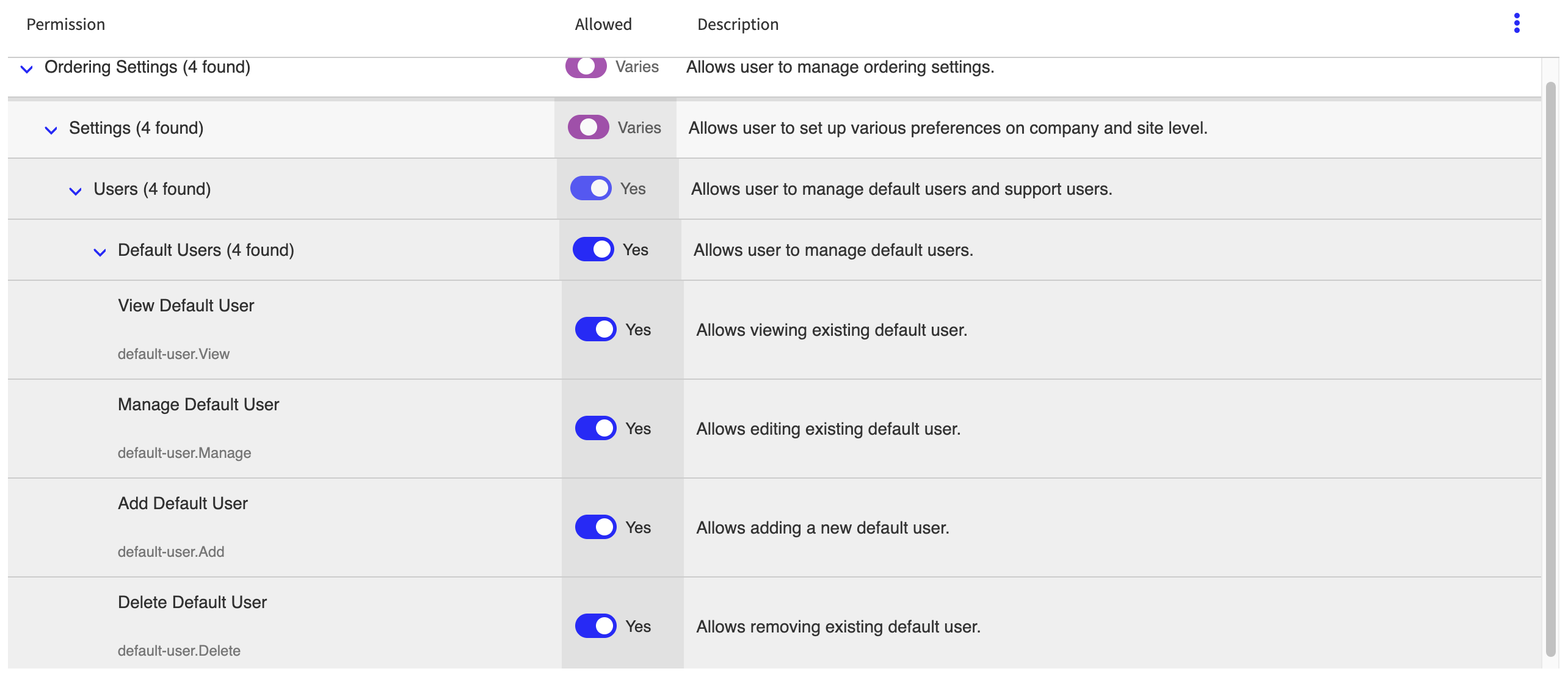
Enhanced management of Default User entity with the following new permissions at global and company levels:
Create new group Users in Ordering Settings
Move Support Users group to new Users group
Add new group Default Users beneath Support Users group
Added following new permissions at the global and company levels: default-user.Add; default-user.Delete; default-user.Manage; default-user.View
 |
Data Management
Added configuration to automatically login to POS as the Default User without authentication.
Default User Configuration
Use the Default Users editor to manage Default User records.
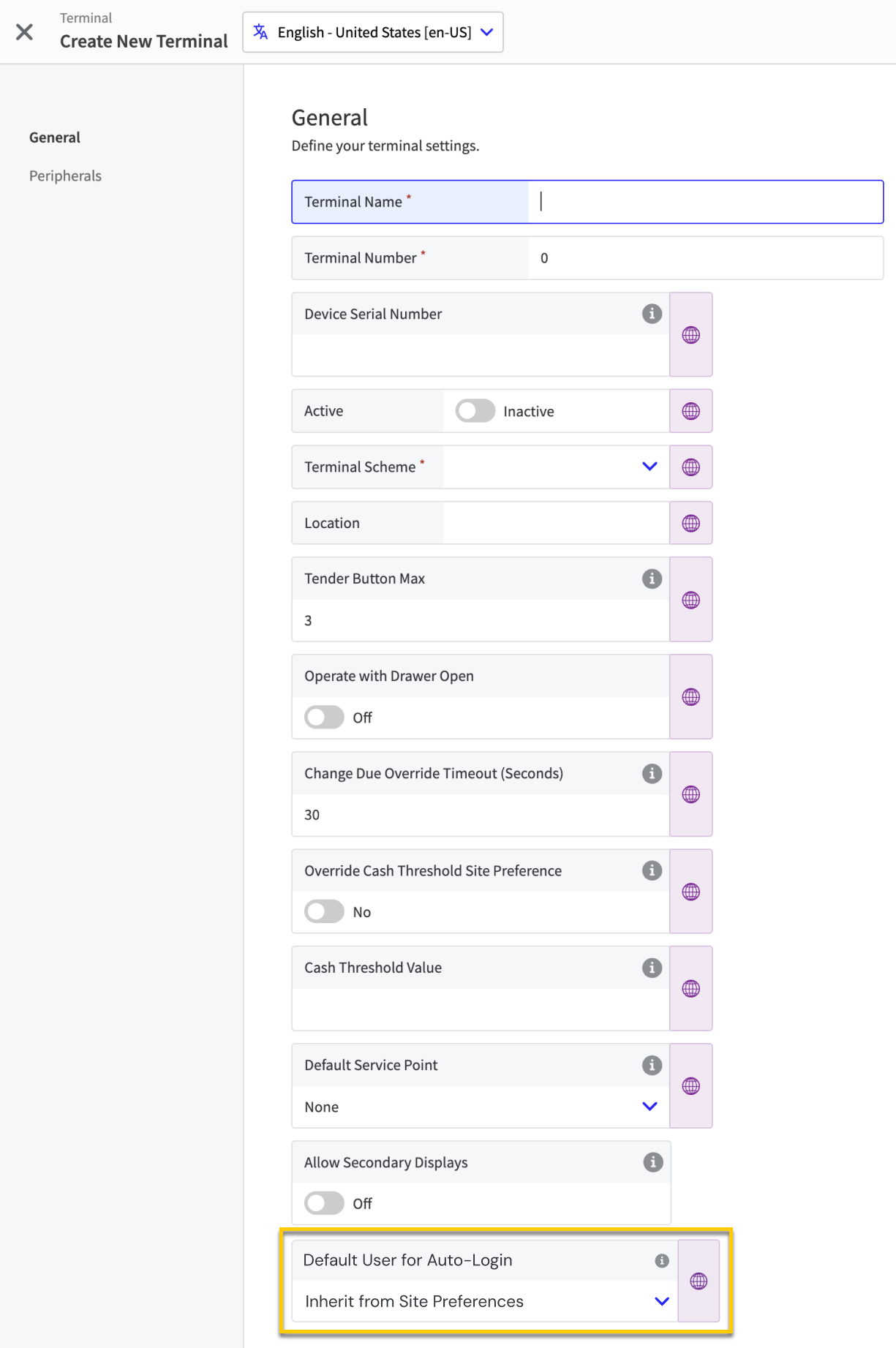
Site Preferences
From the Ordering Application → Access section of Site Preferences, define the following for the site:
Default User for Auto-Login - From dropdown, select the default user to automatically login at the site.
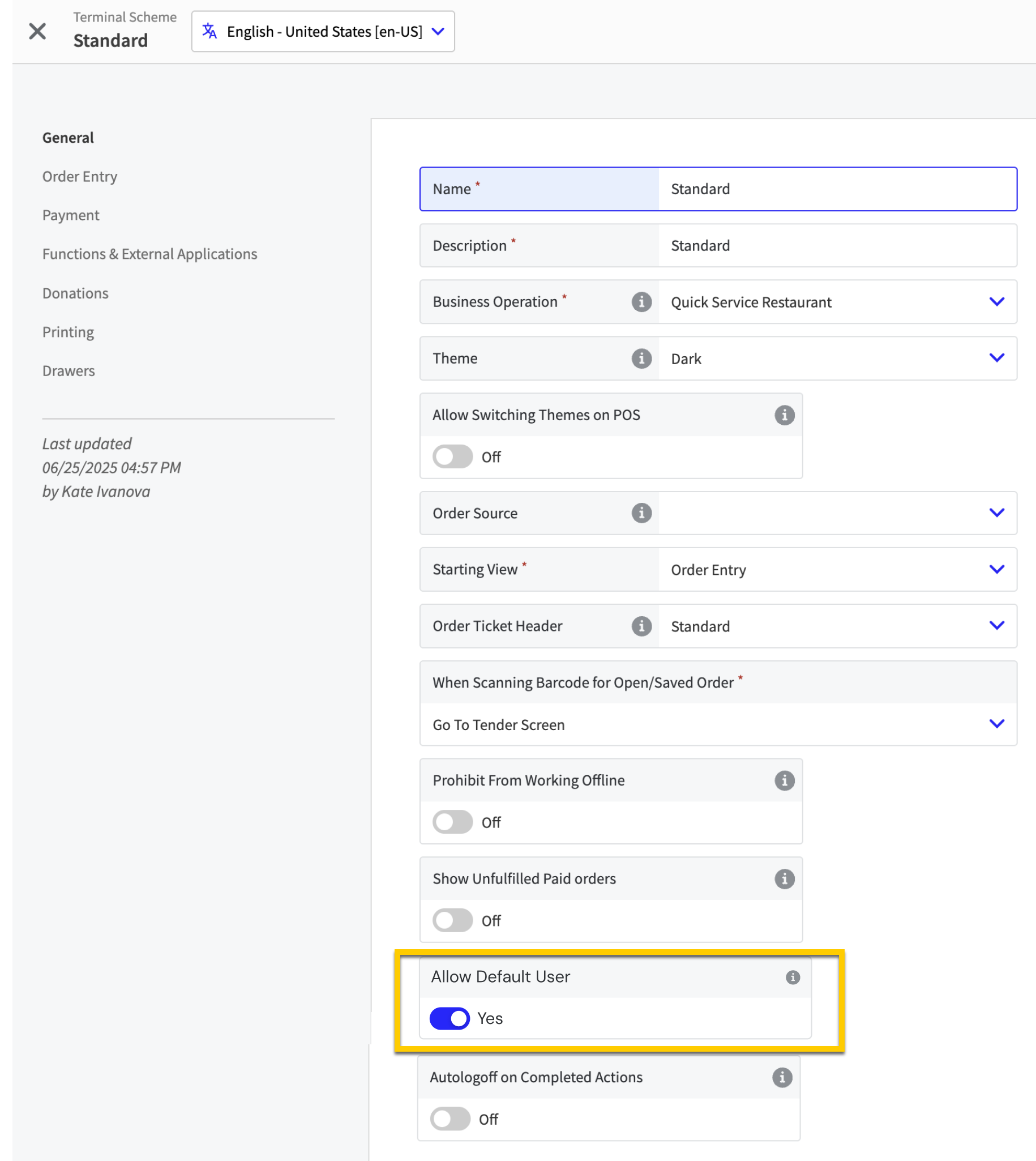
Terminal Scheme Setting
From the General page of the Terminal Scheme editor, define the following for a terminal scheme:
Allow Default User - Toggle On to include the option to automatically login to POS as the default user.
 |
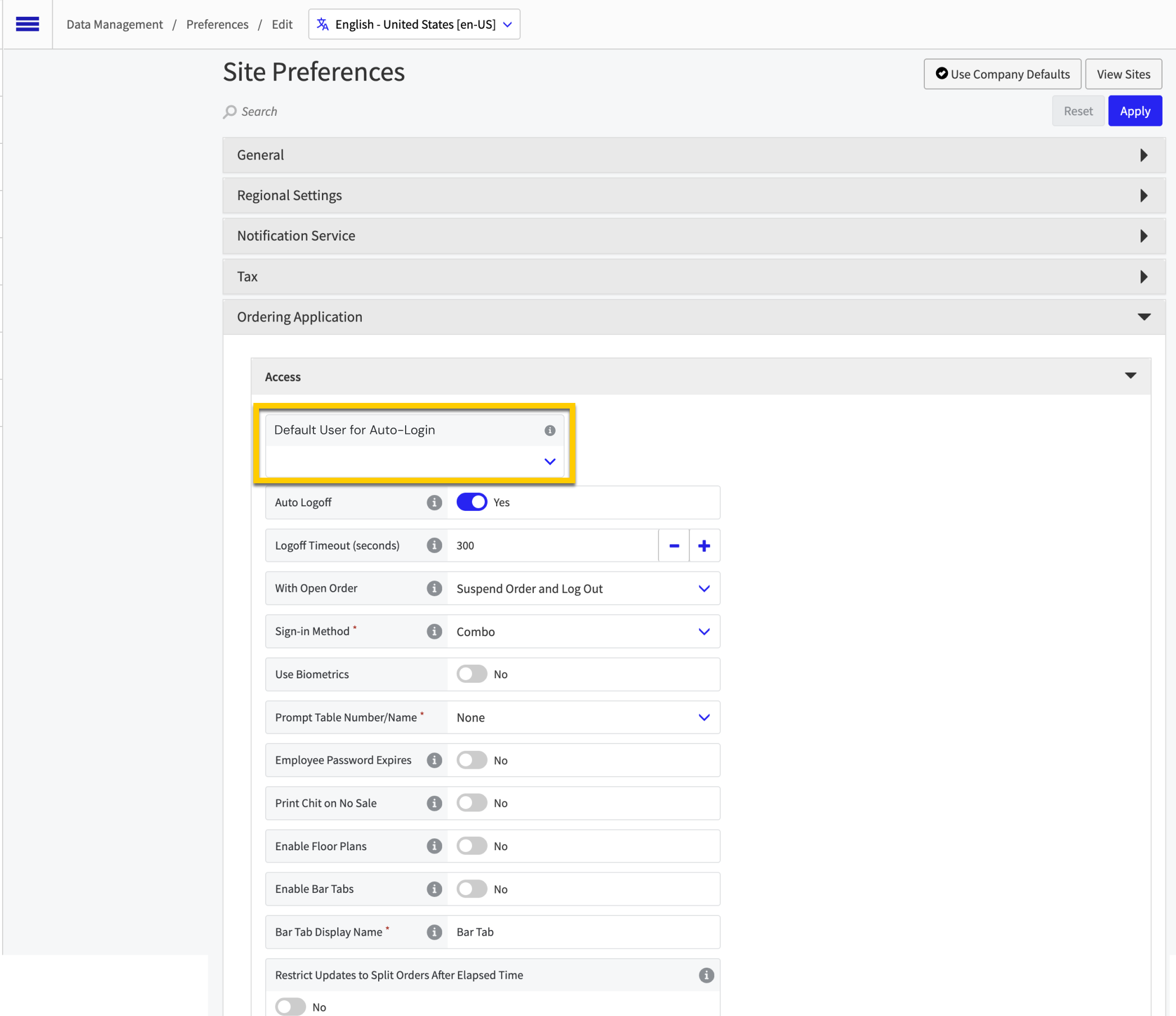
Terminal Setting
From the General page of the Terminals editor, define the following for a terminal:
Default User for Auto-Login - From the dropdown, select the default user to automatically login to this terminal (if applicable).
 |
Point of Sale (POS)
Added ability to automatically login to POS as the Default User without authentication.
Point of Sale | All-in-One
PRMA-4121, PRMA-6217, PRMA-6219, PRMA-6222, PRMA-6220, and PRMA-6218
New terminal scheme type All-in-One, implementing tag-driven menu configurations, enabling code-driven application installations, generating separate configuration files for employees, and managing event assignments to orders.
Affected Components:
Back Office
Cloud Portal
Data Management
Online Ordering
Pipeline
Point of Sale (POS)
Back Office
New Employee configuration to integrate Back Office users for the All-in-One Point of Sale terminals.
Cloud Portal
Enabled administrators to introduce Available status for Point Of Sale terminals by adding new View Available Terminals dropdown to Terminal list. Dropdown will also display existing terminals with Available status.
Enabled user to configure Share Code and Revoke access with the following permissions at company and admin levels:
Create Share Code (ShareCode.Execute) at company and admin level
Revoke Terminal (Revoke.Terminal.Execute) at company level
Revoke Station (Revoke.Station.Execute) at company level

Enhanced Point Of Sale installation by enabling administrators to generate Share Codes for employees with the following actions:
Add 3-dot menu to every Terminal in Terminal List with options Share Code and Refresh Terminal
Share Code option is only displayed if user has Execute permission for Share Code
Refresh Terminal option is only displayed if user has Refresh permission for Sites
Add dropdown button to Refresh Terminal button on Terminal view details form
Dropdown options are Refresh Terminal and Share Code
Refresh Terminal option is only displayed if user has Refresh permission
Share Code option is only displayed if user has Execute permission
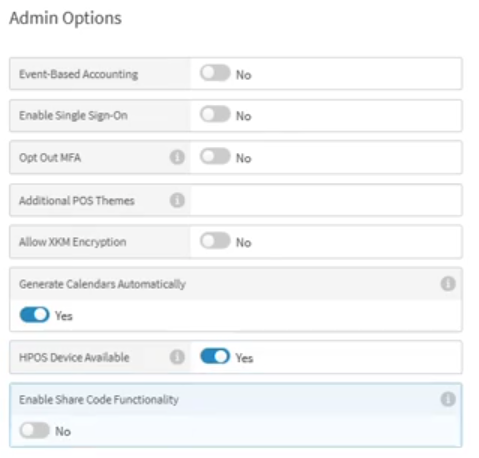
Added support for users to enable/disable option for company to be associated with HPOS AIO devices with the following actions:
Add toggle setting HPOS Device Available to Admin Options under Generate Calendars Automatically setting
Add toggle setting Enable Share Code Functionality to Admin Options under Generate Calendars Automatically setting
Environment variables to control share code generation include data Share Code Generation Enabled
Data Management
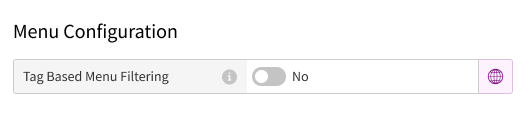
New Terminal editor section Menu Configuration to with setting Tags Based on Menu Filtering.
Yes - Select to show menus based on tags entered in the Products Tagged With field
Products Tagged With - Type a tag assigned to a menu
No - Select to show all menus
 |
Online Ordering
Enhanced functionality by adding support for SQS as alternative method for sending menu generation status updates.
Pipeline
New workflow to ensure an event is assigned when an order is finalized. Orders are checked for an assigned event upon dispatch, and if not, comparing the order creation time against existing event parameters. If order creation time falls within the range of an event's parameters, the corresponding event data is assigned to the order. If no matching event is found, no event data is be added.
Point of Sale (POS)
Updated Point of Sale (POS) to exclude terminals based on settings configured in Data Management.
Reporting | Conversion to AG-Grid format
PRMA-5565
Updated the last reports to AG-Grid format.
Affected Components:
Cloud Portal
Data Management
Reporting
Cloud Portal
Removed access to Employee Productivity report permission (Reporting.Employee.Productivity) from company and global levels.
Data Management
Enhanced usability and consistency by removing following reports from Report Options: Employee Productivity, Sales and Labor Visualisation, Service Productivity.
Removed the following Report Options:
Employee Productivity
Sales and Labor Visualization
Service Productivity
Reporting
Converted the following reports to the AG Grid format:
Speed of Service - Performance Report
Speed of Service - Check Audit Report
Sales and Labor Report
Discount Summary Report
Sales Reduction Summary Report
Void Summary Report
No Sale by Employee Report
Employees on the Clock Report
Employees Audit Report
Weekly Sales Report
Weekly Sales and Labor History Report
Product Sales by Category Report
Discounted Items by Reporting Category Report
Labor Performance - Users Report
Labor Performance - Summary Report
Liability Summary Report
Missed Breaks Report
Modifier Analysis by Product Category Report
Sales Analysis Report
The following reports can now be executed from a ETL job:
Weekly Touchless Report
SQL Server Reporting Services (SSRS) Reports Launch Statistics Report
Daily Sales Report
New drilldown to the Sales Detail Report (SDR)
Reporting | Default View for AG-Grid Report
PRMA-5768
Enhanced Reporting capabilities by allowing admins to set default report options for selected fields.
Affected Components:
Data Management
Mobile Manager
Reporting
Data Management
Added settings to define enabled columns, grouping options, sorting preferences.
Mobile Manager
Added the following field to the Preferences → General page:
Default Sites - Identify the sites to select by default when using the XMM application.
The default site selection applies to all pages where the user selects sites.
Reporting
Added the ability for Admins to define and save a default view for AG-Grid report.
Venue Inventory | Commission Rates
PRMA-6645
Developed Commission Rates Module to create and manage multiple commission rates and track sales and commissions. This module emphasizes the significance of driving concession sales through vendors and outlines a functional workflow for vendor reconciliation reports.
Affected Components:
Data Management
Venue Inventory
Data Management
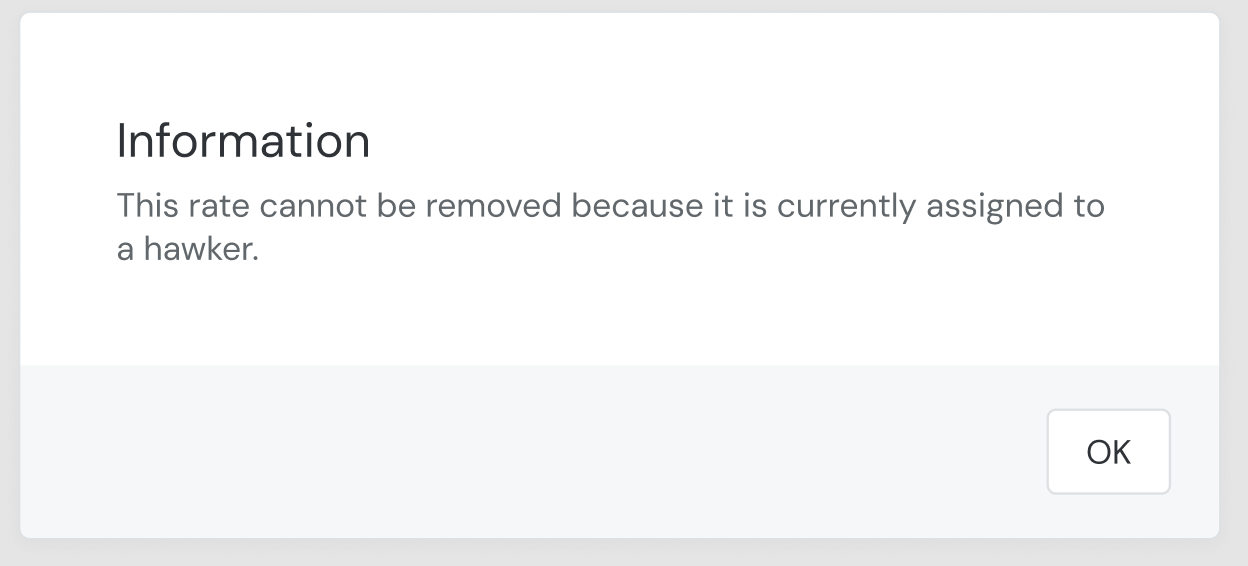
Updated Commission Rates to disallow removal if currently assigned to a profile.
 |
Venue Inventory
Enhance display and performance of Hawkers List and Detail pages, Commission Rate Column, and Rate Details.
Technical Improvement | Web-SRM Updates
PRMA-4757 and PRMA-6365
Extended the Online ordering Menu Engine to include the following data from Data Management:
Affected Components:
Cloud Portal
Data Management
Online Ordering
Pipeline
Point of Sale
Reporting
Cloud Portal
New new field Parent Version to the Add Version Certification window when creating adding a new Version Certification.
Data Management
New Report Menu Layout for Web-SRM
Online Ordering
Extended the Online ordering Menu Engine to include the following data from Data Management:
Discounts
Fees
Pay Types
Destinations
Taxes
Pipeline
New method of managing limits of active partitions in dynamic partitioning for Fiscal Transaction logs.
Point of Sale
Support additional taxes on alcohol beverages.
Support for Table Service (TSR) operations:
Send table details for fiscal transactions.
Split Order and Print All restrictions if invalid user/certificate.
Split/Combine Order logging.
Reporting
Added ETL job to create backup copy files for the number of sites
New WEB-SRM Report