2025 December | Feature Highlights
Data Management | Mongo Enhancements
PRMA-6400
Updated Data Management code and database to run locally on Mongo machines.
Affected Components:
Cloud Portal
Data Management
Data Management
Updated Data Management code and database to run locally on Mongo machines.
Cloud Portal
This release includes infrastructure improvements that do not affect the business functions of Genius or supported services.
Digital Menu Board | Selective Sell
PRMA-4067
Added Suggestive Sell function which recommends items to include an additional purchase or recommends complementary items for the order.
Affected Components:
Cloud Portal
Digital Menu Board (DMB)
Cloud Portal
Enhanced control of access to Visibility Requirement with the following new permissions in Visibility Requirement subgroup at company and global levels:
Add Visibility Requirement (VisibilityRequirement.Add)
Edit Visibility Requirement (VisibilityRequirement.Edit)
Delete Visibility Requirement (VisibilityRequirement.Delete)
 |
Digital Menu Board
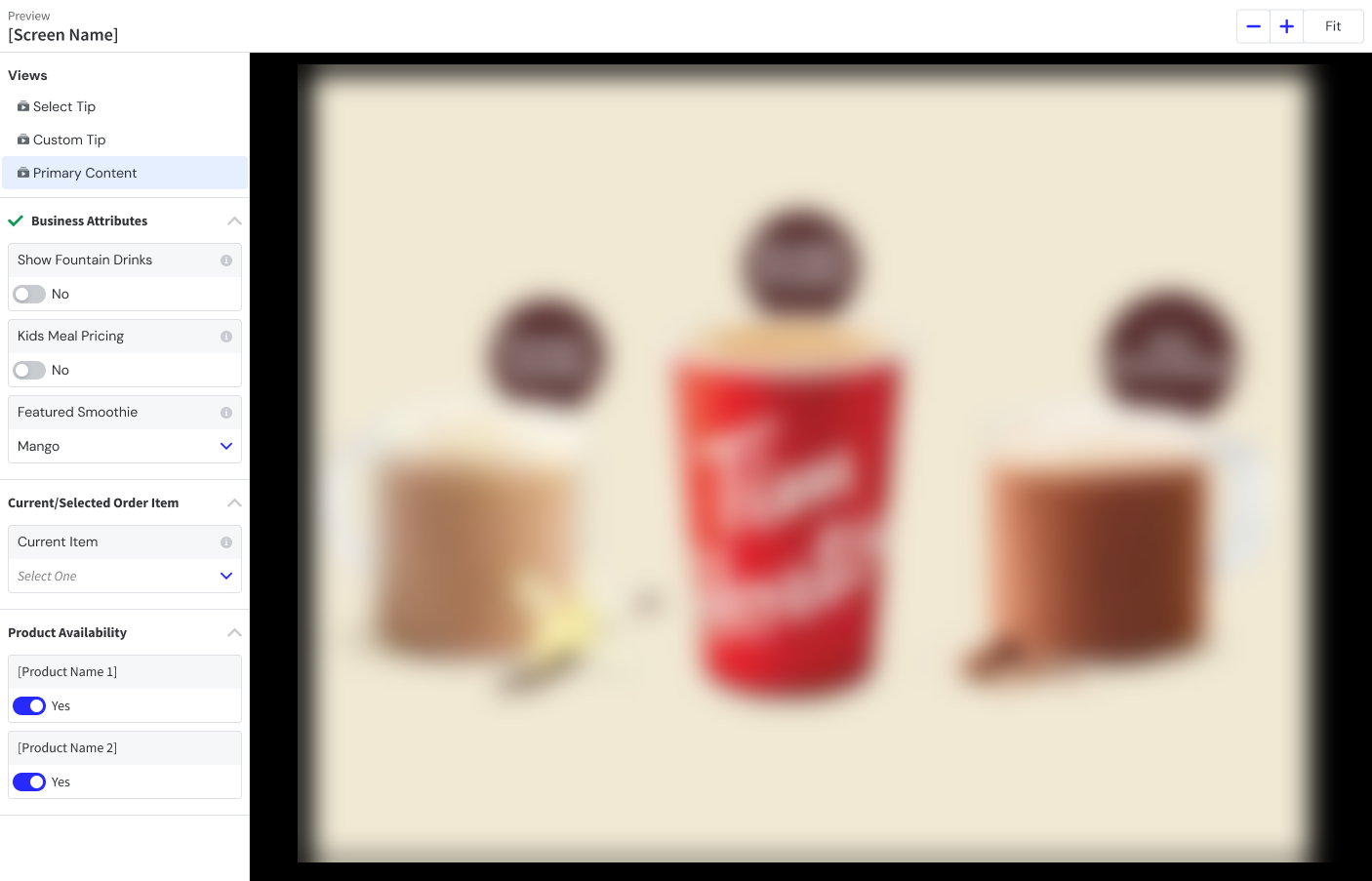
Added Current Order Item section in Preview Mode in the Content Designer. From the dropdown list, select the available products
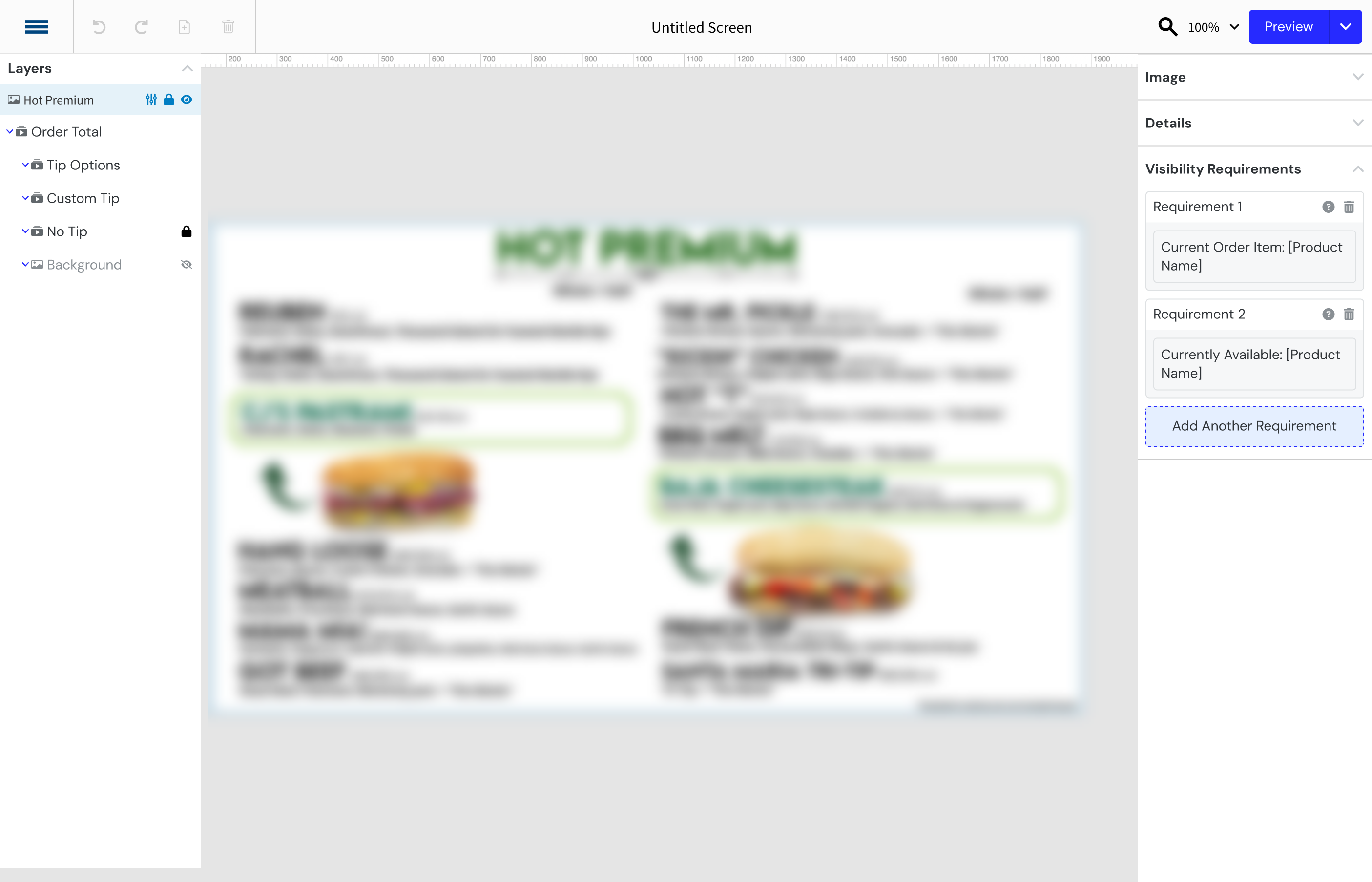
Added the ability to edit and remove a Visibility Requirement
From the lower-right panel of the Content Designer, select the Plus (+)next to Visibility Requirement.
In the Add Requirement pop-up dropdown, select the Requirement Type.
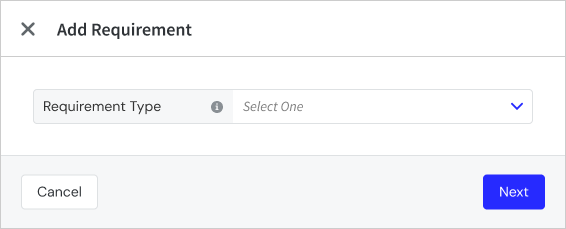
Business Attributes - See Apply Business Attribute to Layer for more information
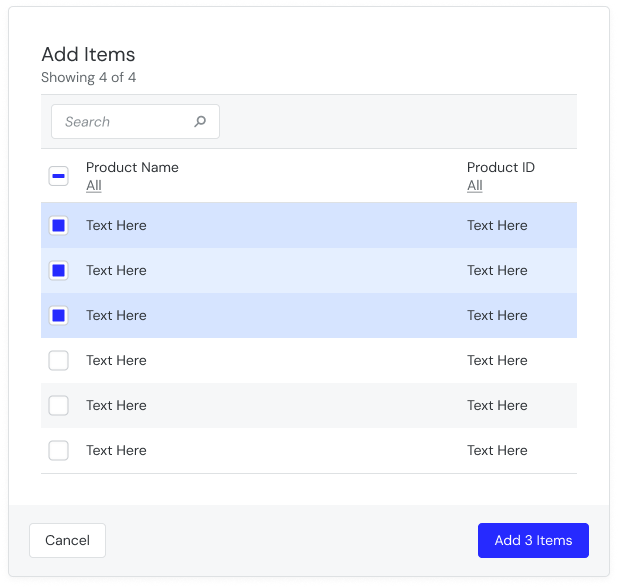
Current Order Item - Inthe Add Items window, select the items to add
In the lower-right of the Add Items window, select the Add Items button.
In the lower-right of the Add Requirement pop-up, select Add Requirement.
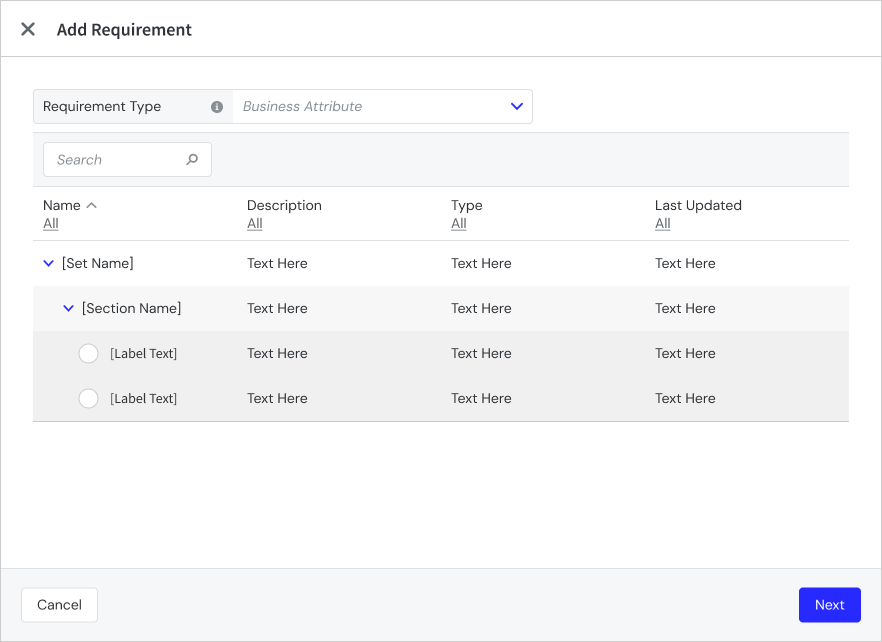
Added logic to show Suggestive Sell content on DMB devices
Gift and Loyalty | Last and Favorite Orders
PRMA-6042
Added the ability to see the last few orders placed and to define a past order as a Favorite.
Affected Components:
Cloud Portal
Data Management
Gift and Loyalty
Pipeline
Point of Sale (POS)
Cloud Portal
Enabled user registration of loyalty customers with new permission Register Loyalty Customer (Loyalty.RegisterCustomer) at company and global levels.

Enhanced administrative control of loyalty customers at the Point of Sale level by adding the new permission Manage Loyalty Account (Loyalty.Manage.Account) at the global and company levels.

Added support for Loyalty account registration with the following actions:
Add new sections Registration and Update to Services with pre-defined and custom loyalty provider options
Add Enabled toggle functionality to Registration and Update section, Off by default for new and existing companies.
When Registration toggle is enabled, Registration Method dropdown displays with options SMS Enroll (default) and Standard Registration
When Standard Registration method is selected in Registration Method dropdown, Card Template Code field displays
When adding Registration Field, Add Registration Field modal displays following field checkboxes: First Name, Middle Name, Last Name, Email, Phone Number, Code, Loyalty Card Number, Birthday, Address, Referral Code, Sms Opt In, Email Opt in
When Update toggle is enabled, Update Fields grid displays
Add Fields button opens Add Update Field modal with the following available fields: First Name, Middle Name, Last Name, Email, Phone Number, Code, Loyalty Card Number, Birthday, Address, Sms Opt In, Email Opt in
Registration
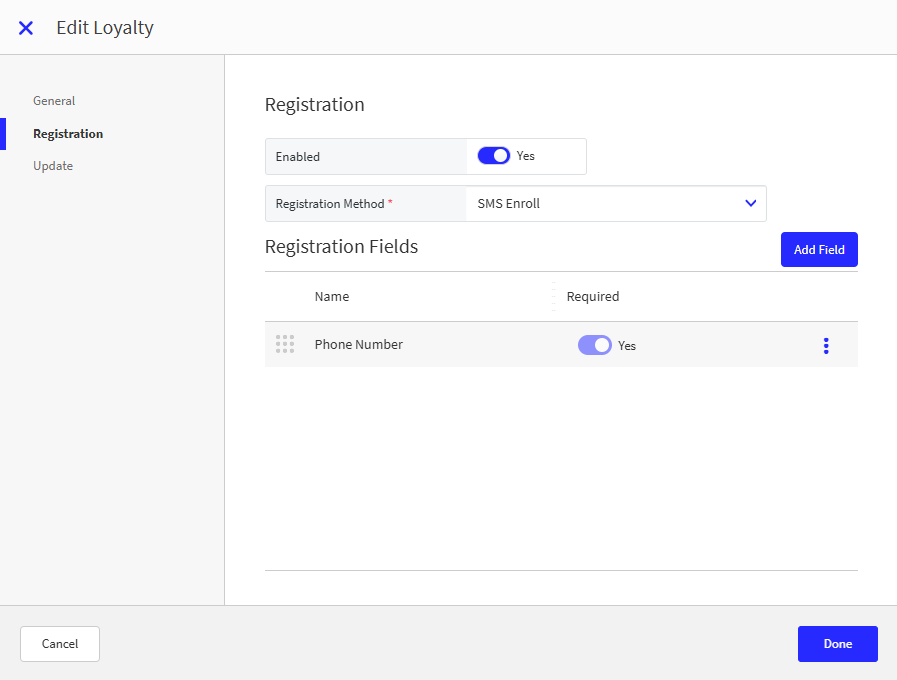
Update

Data Management
Enabled Quick Registration functionality for Loyalty Customer by adding new Quick Registration toggle in Loyalty Company/Site Preferences.
New Loyalty settings at the global and company levels
Portal → 4-Dot Menu → Data Management → Ordering Settings → Settings → Preferences
From the Loyalty → General Loyalty Settings section of Company/Site Preferences, define the following:
Customer Profile Prompt - Toggle On to automatically display the customer profile upon loyalty customer lookup.

From the Loyalty → Cashier Loyalty Prompts section of Company/Site Preferences, define the following:
Prompt Loyalty Lookup - Toggle On to prompt user to lookup loyalty membership if account not already added to order.

From the Loyalty → Favorite and Recent Items section, configure ability to view a customer's favorite and recently ordered items.

Gift and Loyalty
Enhanced Loyalty signup process with the following actions:
Adjusted /addCustomer endpoint by adding is_identified field and middle_name field to customer response
Successful request is sent to POST enrollment/smsEnroll.json in loyalty provider
When successful request returns printedCardNumber value, identifyCustomer request sends to loyalty provider using received printedCardNumber
When Registration Method is set to Standard Registration, POST enrollment/createAndEdit.json request sends to loyalty provider
Added support to add/edit/delete Loyalty account information with the following actions:
Adjusted /updateCustomer endpoint by adding is_identified field and middle_name field to customer response
Successful Point Of Sale request is sent to POST enrollment/editAccount.json in loyalty provider
Successful request returns identifyCustomer request to loyalty provider using same loyalty_card_number
Added primary_identifier field, email_opt_in field,sms_opt_in field, and optional country field to identifyCustomers, addCustomer, and updateCustomer responses.
Enhanced identifyCustomers request with the following actions:
Successful response sends userAndAccountInformationByPrintedCardNumber.json request to loyalty provider
Same merchant ID and printedCardNumber sends to loyalty provider
Successfully processed request maps following fields in information object in identifyCustomers, addCustomer, and updateCustomer to Point Of Sale: address, birth_date, phone, email, sms_opt_in, email_opt_in
Failure of /identifyCustomer request disables call for userAndAccountInformationByPrintedCardNumber as expected.
Set birthday date format in Loyalty service based on Loyalty service configuration when there is a customer_details.birth_date value in the request.
Pipeline
Added support for providing customer order history to Point Of Sale with the following actions:
Verify whether required subscription is enabled and add subscription to order message sent to Order Service
Applicable order messages forwarded to new service to store data in new collection customer_order_history
New GET endpoint fetches data from collection based on set of filters from Point Of Sale
Retention policy for records from new collection is consumed from new subscription
Point of Sale
Updates to allow user to view Loyalty customer's previous orders and favorite items:
Display loyalty profile upon customer lookup.
Prompt user to lookup loyalty membership if account not already added to order.
Create loyalty account from order entry and tender screen.
Quick registration from Identify Customer screen.
Full registration from loyalty lookup keypad and extended customer search.
Update account information from Customer Details modal.
View last few orders for customer and identify favorite items.
Resume unpaid online orders enabling customers to use loyalty benefits.
Gift Cards | Paytronix - Alphanumeric Gift Cards
PRMA-6679
Gift and Loyalty can now support alphanumeric gift cards though the Paytronix service.
Affected Components:
Gift and Loyalty
Gift and Loyalty
Added support for alphanumeric gift cards with Paytronix service by updating endpoint request to look up gift card number.
Gift and Loyalty | Loyalty Points on Customer Profile
PRMA-6865
Updated Gift and Loyalty to show points balance on a loyalty customer profile on Point of Sale (POS).
Affected Components:
Gift and Loyalty
Gift and Loyalty
Enabled mapping of Loyalty customer's Points Balance by consuming new field api_key after receiving identifyCustomers request, then sending request to LoyaltyProgress endpoint.
Kitchen Management | Organize Orders by Pickup Time
PRMA-6658
Kitchen screens can now sorting orders based on pickup date and time.
Affected Components:
Data Management
Kitchen Management
Data Management
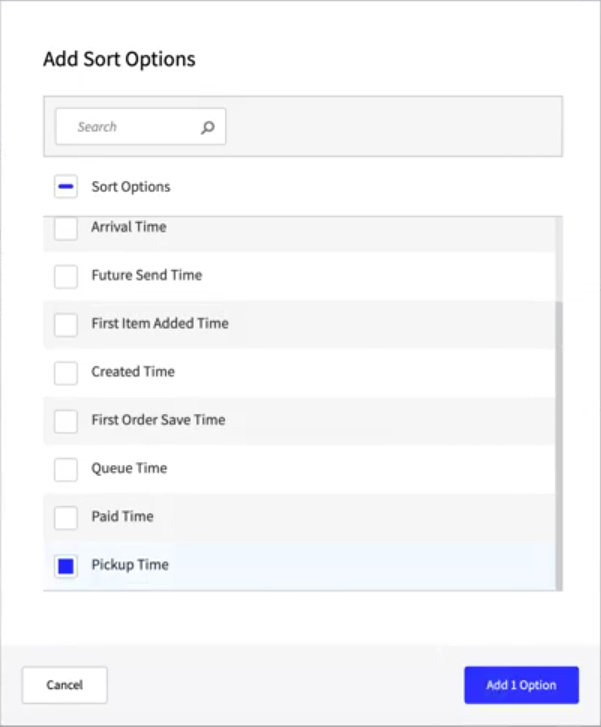
Enhanced configurability of Pickup Time by adding new Pickup Time sorting rule to Kitchen Screens.
 |
Kitchen Management
Added ability to sort orders on kitchen screens by pickup time.
From Sorting Rules of Kitchen Screen Settings in Data Management, define custom rules for how items and orders are sorted and prioritized on a kitchen screen.
Mobile Manager | Labor Cost Key Stat Enhancement
PRMA-5933
Updated Labor Cost Key Stat with the ability to reflect the difference between Labor Cost and Ideal Labor Cost.
Affected Components:
Mobile Manager
Mobile Manager
The Labor Cost key stat now reflects the difference against Ideal Labor Cost.
Added new Calculation field option Ideal Labor.
Key Stats now include a Primary Labor Variance metric that displays the dollar percentage ($/%) of the primary labor from the Hourly STD Labor Report.
Added labels to Ideal Labor and Benchmark Key stats when date comparison is not applied.
Point of Sale | Product Variation Sequence
PRMA-6502
Added the ability to set the order of Product Variations from within the parent product.
Affected Components:
Data Management
Online Ordering
Point of Sale (POS)
Data Management
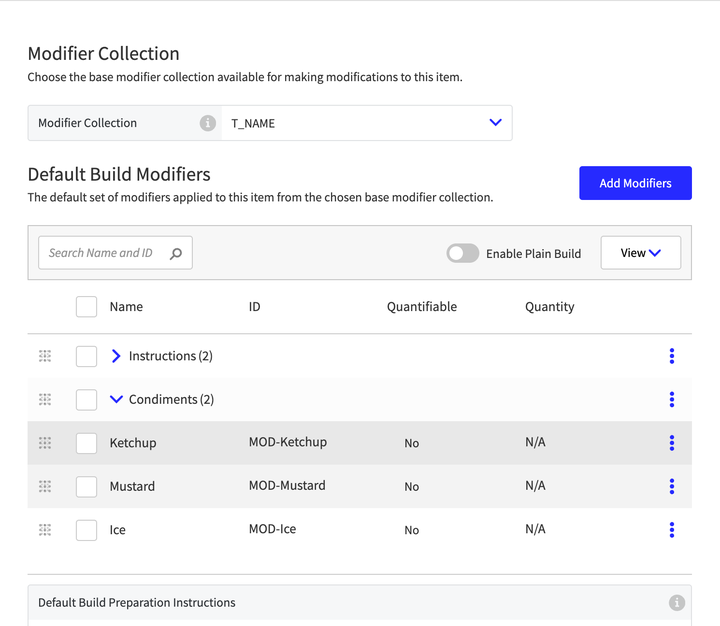
Added the ability to sort the order of Product Variations from within the parent product.
From the Variations page of Product List, identify product and size variations for a product and sort the variations in the preferred sequence.
 |
Online Ordering
Added the ability to consume sorting order from Data Management and sort product variations for each product in Online Ordering.
Point of Sale (POS)
Product variations are sorted on the POS menu in the sequence defined in Data Management.
Point of Sale | Payment Permission Check
PRMA-6539
Updated Point of Sale (POS) to check permissions only once upon initiating payment.
Affected Components:
Point of Sale (POS)
Point of Sale (POS)
Validate user permissions to apply pay type before pay type application in Pay Type First workflow.
Portal | Single Sign On Security Enhancements
PRMA-4836
Enhanced the security of Cloud Portal by removing users authenticated via Single Sign On (SSO) from Cognito.
Affected Components:
Cloud Portal
Cloud Portal
Improved security logic to remove users authenticated by SSO from Cognito.
Reporting | Reporting API
PRMA-5289
Added permissions to access Reporting API.
Affected Components:
Cloud Portal
Reporting
Cloud Portal
Enhanced Reporting functionality by adding the following new permissions at the global level for admin and Portal-Admin roles:
Reporting.API.View to allow integrators to view Reporting data
Reporting.API.Manage to allow integrators to manage Reporting data
 |
Reporting
New permissions Reporting.API.View and Reporting.API.Manage allow users to manage and utilize external reporting integrations.
Suite Catering | Support for Additional Languages
PRMA-4317
Enhanced Suite Catering to support for multiple languages. Current language options include: UK English, Spanish, French, and German.
Affected Components:
Data Management
Suite Catering
Data Management
Add 3 projects to get crowdin translation:
Suite Catering SuiteSpot UI
Suite Catering Portal UI
Suite Catering API
Suite Catering
Added additional language options and translation to Suite Catering.
Improved consistency of service-related codes.
Enhanced support for internationalization, to include the following:
Loading of configured languages
Multiple language selections in Orders
Enhance Order-form and Order status info
Language availability in Portal
Support for exported file names
Support for PDF/Excel files
Enhance ProductOrderRefresh API
Change constant values to accurate translated values
Enhance constants
Enhance error-page and favorites
Enhance Accounts and account-form
Enhance guest-user-form and iframe-mode
Enhance suite-admin-config, ordering-settings, and par-stock-form
Enhance various components
Venue Inventory | Allow Admin Users to change an Event Status
PRMA-5421
Added the ability for admin users to change the Status of an event.
Affected Components:
Cloud Portal
Venue Inventory
Cloud Portal
Enabled access control of reverting Event status with new Events.StatusBack permission for global admin roles.
Enabled venue administrators to change Event status from Open to Pending with new option Status to Pending. Option available for Open events only and only for admins with Events.Manage and Events.StatusBack permissions.
Venue Inventory
Created new collection
event-statusto track status changes to an event.Allow Event Status change by Admin Users
Enhanced process for rolling back transfers, Quantity On Hand, and standsheet values when event is reopened from Pending status and returned to Open status from Pending and/or Closed status.